Artecture Draw, Sketch, Paint
更新日期
当前版本
5.2.0.4
提供者

想体验Artecture Draw, Sketch, Paint,可是手机屏幕太小,用一会就变烫,怎么办?使用逍遥模拟器,在电脑的大屏幕上畅快体验!在电脑上下载安装Artecture Draw, Sketch, Paint,不用担心电量问题,想体验多久就多久,顺畅用一天~全新的逍遥模拟器9,绝对是您体验Artecture Draw, Sketch, Paint电脑版的好选择。完美的按键映射系统让Artecture Draw, Sketch, Paint如PC端般运行;强大的多开功能可同时使用多个应用;独家虚拟化技术更能彻底发挥电脑效能,保障长时间稳定运作。我们致力于不让设备限制您的体验,用起来轻松高效,畅快无比!
更多
透过逍遥模拟器,在电脑上下载Artecture Draw, Sketch, Paint,享受大荧屏的畅快体验。 Artecture enables you to sketch, draw and paint like never before.
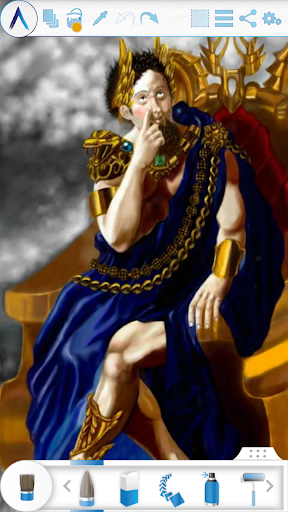
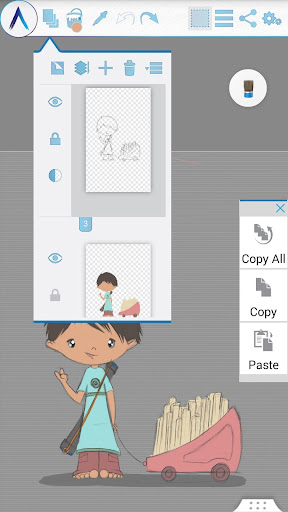
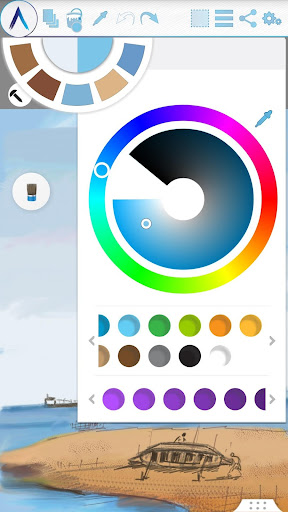

Artecture enables you to sketch, draw and paint like never before. If you love to draw, regardless you are an amateur or a pro, Artecture provides all the tools that you’d love. Enjoy over 30 unique high quality realistic tools. Tune them to match your own taste. You will love it. It’s made by art lovers for art lovers like you. It is simple, beautiful and fun, all together. You can do everything from taking notes to fast architectural sketches, cartoons, illustrations, water color and oil paintings. It feels so real. The best part: it’s all free. No ads.. no download request.
Get it and discover a natural and authentic experience of drawing, painting & sketching on canvas.
Join the Artecture artist community on facebook and learn and share more about it!
Facebook:
Page Name: Artecture Digital Art Community
Link: https://www.facebook.com/artecture.digiart
Main Features:
• All the drawing tools that you love to draw and paint with, including Pencil (for realistic sketches), Marker Pen, Oil Brush, Oil Blend brush, Oil real brush, Water Color, Airbrush, Palette Knife (with color mixing), Paint Roller, Paint Tube, Eraser, Flood Fill, Glitter Tube, Far brush, Gradient Brush, Fill Pattern for Every Tool and more.
• Multi-Layers with create, remove, lock, visibility, opacity, re-ordering, merge etc.
• Different Image effects on selected layer like Sepia, Inverse, Blur , Gray, Bright, Colorize etc.
• Symmetry: Vertical, Horizontal, Concentric with changeable center of symmetry.
• Tracing with automatic color pick, Template Coloring, Import/Export Image.
• Geometric Shape (Free, Line, Rectangle, Circle) drawing.
• Pen-Only mode (Palm rejection).
• Canvas rotation
• Multi-Touch shortcuts.
• Color Palette with favorite color defaults and color picker.
• Floating favorite Color and Tool Palette.
• Rectangular and Free hand selection.
• Copy, Paste Rotation and mirroring of selected area.
• Text Insertion (Insert, resize, rotate and mirror).
• Export artworks to standard image formats (.jpeg, .png, .bmp).
• Auto save of artworks.
• Open last drawing with tool preferences.
• Static background (Texture, Color, Image)
• Tool presets
Storage:
• By default, it saves artworks in “Artecture” folder on device storage, with .bme file format. Only Artecture Gallery can open/view this file format. However, you may export to .bmp image file format also. To reuse a .bmp file, you can simply insert it using the insert option.
• It gives option to change the storage location. Gallery can detect .bme artworks from all the changed locations on device storage.
Sharing:
• Upload artworks on Facebook & PenUp both from canvas and gallery.
• Share artworks via Bluetooth, WI-FI Direct.
• Mail, send or save artworks and exported images via MMS, email, shareit and other applications installed in the device.
Help & Support:
Quick reference guide covers the basics of the app.
Need help? Feel free to email us: srbd.dev@samsung.com
Specialty:
• This Digital painting tool is free of cost, but advanced in performance.
• You will not be bothered with any advertisement, because we made it ads free.
The Artecture screenshots are artworks of students and professors of Fine Art department, Dhaka University. We thank them for allowing us to share.
Special thanks to Mr. Gar Cia for allowing us to include his artwork as a screenshot.
Permissions:
The following permissions are required for the app service.
Required permissions
Storage: Used to save the drawing files
Optional permissions
None
更多

1. 下载逍遥安装器并完成设置

2. 启动逍遥后打开位于桌面上的谷歌商店

3. 在谷歌商店中搜索Artecture Draw, Sketch, Paint
Install
4. 下载并安装Artecture Draw, Sketch, Paint
5. 下载完成后点击图标来启动

6. 通过逍遥在电脑上享受Artecture Draw, Sketch, Paint
逍遥安卓是优秀的安卓模拟器,全球超过5000万用户的优先选择。逍遥安卓以虚拟化技术为核心,为用户打造突破手机配置局限的游戏平台!
大屏精细展示;无限待机,超越电池和流量限制
键鼠、手把操作全面支持,操作更精准
用逍遥多开同时运行多个游戏、应用。
Use Artecture Draw, Sketch, Paint on PC by following steps: