GoDaddy Studio: Create & Grow
更新日期
当前版本
7.80.0
提供者

想体验GoDaddy Studio: Create & Grow,可是手机屏幕太小,用一会就变烫,怎么办?使用逍遥模拟器,在电脑的大屏幕上畅快体验!在电脑上下载安装GoDaddy Studio: Create & Grow,不用担心电量问题,想体验多久就多久,顺畅用一天~全新的逍遥模拟器9,绝对是您体验GoDaddy Studio: Create & Grow电脑版的好选择。完美的按键映射系统让GoDaddy Studio: Create & Grow如PC端般运行;强大的多开功能可同时使用多个应用;独家虚拟化技术更能彻底发挥电脑效能,保障长时间稳定运作。我们致力于不让设备限制您的体验,用起来轻松高效,畅快无比!
更多
透过逍遥模拟器,在电脑上下载GoDaddy Studio: Create & Grow,享受大荧屏的畅快体验。 Graphic design, a domain registrar, social posts and instant videos all-in-one.
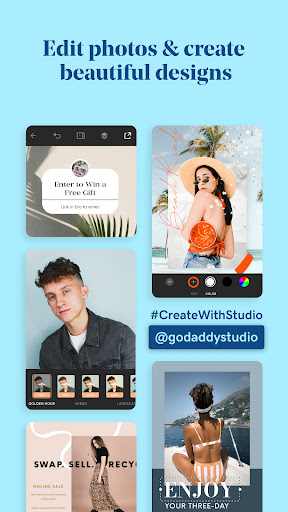

Graphic design, a domain registrar, social posts and instant videos all-in-one. BOOM! You’re in business with GoDaddy Studio.
GoDaddy Studio is designed for the everyday entrepreneur to grow their business while on-the-go. Design a logo, find a domain, create product shots and build your brand with stand-out social posts and engaging videos - all from the palm of your hand.
NEW: GRAB A CUSTOM DOMAIN AND CLAIM YOUR PLACE ONLINE
No domain, no game: Let your customers know where to find you.
Expand your brand’s online presence.
Be more searchable: Increase your brand’s SEO.
Create more credibility for your much-loved brand.
Be secure and accessible from anywhere.
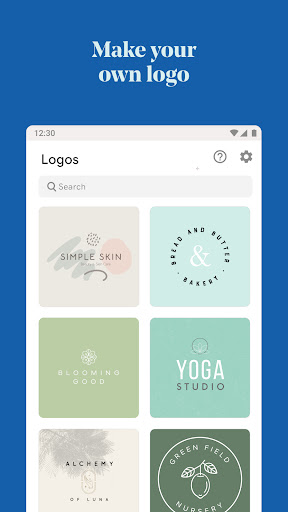
LOGO MAKER
Need a logo? Get one fast and for free with GoDaddy Studio. You choose:
Create a logo from scratch with easy design tools.
Scroll through hundreds of logo templates and take your pick.
Personalize in minutes and launch your business!
EASY DESIGN TOOLS TO SAVE YOU TIME
Discover the best design tools at your fingertips, no design-skills needed.
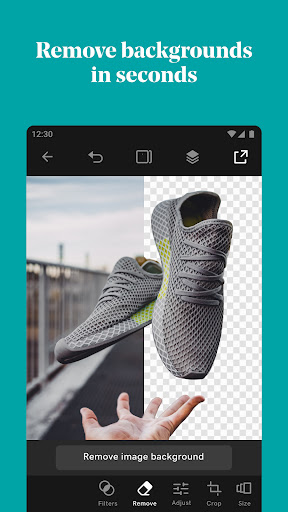
Remove backgrounds from your photos in seconds.
Create snappy videos with our AI-powered Instant Video feature.
Explore thousands of easy-to-customize templates to help you design fast.
Pick from a selection of over 600 fonts, use curved text and more.
Edit your photos. Add text and filters with our easy photo editor.
Create on-trend social posts with graphics and stickers.
Create professional product shots with the remove background tool.
Use Layout Collections for speedy content creation.
Resize content to fit Facebook, Instagram, YouTube, TikTok and more.
Use the masking tool to design like a pro in minutes.
FREE AI-POWERED INSTANT VIDEO MAKER
Get seen on social with instant videos that anyone can create, fast.
Use our AI-powered video maker to get ‘eyes’ on your social content.
A video maker for everyone: No video-editing skills needed.
AI-powered smart text will generate catchy copy to help your videos convert.
Find music for your videos: Fully licensed and good-to-go.
Get noticed on social sites like TikTok and Instagram with custom videos — auto-styled with transitions and music — in an instant.
GROW YOUR BRAND ON SOCIAL
Stand out on social media with beautiful content that is easy to create.
Need ideas to boost engagement? We’ve got them.
Find free videos to use in our exclusive video library.
Speed up content creation and share branded content every day.
Grow your followers with a consistent brand aesthetic.
Create videos with our powerful AI-powered video creation tool.
Create like-worthy Instagram stories and Instagram reels, TikTok videos, Facebook posts, profile pictures and more.
Find 30-days of Instagram posts for your business.
CREATE YOUR BRAND AESTHETIC
Want to look professional on social media, your website, email marketing and more? You can with GoDaddy Studio’s brand kit...
Design your logo
Create your brand color palette
Find your brand fonts
Save your brand kit (logo, colors and fonts) for seamless creation.
Create social posts and branded content with your brand assets to establish a professional brand identity.
FREE LINK IN BIO SITE
What is a Link in Bio site? It’s the only link you need to organise your online presence - and it’s free with GoDaddy Studio.
Link to everywhere you are online from one central place.
Pick your favorite Link in Bio template and customize it in seconds.
Choose your unique URL and publish your Link in Bio site for free.
Direct your customers to all your top content from your Link in Bio.
Grow your following from one central place.
GoDaddy Studio is all you need to easily design, promote and grow your brand online.
Start creating and watch your business fly.
Terms and Conditions
https://godaddy.com/legal/agreements/websites-marketing-agreement
Privacy Policy
https://godaddy.com/legal/agreements/privacy-policy
Got feedback? Email us at
oversupport@godaddy.com
更多

1. 下载逍遥安装器并完成设置

2. 启动逍遥后打开位于桌面上的谷歌商店

3. 在谷歌商店中搜索GoDaddy Studio: Create & Grow
Install
4. 下载并安装GoDaddy Studio: Create & Grow
5. 下载完成后点击图标来启动

6. 通过逍遥在电脑上享受GoDaddy Studio: Create & Grow
逍遥安卓是优秀的安卓模拟器,全球超过5000万用户的优先选择。逍遥安卓以虚拟化技术为核心,为用户打造突破手机配置局限的游戏平台!
大屏精细展示;无限待机,超越电池和流量限制
键鼠、手把操作全面支持,操作更精准
用逍遥多开同时运行多个游戏、应用。
Use GoDaddy Studio: Create & Grow on PC by following steps: