
Chessis: Chess Analysis
تم التحديث
الإصدار الحالي
9.3
تقديم

مع كل شغفك للعب Chessis: Chess Analysis ,يديك لايجب ان تكون محدودة بشاشة صغيرة علي تليفونك. العب كمحترف واحصل علي تحكم كامل علي لعبتك عن طريق لوحة المفاتيح والفأره. MEmuيقدم جميع الاشياء التي تتوقعها.حمل والعب Chessis: Chess Analysis علي جهاز الحاسوب الخاص بك العب كماتريد ,لايوجد حدود علي البطارية والباقة ولا يوجد اتصالات مزعجة النسخة الجديدة من MEmu7 هو افضل وسيلة للعب Chessis: Chess Analysis علي جهاز الحاسب معد عن طريق خبراتنا , لوحة المفاتيح المعده مسبقا تجعل Chessis: Chess Analysis العبة لعبة كمبيوتر حقيقة تم برمجتها باقصي استيعابنا .المتحكم في عدة نوافذ يجعل لعب لعبتين او اكثر او استعمال اكثر من حساب اسهل واهم شئ ان المحرك الخاص بنا يمكن ان يخرج كل امكانيات جهازك ويجعل كل شئ اكثر سلاسة نحن لانهتم بكيف تلعب فقط بل ايضا بالسعادة التي تغمرك من اللعب
أظهر المزيد
قم بتنزيل Chessis: Chess Analysis على الكمبيوتر بإستخدام جهاز مقلد أندروز MEmu.استمتع بمتعة اللعب على الشاشة الكبيرة. ChessIs is a Chess Analysis app that allows you to .
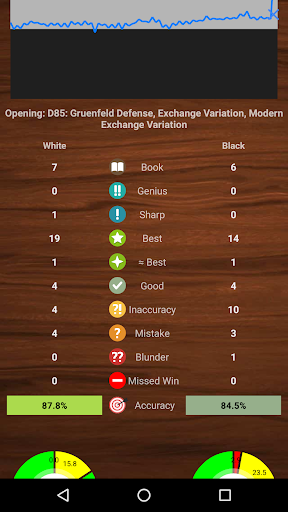
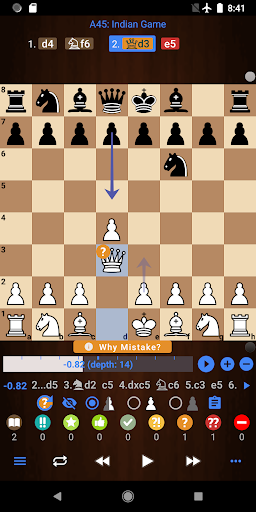
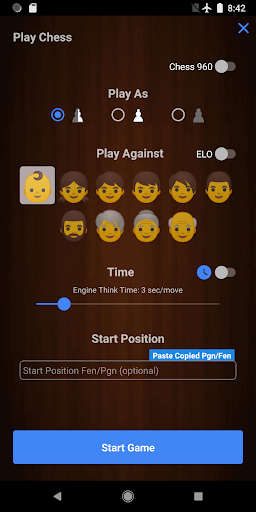
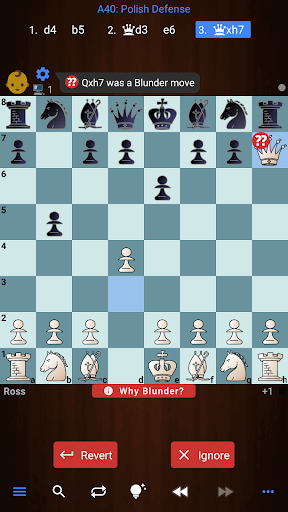
ChessIs is a Chess Analysis app that allows you to
✔️ Analyze your games and get game reports
✔️ Analyze chess positions with Stockfish Engine
✔️ Detect Blunders, Mistakes, Missed Wins, Best Moves, etc
✔️ Play chess against Computer according to your level.
✔️ Setup Board Positions (Board Editor) and analyze them
✔️ Open Pgn files (PGN Viewer)
✔️ Get blunder alerts and learn why it was a blunder
✔️ Add multiple engine lines
✔️ Play engine lines
✔️ Customize board color and pieces
✔️Analyze your chess games from chess.com or Lichess
✔️ Export Annotated Pgn
✔️ Adjust "Game Report Depth"
✔️ Chess960
✔️ Games database with the ability to search fen in games
✔️ Add Oex engines
✔️ Change Engines settings like hash value and threads
✔️ List of all chess openings to explore
✔️ Play chess on the clock or set engine think time
✔️ Avg CPL on game reports
✔️Analyze games on either time or depth
✔️Show Threats
✔️Accuracy %
✔️ Threats
✔️ Draw Arrows on the board
ChessIs is one of the best Chess Analyzer apps. It helps you to improve your chess by analyzing your games and providing you with game reports which contain Blunders, Missed Wins, Best Moves, etc. It not only tells you where you made a blunder but also tells why that was a blunder.
To support the app we offer a Pro version with some extra benefits.
Most features of the app are free but you get some extra benefits with the Pro version:
✔️ Play/Show "Why Blunder" Line
✔️ Play Engine Lines
✔️ Enable NNUE
✔️Add unlimited engine lines
✔️ Adjust "Game Report Depth"
✔️ Adjust "Game Report Time"
✔️ Deep Analysis
✔️ While Playing show each move's strength
✔️ While Playing get a mistakes alert as well
✔️ No Ads
✔️ Analyze unlimited games forever!
✔️ Key Elements
Note: Deep analysis provides much more accurate and consistent results compare to quick analysis.
So Let's Analyze Chess with the ChessIs app!!!
You can expect lots of improvements and new features in the future! If you have any suggestions or need help, please feel free to email me at chessimprovementapps@gmail.com, Thank you:)
أظهر المزيد

1. قم بتنزيل برنامج MEmu واكمال تثبيته

2. قم بتشغيل برنامج MEmu وفتح Google Play على الصفحة الرئيسية

3. ابح Chessis: Chess Analysis في Google Play
Install
4. تنزيل وتثبيت Chessis: Chess Analysis
5. انقر على الرمز للتشغيل بعد اكتمال التثبيت

6. استمتع بلعب *** على الكمبيوتر Chessis: Chess Analysis تخدام برنامج MEmu
تطبيق MEmuهو افضل محاكى اندرويد مجانى وبالفعل 50 مليون شخص يستمتعون حاليا بتجربه اللعب عليه. تمكّنك تقنية MEmu الافتراضية من تشغيل آلاف ألعاب Android بسلاسة على الكمبيوتر الشخصي ، حتى أكثرها استخدامًا للرسومات.
شاشة أكبر وجرافيك افضل ووقت أطول بدون حدود البطارية وباقة التليفون
لوحة مفاتيح كاملة تدعم تحكم كامل عن طريق لوحة المفاتيح و الفأره وجيم باد
عدة العاب وحسابات ومهمات علي جهاز الكمبيوتر في وقت معين عن طريق Memu متعدد النوافذ
Play Chessis: Chess Analysis on PC by following steps: