AI Rizz-Hug video&Photo Editor
تم التحديث
الإصدار الحالي
1.47.0
تقديم

لا داعي للقلق بشأن الشحن الزائد عند استخدام AI Rizz-Hug video&Photo Editor على هاتفك. تحرر من قيود الشاشة الصغيرة واستمتع به على شاشة أكبر باستخدام لوحة المفاتيح والفأرة. يوفر MEmu جميع الميزات الرائعة التي تتوقعها: تثبيت سريع، إعداد سهل، أدوات تحكم بديهية، ودون قيود على عمر البطارية، أو استخدام البيانات، أو المكالمات الواردة. يُعد MEmu 9 الجديد الخيار الأمثل لتجربة AI Rizz-Hug video&Photo Editor على جهاز الكمبيوتر. بفضل تقنية التشفير الفريدة، يتيح لك مدير الحسابات المتعددة تشغيل حسابين أو أكثر في وقت واحد. والأهم من ذلك، أن محرك المحاكاة الفريد يستغل أداء جهاز الكمبيوتر بالكامل، مما يُحسّن تجربة التطبيق ويجعل كل شيء سلسًا للغاية.
أظهر المزيد
قم بتنزيل AI Rizz-Hug video&Photo Editor على الكمبيوتر بإستخدام جهاز مقلد أندروز MEmu.استمتع بمتعة اللعب على الشاشة الكبيرة. AI Rizz is an AI photo editing and video creation app that features AI filters, AI portraits, and an exclusive AI hug video function.
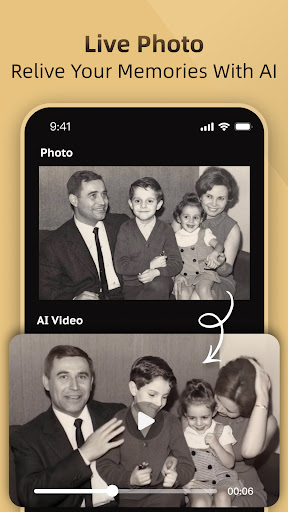
AI Rizz is an AI photo editing and video creation app that features AI filters, AI portraits, and an exclusive AI hug video function. Download our app, and with just one click, you can transform your photos into anime, comic, game characters, and various portrait styles, as well as create funny ai videos. AI Rizz—satisfying all your needs for AI filters, AI portraits, and AI video features!
-------- What's new in AI Rizz app? --------
AI Christmas Content:
Christmas is here, and our app now features AI-powered Christmas videos and filters! You can transform into Santa Claus, a reindeer, or a gingerbread man with our AI videos. let AI add extra fun to your celebrations!
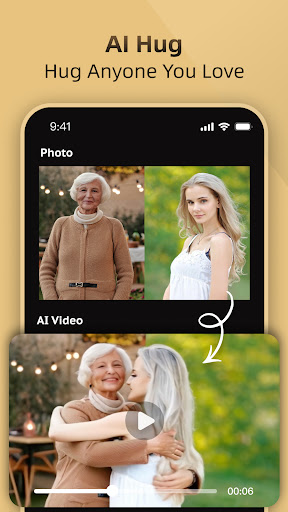
AI Hug Video:
Simply upload images, and our app will create a realistic AI hug video, letting you embrace anyone you loved. You can also explore other exciting features, like AI kisses,AI Squish, AI Inflate, AI Cake-ify it.Download now to explore more AI interactive features!
Text to Video&Image:
Simply enter a piece of text, and our AI will transform it into a unique video or image based on your words. Give it a try and let your imagination run wild to create your own AI video and AI image.
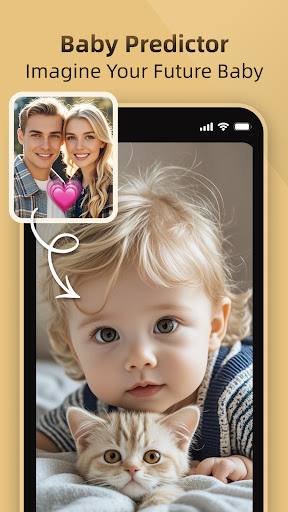
Baby Predictor:
Are you curious about what your future child with your beloved might look like? Our app uses AI to predict your baby’s face based on your and your beloved’s features. Come and see the results!
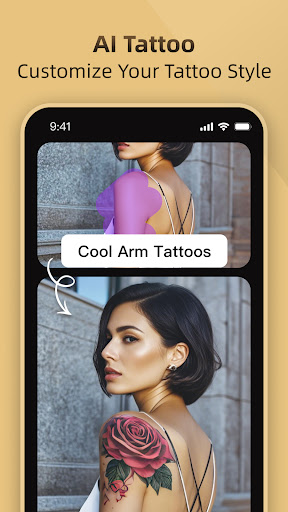
AI Tattoo:
Not sure what tattoo suits you? Try our AI Tattoo feature! Upload an image, and let the AI generate designs to help you find the perfect style.
Magic Edit:
Want to change the details in your photo? Upload an image, and use AI Rizz’s Magic Edit to change outfits, hair color, or add tattoos—your photo, reimagined!
AI Video:
- Our app features an AI transformation function. Upload your image, and let the AI transform you into a superhero,fulfill your dream of becoming a superhero.
- Whether it's a person or a pet, simply upload an image, and our app can generate fun AI dance videos.
- Pets can now also be part of our AI experience! Upload a photo of your cat, and our app can create videos of your cat cooking or dancing.
- Our advanced AI algorithm can add a variety of filters to your video. Upload your video, and let the AI make it cool and vibrant.
In addition, our app also offers AI style features for you to experience!
AI Style:
- Transform your look with our popular AI filters and AI portraits.
- Our AI portraits feature a variety of popular themes, including bikini styles, sporty fashion styles, lifestyles, business styles, ID photos, retro styles, yearbook styles, and more. Our AI portraits are updated weekly in real-time, helping you find the style that suits you best.
- Enjoy unique AI art filters to redesign your photos, including sketch filters, comic filters, 3D cartoon filters, game-style filters, and more. You’ll find the perfect anime style here and unleash your creativity!
- Create a cartoon version of yourself in seconds for the perfect social media profile picture.
With all these fun and distinctive features above, AI Rizz allows you to experience a variety of exciting AI activities and discover endless fun during the time.
Read our Terms of Use:https://docs.google.com/document/d/e/2PACX-1vS3RoG7aGoP-vLJHGOGh0gj6v1IgLe3LoBF9u-PBzqRyitkjClLWFOcy7Sap513yvFzvBNvYpy0rDLd/pub
Read our Privacy Policy:https://docs.google.com/document/d/e/2PACX-1vTQDMJKLIgmvMnFtXoD4cAPyO3aqoZ19DwEh5BnxM8Uqp__4AvmJ0H7dwNIS0XEzAvJ8OQG5cvXTyB7/pub
Get ready to dive into this ultimate app and create fashionable and breathtaking AI portraits! If you have any suggestions, feel free to contact us at support@adoreshare.com!
أظهر المزيد

1. قم بتنزيل برنامج MEmu واكمال تثبيته

2. قم بتشغيل برنامج MEmu وفتح Google Play على الصفحة الرئيسية

3. ابح AI Rizz-Hug video&Photo Editor في Google Play
Install
4. تنزيل وتثبيت AI Rizz-Hug video&Photo Editor
5. انقر على الرمز للتشغيل بعد اكتمال التثبيت

6. استخدم MEmu لتجربة AI Rizz-Hug video&Photo Editor على جهاز الكمبيوتر الخاص بك.
تطبيق MEmuهو افضل محاكى اندرويد مجانى وبالفعل 50 مليون شخص يستمتعون حاليا بتجربه اللعب عليه. تمكّنك تقنية MEmu الافتراضية من تشغيل آلاف ألعاب Android بسلاسة على الكمبيوتر الشخصي ، حتى أكثرها استخدامًا للرسومات.
شاشة أكبر وجرافيك افضل ووقت أطول بدون حدود البطارية وباقة التليفون
لوحة مفاتيح كاملة تدعم تحكم كامل عن طريق لوحة المفاتيح و الفأره وجيم باد
عدة العاب وحسابات ومهمات علي جهاز الكمبيوتر في وقت معين عن طريق Memu متعدد النوافذ
Use AI Rizz-Hug video&Photo Editor on PC by following steps: