AI Rizz-Hug video&Photo Editor
Updated
Current Version
1.47.0
Offered By

Stop worrying about high battery drain when using AI Rizz-Hug video&Photo Editor on your phone. Free yourself from the tiny screen and enjoy the app on a much larger display. From now on, get a full-screen experience of your app with the convenience of a keyboard and mouse. MEmu offers you all the surprising features you’d expect: quick installation and easy setup, intuitive controls, and no more worries about battery life, mobile data, or unexpected calls. The all-new MEmu 9 is the choice for using AI Rizz-Hug video&Photo Editor on your computer. With the MEmu multi-instance manager, you can run two or more accounts at the same time. Most importantly, our exclusive emulation engine unlocks your PC’s full potential, delivering smooth and enjoyable performance.
Show more
Enjoy superb experience of using AI Rizz-Hug video&Photo Editor on PC with MEMU App Player. It's a powerful free Android emulator which provides you with thousands of android apps for their desktop version. Enjoy connecting with friends and polishing your work with higher efficiency! AI Rizz is an AI photo editing and video creation app that features AI filters, AI portraits, and an exclusive AI hug video function.
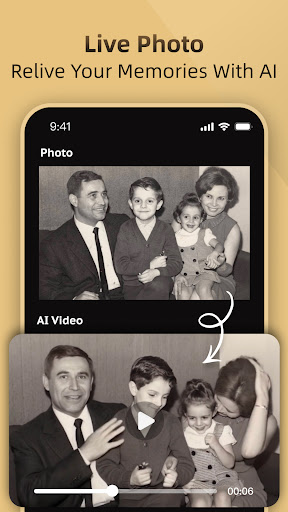
AI Rizz is an AI photo editing and video creation app that features AI filters, AI portraits, and an exclusive AI hug video function. Download our app, and with just one click, you can transform your photos into anime, comic, game characters, and various portrait styles, as well as create funny ai videos. AI Rizz—satisfying all your needs for AI filters, AI portraits, and AI video features!
-------- What's new in AI Rizz app? --------
AI Christmas Content:
Christmas is here, and our app now features AI-powered Christmas videos and filters! You can transform into Santa Claus, a reindeer, or a gingerbread man with our AI videos. let AI add extra fun to your celebrations!
AI Hug Video:
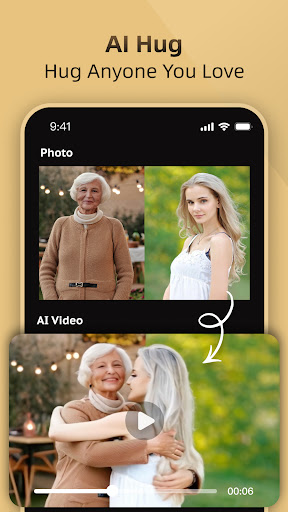
Simply upload images, and our app will create a realistic AI hug video, letting you embrace anyone you loved. You can also explore other exciting features, like AI kisses,AI Squish, AI Inflate, AI Cake-ify it.Download now to explore more AI interactive features!
Text to Video&Image:
Simply enter a piece of text, and our AI will transform it into a unique video or image based on your words. Give it a try and let your imagination run wild to create your own AI video and AI image.
Baby Predictor:
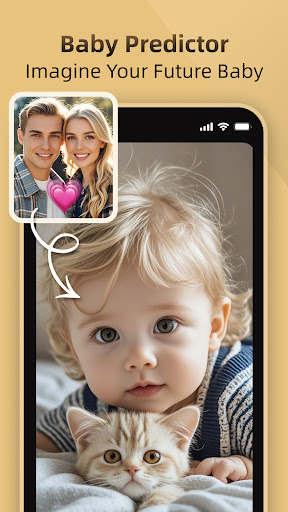
Are you curious about what your future child with your beloved might look like? Our app uses AI to predict your baby’s face based on your and your beloved’s features. Come and see the results!
AI Tattoo:
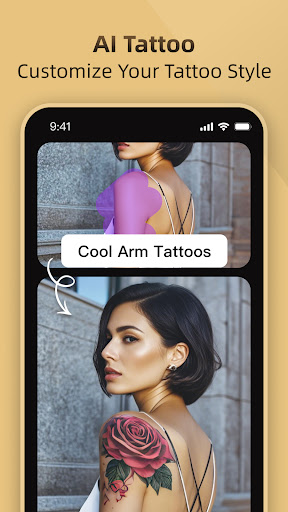
Not sure what tattoo suits you? Try our AI Tattoo feature! Upload an image, and let the AI generate designs to help you find the perfect style.
Magic Edit:
Want to change the details in your photo? Upload an image, and use AI Rizz’s Magic Edit to change outfits, hair color, or add tattoos—your photo, reimagined!
AI Video:
- Our app features an AI transformation function. Upload your image, and let the AI transform you into a superhero,fulfill your dream of becoming a superhero.
- Whether it's a person or a pet, simply upload an image, and our app can generate fun AI dance videos.
- Pets can now also be part of our AI experience! Upload a photo of your cat, and our app can create videos of your cat cooking or dancing.
- Our advanced AI algorithm can add a variety of filters to your video. Upload your video, and let the AI make it cool and vibrant.
In addition, our app also offers AI style features for you to experience!
AI Style:
- Transform your look with our popular AI filters and AI portraits.
- Our AI portraits feature a variety of popular themes, including bikini styles, sporty fashion styles, lifestyles, business styles, ID photos, retro styles, yearbook styles, and more. Our AI portraits are updated weekly in real-time, helping you find the style that suits you best.
- Enjoy unique AI art filters to redesign your photos, including sketch filters, comic filters, 3D cartoon filters, game-style filters, and more. You’ll find the perfect anime style here and unleash your creativity!
- Create a cartoon version of yourself in seconds for the perfect social media profile picture.
With all these fun and distinctive features above, AI Rizz allows you to experience a variety of exciting AI activities and discover endless fun during the time.
Read our Terms of Use:https://docs.google.com/document/d/e/2PACX-1vS3RoG7aGoP-vLJHGOGh0gj6v1IgLe3LoBF9u-PBzqRyitkjClLWFOcy7Sap513yvFzvBNvYpy0rDLd/pub
Read our Privacy Policy:https://docs.google.com/document/d/e/2PACX-1vTQDMJKLIgmvMnFtXoD4cAPyO3aqoZ19DwEh5BnxM8Uqp__4AvmJ0H7dwNIS0XEzAvJ8OQG5cvXTyB7/pub
Get ready to dive into this ultimate app and create fashionable and breathtaking AI portraits! If you have any suggestions, feel free to contact us at support@adoreshare.com!
Show more

1. Download MEmu installer and finish the setup

2. Start MEmu then open Google Play on the desktop

3. Search AI Rizz-Hug video&Photo Editor in Google Play
Install
4. Download and Install AI Rizz-Hug video&Photo Editor
5. On install completion click the icon to start

6. Enjoy using AI Rizz-Hug video&Photo Editor on PC with MEmu
MEmu Play is the best Android emulator, and 100 million users already enjoy its superb Android app experience. Powered by advanced virtualization technology, it lets you enjoy thousands of Android apps smoothly on your PC—including the most graphics-intensive ones.
Bigger screen with better graphics; Long duration, without limitation of battery or mobile data.
Full Keymapping support for precise control of keyboard and mouse or gamepad.
Multiple game accounts or tasks on single PC at one time with Multi-Instance manager.
Use AI Rizz-Hug video&Photo Editor on PC by following steps: