
AutoCap Captions Teleprompter
تم التحديث
الإصدار الحالي
1.0.61
تقديم

لا داعي للقلق بشأن الشحن الزائد عند استخدام AutoCap Captions Teleprompter على هاتفك. تحرر من قيود الشاشة الصغيرة واستمتع به على شاشة أكبر باستخدام لوحة المفاتيح والفأرة. يوفر MEmu جميع الميزات الرائعة التي تتوقعها: تثبيت سريع، إعداد سهل، أدوات تحكم بديهية، ودون قيود على عمر البطارية، أو استخدام البيانات، أو المكالمات الواردة. يُعد MEmu 9 الجديد الخيار الأمثل لتجربة AutoCap Captions Teleprompter على جهاز الكمبيوتر. بفضل تقنية التشفير الفريدة، يتيح لك مدير الحسابات المتعددة تشغيل حسابين أو أكثر في وقت واحد. والأهم من ذلك، أن محرك المحاكاة الفريد يستغل أداء جهاز الكمبيوتر بالكامل، مما يُحسّن تجربة التطبيق ويجعل كل شيء سلسًا للغاية.
أظهر المزيد
قم بتنزيل AutoCap Captions Teleprompter على الكمبيوتر بإستخدام جهاز مقلد أندروز MEmu.استمتع بمتعة اللعب على الشاشة الكبيرة. AutoCap adds stunning animated captions to video automatically, .
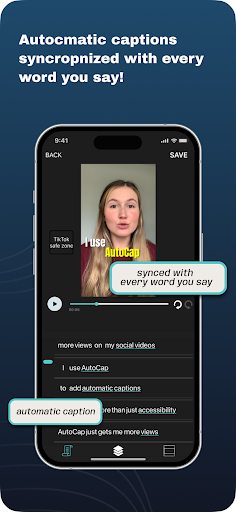
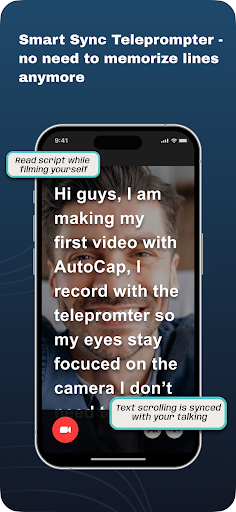
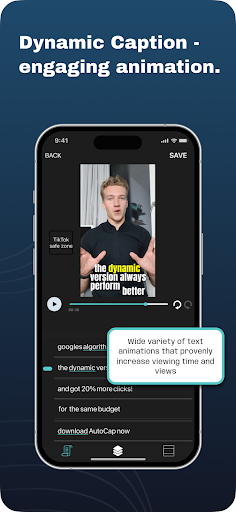
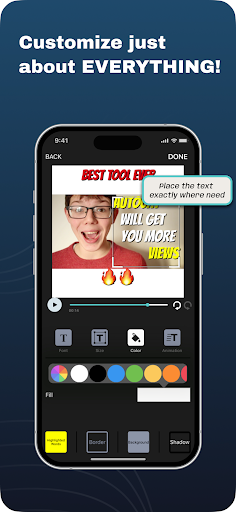
AutoCap adds stunning animated captions to video automatically,
it uses voice recognition technologies to analyze the video's audio**, transcribe it into text.
add text titles to your video.
make subtitle easily
DETAILS
- App transcribes up to 5 minutes length (10 minutes to subscribers) of videos audio the rest can be added manually
- Videos are free in original quality with AutoCap watermark
- Watermark can be removal can be purchased in a one time purchase or subscription
-All video's that have been recorded on Android phones are supported, video that was created on another platform might have issues with saving
perfect for Tiktok , Instagram, Facebook, Youtube, Snapchat , Twitter,
and Linkedin video's and stories
save the result to MP4 file and share it!!
HOW IT WORKS
1. Select or record a video with speaking audio in it.
2. Edit and change the results of the automated voice recognition.
3.Select text style, color and animation
3. Save as MP4 video and share!
LEGENDARY FEATURES
- 7 amazing text animation styles
- automatic voice recognition
- edit text
- emphasize selected word in different color
- save video
- share video on Youtube, Snapchat , Twitter, Linkedin, Facebook, Instagram...
feature for subscribers only:
-Translation - Autocap allows to translate the transcribed captions to another language (supported languages : https://cloud.google.com/translate/docs/languages )
-Download SRT
-Copy videos complete transcription into clipboard
-up to 10 minutes of transcription for each video
** We use the best voice recognition services in the market, yet this technology has some limitations. when voice is clear fluent and there are no background noises the system can achieve more then 80% WER (word errors), however when there are background noises or music it can get to much less then that and to short breaks in the transcription. we are working constantly to improve this.
** Exported video quality -
AutoCap aims to keep the original's video format and quality, it always keeps the original resolution (unless exported resolution is changes - from landscape to square ect.).
Videos might be compressed if the exporting device does not let app to render in the same quality as the original video
- AutoCap does not support video's that are beyond the user's device GPU's ability to render the video (some devices have trouble with rendering high resolution 4K videos, usually the ones that are created on other devices or edited by another software)
this App is built for social media video and mostly selfie talking head videos, it can work for other types of video's but it's not what it's intended for. the App wont give good results for musical video's or for high resolution videos intended for screening on large screens
Still reading? Great! Now go make a video.
أظهر المزيد

1. قم بتنزيل برنامج MEmu واكمال تثبيته

2. قم بتشغيل برنامج MEmu وفتح Google Play على الصفحة الرئيسية

3. ابح AutoCap Captions Teleprompter في Google Play
Install
4. تنزيل وتثبيت AutoCap Captions Teleprompter
5. انقر على الرمز للتشغيل بعد اكتمال التثبيت

6. استخدم MEmu لتجربة AutoCap Captions Teleprompter على جهاز الكمبيوتر الخاص بك.
تطبيق MEmuهو افضل محاكى اندرويد مجانى وبالفعل 50 مليون شخص يستمتعون حاليا بتجربه اللعب عليه. تمكّنك تقنية MEmu الافتراضية من تشغيل آلاف ألعاب Android بسلاسة على الكمبيوتر الشخصي ، حتى أكثرها استخدامًا للرسومات.
شاشة أكبر وجرافيك افضل ووقت أطول بدون حدود البطارية وباقة التليفون
لوحة مفاتيح كاملة تدعم تحكم كامل عن طريق لوحة المفاتيح و الفأره وجيم باد
عدة العاب وحسابات ومهمات علي جهاز الكمبيوتر في وقت معين عن طريق Memu متعدد النوافذ
Use AutoCap Captions Teleprompter on PC by following steps: