AutoCap Captions Teleprompter
更新日
現在のバージョン
1.0.61
提供元

スマートフォンは不要!パソコンと同じようにキーボードとマウスで操作できます。MEmu Playは、あなたが待ち望んでいたすべての楽しみをお届けします。バッテリー残量や小さな画面を気にすることなく、AutoCap Captions Teleprompterをご利用ください。最新のMEmu 9は、AutoCap Captions TeleprompterをPCで体験するのに最適です!完璧なキーマッピングシステムにより、PCのようなスムーズな操作性を実現します。マルチインスタンス機能により、複数のアプリケーションを同時に実行できます。独自の仮想化エンジンがPCのパフォーマンスを最大限に引き出します。アプリを使用するだけでなく、高品質な体験を得ることができます。
もっと見る
AutoCap Captions TeleprompterをPCでダウンロード!大画面でより楽しむ。電源が落ちてしまうとか通信料が足りないとかの問題を心配する必要がなく、PCの大画面でより快適にゲームを楽しましょう! AutoCap adds stunning animated captions to video automatically, .
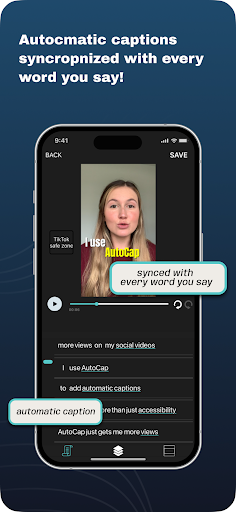
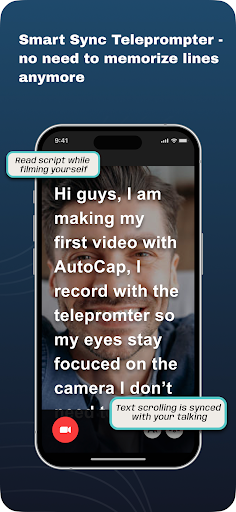
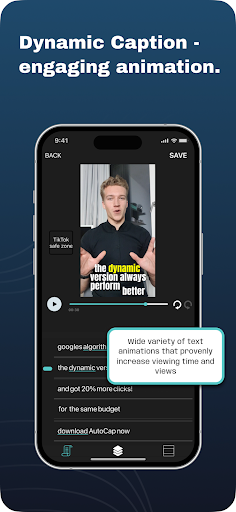
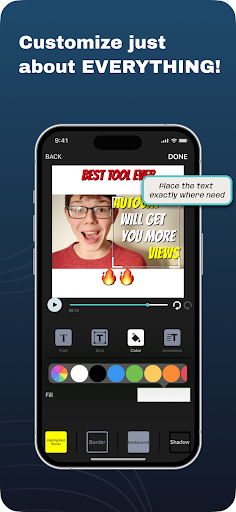
AutoCap adds stunning animated captions to video automatically,
it uses voice recognition technologies to analyze the video's audio**, transcribe it into text.
add text titles to your video.
make subtitle easily
DETAILS
- App transcribes up to 5 minutes length (10 minutes to subscribers) of videos audio the rest can be added manually
- Videos are free in original quality with AutoCap watermark
- Watermark can be removal can be purchased in a one time purchase or subscription
-All video's that have been recorded on Android phones are supported, video that was created on another platform might have issues with saving
perfect for Tiktok , Instagram, Facebook, Youtube, Snapchat , Twitter,
and Linkedin video's and stories
save the result to MP4 file and share it!!
HOW IT WORKS
1. Select or record a video with speaking audio in it.
2. Edit and change the results of the automated voice recognition.
3.Select text style, color and animation
3. Save as MP4 video and share!
LEGENDARY FEATURES
- 7 amazing text animation styles
- automatic voice recognition
- edit text
- emphasize selected word in different color
- save video
- share video on Youtube, Snapchat , Twitter, Linkedin, Facebook, Instagram...
feature for subscribers only:
-Translation - Autocap allows to translate the transcribed captions to another language (supported languages : https://cloud.google.com/translate/docs/languages )
-Download SRT
-Copy videos complete transcription into clipboard
-up to 10 minutes of transcription for each video
** We use the best voice recognition services in the market, yet this technology has some limitations. when voice is clear fluent and there are no background noises the system can achieve more then 80% WER (word errors), however when there are background noises or music it can get to much less then that and to short breaks in the transcription. we are working constantly to improve this.
** Exported video quality -
AutoCap aims to keep the original's video format and quality, it always keeps the original resolution (unless exported resolution is changes - from landscape to square ect.).
Videos might be compressed if the exporting device does not let app to render in the same quality as the original video
- AutoCap does not support video's that are beyond the user's device GPU's ability to render the video (some devices have trouble with rendering high resolution 4K videos, usually the ones that are created on other devices or edited by another software)
this App is built for social media video and mostly selfie talking head videos, it can work for other types of video's but it's not what it's intended for. the App wont give good results for musical video's or for high resolution videos intended for screening on large screens
Still reading? Great! Now go make a video.
もっと見る

1. MEmuインストーラーをダウンロードしてセットアップを完了する

2. MEmuを起動し、デスクトップでのPlayストアを開く

3. PlayストアでAutoCap Captions Teleprompterを検索する
Install
4. AutoCap Captions Teleprompterをダウンロードしてインストールする
5. インストールが完了したら、アイコンをクリックしてスタート

6. MEmuを使ってパソコンでAutoCap Captions Teleprompterを体験する
MEmu Playは現在、最高の無料Androidエミュレーターであり、5,000万人のユーザーが優れたAndroidアプリ体験を楽しんでいます。MEmuの仮想化テクノロジーにより、数千ものAndroidアプリをコンピューターでスムーズに実行できます。
大画面でより精細;無限の待機、電池とドラフィックの極限を超え
キーボード・マウス・コントローラーを全力でサポート、より快適
マルチインスタンスで複数のゲームを同時に実行
Use AutoCap Captions Teleprompter on PC by following steps: