BeautyCam-AI Photo Editor
تم التحديث
الإصدار الحالي
13.0.55
تقديم

لا داعي للقلق بشأن الشحن الزائد عند استخدام BeautyCam-AI Photo Editor على هاتفك. تحرر من قيود الشاشة الصغيرة واستمتع به على شاشة أكبر باستخدام لوحة المفاتيح والفأرة. يوفر MEmu جميع الميزات الرائعة التي تتوقعها: تثبيت سريع، إعداد سهل، أدوات تحكم بديهية، ودون قيود على عمر البطارية، أو استخدام البيانات، أو المكالمات الواردة. يُعد MEmu 9 الجديد الخيار الأمثل لتجربة BeautyCam-AI Photo Editor على جهاز الكمبيوتر. بفضل تقنية التشفير الفريدة، يتيح لك مدير الحسابات المتعددة تشغيل حسابين أو أكثر في وقت واحد. والأهم من ذلك، أن محرك المحاكاة الفريد يستغل أداء جهاز الكمبيوتر بالكامل، مما يُحسّن تجربة التطبيق ويجعل كل شيء سلسًا للغاية.
أظهر المزيد
قم بتنزيل BeautyCam-AI Photo Editor على الكمبيوتر بإستخدام جهاز مقلد أندروز MEmu.استمتع بمتعة اللعب على الشاشة الكبيرة. BeautyCam: حوّل صورك، وأبرز جمالك الطبيعي.
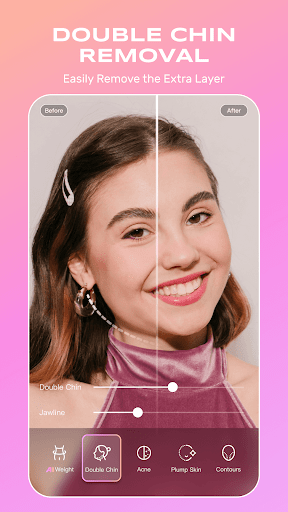
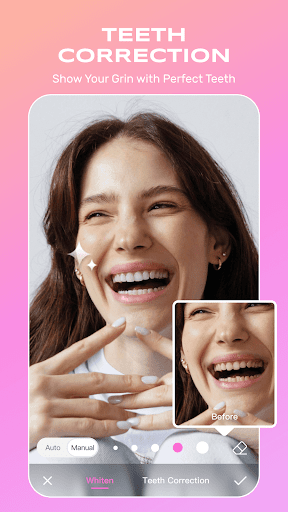
BeautyCam: حوّل صورك، وأبرز جمالك الطبيعي
اكتشف قوة التكنولوجيا المتقدمة لإنشاء صور مذهلة بكل سهولة
BeautyCam تضع أدوات احترافية في متناول يديك:
نماذج كاميرات متعددة تحاكي سحر كاميرات DSLR، وكاميرات iPhone، وكاميرات الأفلام
يعزز الاكتشاف المدعوم بالذكاء الاصطناعي ملامحك الطبيعية لمظهر أنيق وأصلي
أنماط بورتريه متنوعة تتيح لك الحصول على صور احترافية في الاستوديو بسهولة
=== وفر المال على شراء الكاميرات ===
· الكاميرا الرقمية: استمتع بذكريات الكاميرات الرقمية مع فلاتر كلاسيكية مستوحاة من الطراز القديم
· كاميرا DSLR: تمتع بخيارات احترافية مثل التكبير/التصغير، وعمق المجال، وتوازن اللون الأبيض
· كشك الصور: أضف إطارات أنيقة وتأثيرات مرحة إلى صورك للحظات لا تُنسى
· كاميرا iPhone: احصل على بشرة مشرقة وشفافة بتوهج طبيعي وصحي
=== أدوات الذكاء الاصطناعي: جمال شخصي في أبهى صوره ===
· فن الأظافر بالذكاء الاصطناعي: غيّر أظافرك بأنماط تتراوح من الأنيقة إلى البراقة
· تأثير الذكاء الاصطناعي: استكشف تأثيرات ذكاء اصطناعي إبداعية لجعل صورك أكثر متعة وجاذبية.
· خزانة صور بتقنية الذكاء الاصطناعي: غيّر مظهرك بنقرة واحدة - أنيق وسهل!
· إزالة بالذكاء الاصطناعي: أزل العناصر غير المرغوب فيها بدقة.
· توسيع بالذكاء الاصطناعي: وسّع الصور بسلاسة لتناسب أي أبعاد مرغوبة.
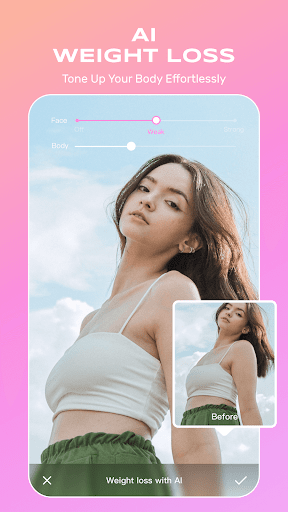
· تنحيف بالذكاء الاصطناعي: حسّن مظهرك مع الحفاظ على أصالته.
=== أساسيات الصور ===
· استعادة جودة عالية الدقة: حوّل الصور الضبابية إلى صور حادة وحيوية.
· إزالة ذكية للخلفية: أزل عوامل التشتيت بسلاسة للحصول على لمسة نهائية احترافية.
· فلاتر نابضة بالحياة: حسّن الألوان لإنشاء صور آسرة مثالية لوسائل التواصل الاجتماعي.
· إضاءة نابضة بالحياة: التقط صور سيلفي لامعة وواضحة حتى في ظروف الإضاءة المنخفضة.
=== أداة البورتريه المثالية ===
· مكياج عصري: طبّق أحدث صيحات المكياج بسهولة.
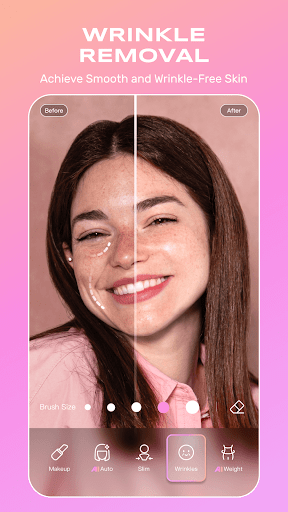
· إزالة التجاعيد: نعّم بشرتك وجددها لإطلالة شبابية.
· نحت الأنف ثلاثي الأبعاد: حسّن شكل أنفك بشكل طبيعي وبدون ألم.
· خافي العيوب: غطِّ وجهك بسهولة. عيوب البشرة لبشرة مثالية
· الشعر: استكشفي تسريحات وألوانًا مختلفة لإطلالة مثالية.
=== ميزات الفيديو===
· شاشة التلقين: قراءة النصوص بسهولة دون تفويت أي كلمة.
· تجميل صور الفيديو: تحسين شكل الجسم وملامح الوجه بذكاء، لضمان الكمال حتى في مقاطع الفيديو الديناميكية.
شروط الخدمة: https://pro.meitu.com/meiyan/agreements/service.html?lang=en
سياسة الخصوصية: https://pro.meitu.com/meiyan/agreements/privacy_policy.html?lang=en
اتفاقية خدمة كبار الشخصيات: https://pro.meitu.com/meiyan/agreements/membership.html?lang=en
أظهر المزيد

1. قم بتنزيل برنامج MEmu واكمال تثبيته

2. قم بتشغيل برنامج MEmu وفتح Google Play على الصفحة الرئيسية

3. ابح BeautyCam-AI Photo Editor في Google Play
Install
4. تنزيل وتثبيت BeautyCam-AI Photo Editor
5. انقر على الرمز للتشغيل بعد اكتمال التثبيت

6. استخدم MEmu لتجربة BeautyCam-AI Photo Editor على جهاز الكمبيوتر الخاص بك.
تطبيق MEmuهو افضل محاكى اندرويد مجانى وبالفعل 50 مليون شخص يستمتعون حاليا بتجربه اللعب عليه. تمكّنك تقنية MEmu الافتراضية من تشغيل آلاف ألعاب Android بسلاسة على الكمبيوتر الشخصي ، حتى أكثرها استخدامًا للرسومات.
شاشة أكبر وجرافيك افضل ووقت أطول بدون حدود البطارية وباقة التليفون
لوحة مفاتيح كاملة تدعم تحكم كامل عن طريق لوحة المفاتيح و الفأره وجيم باد
عدة العاب وحسابات ومهمات علي جهاز الكمبيوتر في وقت معين عن طريق Memu متعدد النوافذ
Use BeautyCam-AI Photo Editor on PC by following steps: