
Captions: For Talking Videos
تم التحديث
الإصدار الحالي
2.21.0
تقديم

لا داعي للقلق بشأن الشحن الزائد عند استخدام Captions: For Talking Videos على هاتفك. تحرر من قيود الشاشة الصغيرة واستمتع به على شاشة أكبر باستخدام لوحة المفاتيح والفأرة. يوفر MEmu جميع الميزات الرائعة التي تتوقعها: تثبيت سريع، إعداد سهل، أدوات تحكم بديهية، ودون قيود على عمر البطارية، أو استخدام البيانات، أو المكالمات الواردة. يُعد MEmu 9 الجديد الخيار الأمثل لتجربة Captions: For Talking Videos على جهاز الكمبيوتر. بفضل تقنية التشفير الفريدة، يتيح لك مدير الحسابات المتعددة تشغيل حسابين أو أكثر في وقت واحد. والأهم من ذلك، أن محرك المحاكاة الفريد يستغل أداء جهاز الكمبيوتر بالكامل، مما يُحسّن تجربة التطبيق ويجعل كل شيء سلسًا للغاية.
أظهر المزيد
قم بتنزيل Captions: For Talking Videos على الكمبيوتر بإستخدام جهاز مقلد أندروز MEmu.استمتع بمتعة اللعب على الشاشة الكبيرة. Say it with a video.
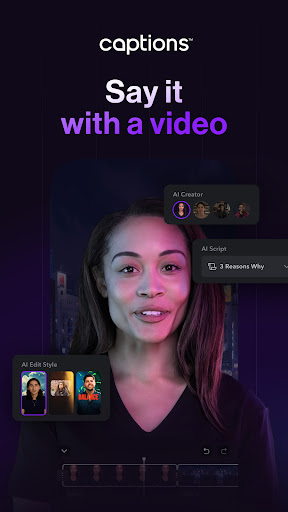
Say it with a video
Captions revolutionizes video creation and editing with advanced AI, allowing you to create videos you’re proud to share quickly and easily. Ideal for content creators, marketers, small businesses, and media agencies, Captions provides all the tools you need to create engaging, high-quality videos right from your phone.
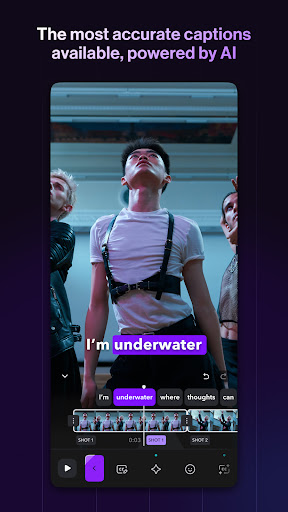
The most accurate automatic captions and subtitles
•Automatic captions: Add customizable auto subtitles powered by cutting-edge speech recognition technology.
•Add static text to video: Enhance your content with easy text editing.
•Subtitle generation: Create eye-catching, dynamic word-by-word video subtitles.
•Generate Captions and Hashtags: Simplify editing for Instagram (IG captions), TikTok, YouTube, Shorts, and more.
Edit and customize your content
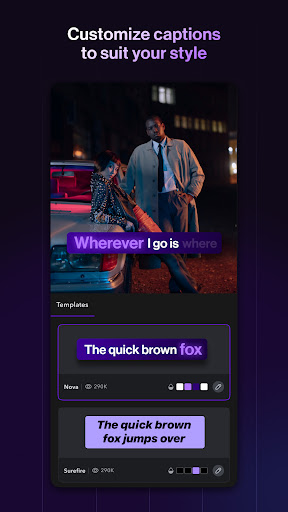
•Wide range of caption templates: Choose from viral and classic caption styles.
•Customizable styles: Keep your content on-brand with customized colors and styles.
•Comprehensive video editor: Use Captions’ full video editing suite of tools for X, Reels, IG Stories, Threads, and more.
Expand your reach with translation and dubbing
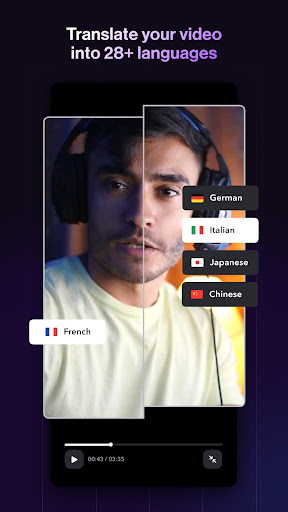
•Multilingual dubbing: Automatically dub your content into 29+ languages in your own voice.
•Subtitle translation: Translate video subtitles into 29+ languages to grow your global audience.
•Accurate transcription: Transcribe spoken content to text for easy editing and translation.
Enhance video quality with AI effects
•AI eye contact: Correct your eye contact even when reading from a script.
•AI zooms: Instantly add relevant zooms personalized to your content.
•AI sounds: Automatically generate relevant sounds for your videos.
•Video transition effects: Keep your videos engaging with smooth transitions.
•Template library: Select from an extensive library of trending templates and styles.
Create accessible content
•Create inclusive videos: With over 6% of the global population experiencing hearing loss, adding captions makes your videos inclusive and enjoyable for everyone.
•No more language barriers: Make your message accessible to a broader audience by dubbing your content into multiple languages, so you can grow your international audience.
•Support for noisy environments: Boost engagement with dynamic closed captions (cc), preferred by the 85% of viewers who watch videos without sound.
Why choose captions?
Trusted by over 10M+ people, Captions offers the easiest way to create and edit talking videos with AI. Try Captions today.
Start your free trial now.
Terms of Use: https://www.captions.ai/legal/terms
Privacy Policy: https://www.captions.ai/legal/privacy
أظهر المزيد

1. قم بتنزيل برنامج MEmu واكمال تثبيته

2. قم بتشغيل برنامج MEmu وفتح Google Play على الصفحة الرئيسية

3. ابح Captions: For Talking Videos في Google Play
Install
4. تنزيل وتثبيت Captions: For Talking Videos
5. انقر على الرمز للتشغيل بعد اكتمال التثبيت

6. استخدم MEmu لتجربة Captions: For Talking Videos على جهاز الكمبيوتر الخاص بك.
تطبيق MEmuهو افضل محاكى اندرويد مجانى وبالفعل 50 مليون شخص يستمتعون حاليا بتجربه اللعب عليه. تمكّنك تقنية MEmu الافتراضية من تشغيل آلاف ألعاب Android بسلاسة على الكمبيوتر الشخصي ، حتى أكثرها استخدامًا للرسومات.
شاشة أكبر وجرافيك افضل ووقت أطول بدون حدود البطارية وباقة التليفون
لوحة مفاتيح كاملة تدعم تحكم كامل عن طريق لوحة المفاتيح و الفأره وجيم باد
عدة العاب وحسابات ومهمات علي جهاز الكمبيوتر في وقت معين عن طريق Memu متعدد النوافذ
Use Captions: For Talking Videos on PC by following steps: