
Aiuta – AI Stylist
تم التحديث
الإصدار الحالي
2.6.3
تقديم

لا داعي للقلق بشأن الشحن الزائد عند استخدام Aiuta – AI Stylist على هاتفك. تحرر من قيود الشاشة الصغيرة واستمتع به على شاشة أكبر باستخدام لوحة المفاتيح والفأرة. يوفر MEmu جميع الميزات الرائعة التي تتوقعها: تثبيت سريع، إعداد سهل، أدوات تحكم بديهية، ودون قيود على عمر البطارية، أو استخدام البيانات، أو المكالمات الواردة. يُعد MEmu 9 الجديد الخيار الأمثل لتجربة Aiuta – AI Stylist على جهاز الكمبيوتر. بفضل تقنية التشفير الفريدة، يتيح لك مدير الحسابات المتعددة تشغيل حسابين أو أكثر في وقت واحد. والأهم من ذلك، أن محرك المحاكاة الفريد يستغل أداء جهاز الكمبيوتر بالكامل، مما يُحسّن تجربة التطبيق ويجعل كل شيء سلسًا للغاية.
أظهر المزيد
قم بتنزيل Aiuta – AI Stylist على الكمبيوتر بإستخدام جهاز مقلد أندروز MEmu.استمتع بمتعة اللعب على الشاشة الكبيرة. Aiuta AI Stylist: Elevate Your Style Effortlessly.
Aiuta AI Stylist: Elevate Your Style Effortlessly
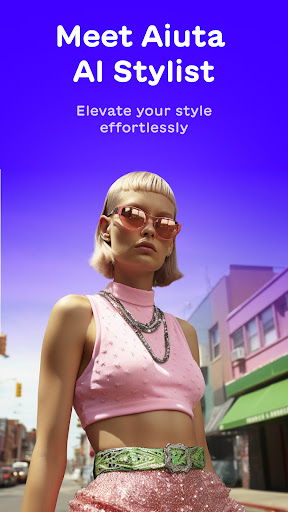
Meet Aiuta, the fashion-tech app built on cutting-edge AI that takes your style to the next level. With Aiuta, you can express your personality through fashion, virtually try on new outfits, discover inspiration ideas, get feedback from AI stylists, and feel confident about what you wear.
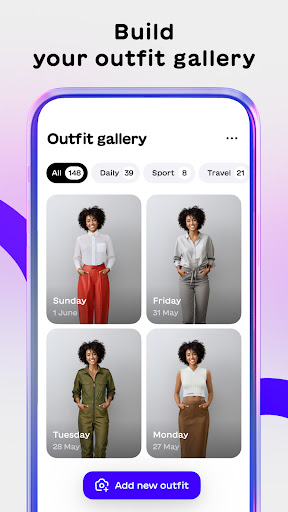
Build Your Outfit Gallery
Effortlessly create stunning outfits with ease. Dress up and create your own outfit gallery to showcase your unique personal style. Whether it’s casual, formal, or anything in between, Aiuta helps you create your very own lookbook for every occasion.
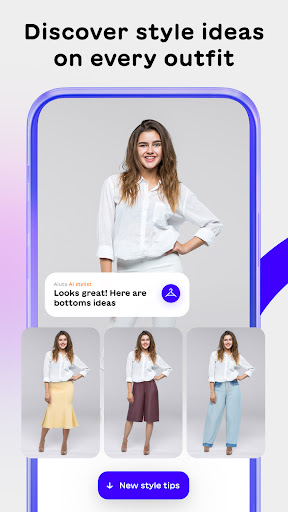
Discover Style Ideas for Every Outfit
Explore new styling options to perfect your look. With Aiuta, you can discover endless style ideas and alternatives for every outfit, helping you enhance your wardrobe with confidence.
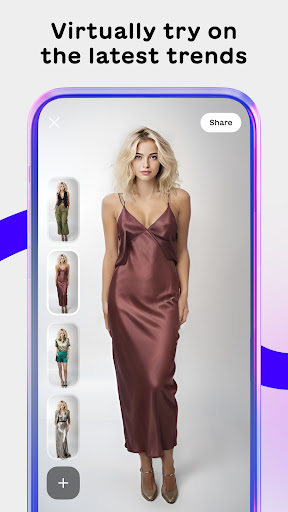
Try on the Latest Trends Virtually
Experiment with diverse brands and styles by virtually trying on outfits. Take a selfie, upload a photo, and see how different fashion items look on you without leaving your home. Enjoy the fun and convenience of virtual try-ons to find your perfect style.
Build your own looks
Tell our AI Stylist what you want to wear, and watch it create the perfect visualisation of your thoughts in seconds.
Achieve a Perfectly Organised Wardrobe (Coming Soon)
Aiuta AI organises, categorises, and saves your wardrobe items. Say goodbye to the frustration of not knowing what to wear. Our app helps you keep track of your clothing and accessories, making it easier to plan and coordinate your outfits. This feature will be available soon.
Key Features:
Virtual Try-on: Upload a photo and virtually try on outfits to discover new trends and experiment with your look.
AI Stylist Opinion: Get professional opinions from AI stylists to guide you on how to elevate your style
Organised Wardrobe: Save, categorise, and manage your wardrobe items efficiently (Coming Soon).
Our research shows that 74% of women have items they’ve never worn in their wardrobe. Impulsive buying wastes your money and the planet’s resources. Whether shopping online or in-store, Aiuta is with you, helping you make rational buying decisions so you choose the items that you truly love. Aiuta aims to eliminate “I’ve got nothing to wear” or “I don’t know if this suits me” moments and help you feel empowered to dress confidently.
Discover and showcase your unique personal style with our innovative clothing style app! Dress up and create stunning outfits with ease using our extensive collection of fashion items. Elevate your daily look and become a trendsetter with our interactive fashion app.
Immerse yourself in a one-of-a-kind shopping experience with our digital style experts. Discover a curated selection of fashion items and gain access to inspiring content that will ignite your creativity. Aiuta is designed to save you time and mental energy, allowing you to stay focused on reaching your goals.
For more information, visit our website: www.aiuta.com
أظهر المزيد

1. قم بتنزيل برنامج MEmu واكمال تثبيته

2. قم بتشغيل برنامج MEmu وفتح Google Play على الصفحة الرئيسية

3. ابح Aiuta – AI Stylist في Google Play
Install
4. تنزيل وتثبيت Aiuta – AI Stylist
5. انقر على الرمز للتشغيل بعد اكتمال التثبيت

6. استخدم MEmu لتجربة Aiuta – AI Stylist على جهاز الكمبيوتر الخاص بك.
تطبيق MEmuهو افضل محاكى اندرويد مجانى وبالفعل 50 مليون شخص يستمتعون حاليا بتجربه اللعب عليه. تمكّنك تقنية MEmu الافتراضية من تشغيل آلاف ألعاب Android بسلاسة على الكمبيوتر الشخصي ، حتى أكثرها استخدامًا للرسومات.
شاشة أكبر وجرافيك افضل ووقت أطول بدون حدود البطارية وباقة التليفون
لوحة مفاتيح كاملة تدعم تحكم كامل عن طريق لوحة المفاتيح و الفأره وجيم باد
عدة العاب وحسابات ومهمات علي جهاز الكمبيوتر في وقت معين عن طريق Memu متعدد النوافذ
Use Aiuta – AI Stylist on PC by following steps: