Aiuta – AI Stylist
अपडेट किया गया
वर्तमान वर्शन
2.6.3
संसाधन

Aiuta – AI Stylist पर अपनी मोबाइल डेटा सीमा पार करने को अलविदा कहें और छोटी स्क्रीन की सीमाओं से मुक्त होकर बड़े डिस्प्ले के लाभों का अनुभव करें। अब, आप अपने कीबोर्ड और माउस का उपयोग करके फुल-स्क्रीन मोड में टॉपर्स क्लैन की शक्ति का अनुभव कर सकते हैं। MEmu Play में वे सभी बेहतरीन सुविधाएँ हैं जिनकी आप अपेक्षा करते हैं: त्वरित इंस्टॉलेशन और आसान सेटअप, सहज नियंत्रण, बैटरी की आवश्यकता नहीं, और कोई डेटा या कॉल समय सीमा नहीं। नया MEmu 9 आपके कंप्यूटर पर Aiuta – AI Stylist का उपयोग करने के लिए सबसे अच्छा विकल्प है। हमारा मालिकाना मल्टी-इंस्टेंस मैनेजर एक साथ दो या अधिक खातों को चलाने का समर्थन करता है। इससे भी महत्वपूर्ण बात यह है कि हमारा अनूठा इम्यूलेशन इंजन आपके कंप्यूटर के प्रदर्शन का पूरा उपयोग करता है, जिससे एक सहज और निर्बाध अनुभव मिलता है।
और दिखाएं
डाउनलोड करें Aiuta – AI Stylist पीसी पर MEmu एंड्रॉयड एमुलेटर के साथ बड़े पर्दे पर खेलने का आनंद लें। Your personal AI stylist with virtual try on and expert second opinion!
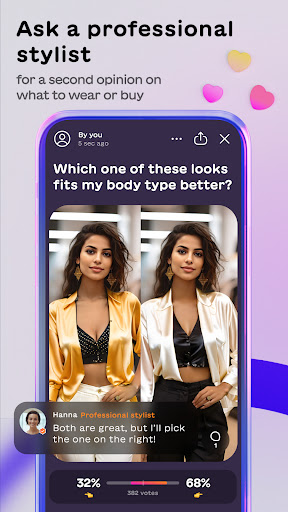
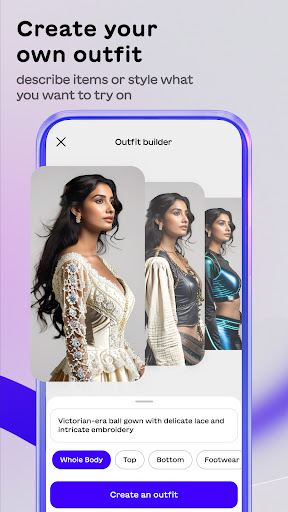
Your personal AI stylist with virtual try on and expert second opinion!
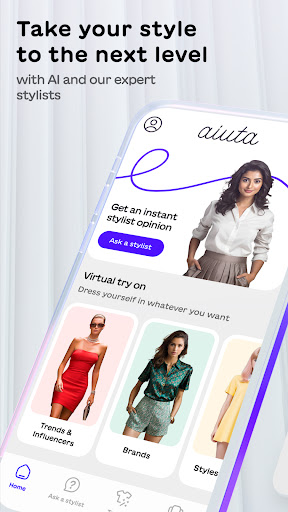
Aiuta — a fashion-tech app built on cutting-edge AI. Our product helps you express your personality through style, discover new virtual outfits, provides feedback from expert stylists and the Aiuta community for more satisfying fashion choices, and empowers you to feel confident about what you wear.
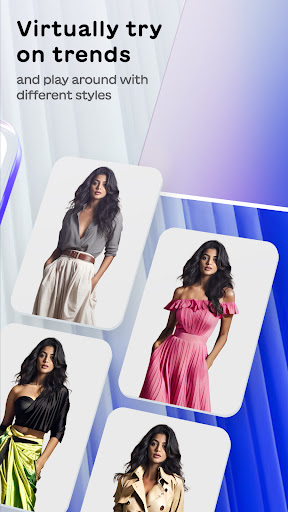
Virtual try on
Take a selfie and virtually try on outfits, discover exciting new trends, and experiment with your look. Most importantly, we want you to have fun with fashion and feel confident in your choice of clothes. ,
Professional second opinion from real stylist
Aiuta is like having a personal stylist with you all the time, guiding on what outfit to wear to work, dates, special occasions, and meet-ups with friends…, advising you on the latest fashion trends, and making buying suggestions based on items you like. Ask an Aiuta stylist for expert fashion advice on what to wear or buy.
Buy Ai-generated outfits in real stores
Fallen in love with an item? We recommend similar items to buy; saving you the hassle of finding them yourself.
Aiuta aims to eliminate “I’ve got nothing to wear” or “I don’t know if this suits me” moments and help you feel empowered to dress confidently.
Find out more:
For more information, check out our website: www.aiuta.com
और दिखाएं

1. MEmu इंस्टॉलर को डाउनलोड करें और इंस्टॉलेशन को पूरा करें

2. MEmu शुरू करें फिर होमपेज पर Google Play खोलें

3. Google Play में Aiuta – AI Stylist खोजें
Install
4. Aiuta – AI Stylist डाउनलोड कर इंस्टॉल करें
5. इंस्टॉल पूरा होने पर आइकन दबाएं

6. MEmu का उपयोग करके अपने कंप्यूटर पर Aiuta – AI Stylist का अनुभव करें
MEmu Play सबसे बेहतरीन मुफ़्त Android एमुलेटर है और 5 करोड़ लोग पहले ही इसके शानदार Android ऐप अनुभव का आनंद ले चुके हैं। MEmu 9 वर्चुअलाइज़ेशन तकनीक आपको अपने PC पर हज़ारों Android ऐप्स, यहाँ तक कि सबसे ज़्यादा ग्राफ़िक्स वाले ऐप्स भी, आसानी से चलाने की सुविधा देती है।
असीमित बैटरी या मोबाइल डेटा के साथ बेहतर ग्राफिक्स के साथ बड़ी स्क्रीन; लंबी अवधि।
कीबोर्ड और माउस या गेमपैड के उत्तम नियंत्रण के लिए संपूर्ण कीमैपिंग का समर्थन करता हैं।
एक ही पीसी पर मल्टी-इंस्टेंस मैनेजर के साथ एक समय में कई गेम खाते या कार्य कर सकते हैं।
Use Aiuta – AI Stylist on PC by following steps: