Concepts: Sketch, Note, Draw
تم التحديث
الإصدار الحالي
2024.12.5
تقديم

لا داعي للقلق بشأن الشحن الزائد عند استخدام Concepts: Sketch, Note, Draw على هاتفك. تحرر من قيود الشاشة الصغيرة واستمتع به على شاشة أكبر باستخدام لوحة المفاتيح والفأرة. يوفر MEmu جميع الميزات الرائعة التي تتوقعها: تثبيت سريع، إعداد سهل، أدوات تحكم بديهية، ودون قيود على عمر البطارية، أو استخدام البيانات، أو المكالمات الواردة. يُعد MEmu 9 الجديد الخيار الأمثل لتجربة Concepts: Sketch, Note, Draw على جهاز الكمبيوتر. بفضل تقنية التشفير الفريدة، يتيح لك مدير الحسابات المتعددة تشغيل حسابين أو أكثر في وقت واحد. والأهم من ذلك، أن محرك المحاكاة الفريد يستغل أداء جهاز الكمبيوتر بالكامل، مما يُحسّن تجربة التطبيق ويجعل كل شيء سلسًا للغاية.
أظهر المزيد
قم بتنزيل Concepts: Sketch, Note, Draw على الكمبيوتر بإستخدام جهاز مقلد أندروز MEmu.استمتع بمتعة اللعب على الشاشة الكبيرة. Think, plan & create – Concepts is a flexible vector-based creative workspace/sketchpad where you can take your ideas from concept to reality.
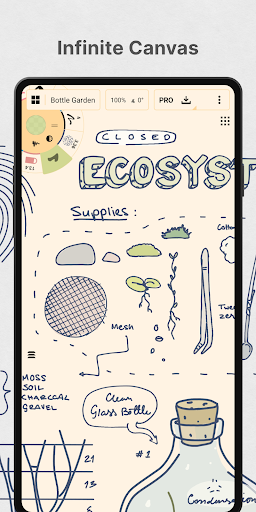
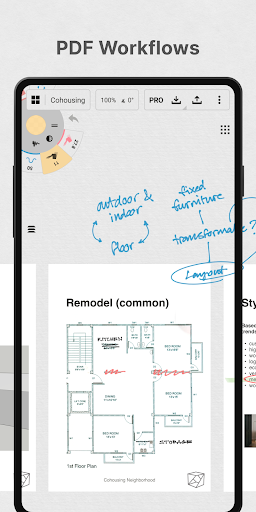
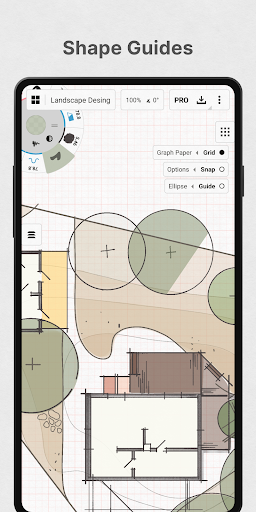
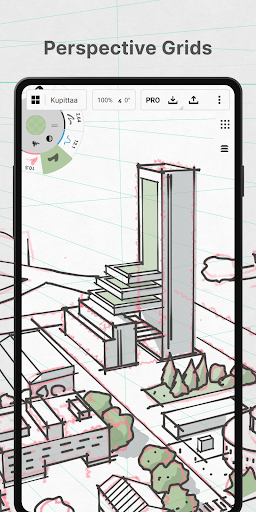
Think, plan & create – Concepts is a flexible vector-based creative workspace/sketchpad where you can take your ideas from concept to reality.
Concepts reimagines the ideation stage – offering a safe and dynamic workspace to explore your ideas, organize your thoughts, experiment with and iterate designs before sharing them with friends, clients and other apps.
With our infinite canvas, you can:
• sketch out plans and whiteboard ideas
• make notes, doodles, and mindmaps
• draw storyboards, product sketches and designs
Concepts is vector-based, making every stroke editable and scalable. With our Nudge, Slice and Select tools, you can easily change any element of your sketch without redrawing it. Concepts is optimized for the latest pen-enabled devices and Chrome OS™, making it fast, smooth and responsive.
Talented creators at Disney, Playstation, Philips, HP, Apple, Google, Unity and Illumination Entertainment use Concepts to develop and realize extraordinary ideas. Join us!
Concepts has:
• realistic pencils, pens and brushes that respond to pressure, tilt and velocity with adjustable live smoothing
• an infinite canvas with many paper types and custom grids
• a tool wheel or bar you can customize with your favorite tools and presets
• an infinite layering system with automatic sorting & adjustable opacity
• HSL, RGB and COPIC color wheels to help you choose colors that look great together
• flexible vector-based sketching – move and adjust what you’ve drawn anytime by tool, color, size, smoothing and scale
With Concepts, you can:
• draw with precision using shape guides, live snap and measurement for clean and accurate sketches
• personalize your canvas, tools, gestures, everything
• duplicate your work for easy iterations in the gallery and on canvas
• drag+drop images straight onto the canvas as references or for tracing
• export images, PDFs, and vectors for printing or fast feedback between friends and clients
FREE FEATURES
• Endless sketching on our infinite canvas
• A selection of paper, grid types & tools to get you started
• The full COPIC color spectrum + RGB and HSL color wheels
• Five layers
• Unlimited drawings
• JPG exports
PAID/PREMIUM FEATURES
Subscribe and master your creative potential:
• Access every library, service and feature, with new updates arriving all the time
• Unlocks everything across Android, ChromeOS, iOS and Windows
• TRY PREMIUM FREE FOR 7 DAYS
One-time-purchases:
• Buy the Essentials for life and unlock selection & editing tools, infinite layers, shape guides, custom grids, and exports to PNG / PSD / SVG / DXF.
• Pay for advanced features as you need them – professional brushes & PDF workflows are sold separately
• Limited to the platform you purchase on.
Terms & Conditions:
• Monthly and yearly subscription payments are charged to your Google Play Account at the time of purchase.
• Your plan will renew automatically at the price shown within 24 hours after the billing period ends unless canceled beforehand.
• You can cancel or make changes to your subscription at any time in your Google Play Account settings.
We’re dedicated to quality and update our app frequently based on your feedback. Your experience matters to us. Chat with us in-app via Ask Us Anything, email us at concepts@tophatch.com, or find us anywhere with @ConceptsApp.
COPIC is the trademark of Too Corporation. Many thanks to Lasse Pekkala and Osama Elfar for the cover art!
أظهر المزيد

1. قم بتنزيل برنامج MEmu واكمال تثبيته

2. قم بتشغيل برنامج MEmu وفتح Google Play على الصفحة الرئيسية

3. ابح Concepts: Sketch, Note, Draw في Google Play
Install
4. تنزيل وتثبيت Concepts: Sketch, Note, Draw
5. انقر على الرمز للتشغيل بعد اكتمال التثبيت

6. استخدم MEmu لتجربة Concepts: Sketch, Note, Draw على جهاز الكمبيوتر الخاص بك.
تطبيق MEmuهو افضل محاكى اندرويد مجانى وبالفعل 50 مليون شخص يستمتعون حاليا بتجربه اللعب عليه. تمكّنك تقنية MEmu الافتراضية من تشغيل آلاف ألعاب Android بسلاسة على الكمبيوتر الشخصي ، حتى أكثرها استخدامًا للرسومات.
شاشة أكبر وجرافيك افضل ووقت أطول بدون حدود البطارية وباقة التليفون
لوحة مفاتيح كاملة تدعم تحكم كامل عن طريق لوحة المفاتيح و الفأره وجيم باد
عدة العاب وحسابات ومهمات علي جهاز الكمبيوتر في وقت معين عن طريق Memu متعدد النوافذ
Use Concepts: Sketch, Note, Draw on PC by following steps: