Fotorama - AI Photo Generator
تم التحديث
الإصدار الحالي
3.3.0
تقديم

لا داعي للقلق بشأن الشحن الزائد عند استخدام Fotorama - AI Photo Generator على هاتفك. تحرر من قيود الشاشة الصغيرة واستمتع به على شاشة أكبر باستخدام لوحة المفاتيح والفأرة. يوفر MEmu جميع الميزات الرائعة التي تتوقعها: تثبيت سريع، إعداد سهل، أدوات تحكم بديهية، ودون قيود على عمر البطارية، أو استخدام البيانات، أو المكالمات الواردة. يُعد MEmu 9 الجديد الخيار الأمثل لتجربة Fotorama - AI Photo Generator على جهاز الكمبيوتر. بفضل تقنية التشفير الفريدة، يتيح لك مدير الحسابات المتعددة تشغيل حسابين أو أكثر في وقت واحد. والأهم من ذلك، أن محرك المحاكاة الفريد يستغل أداء جهاز الكمبيوتر بالكامل، مما يُحسّن تجربة التطبيق ويجعل كل شيء سلسًا للغاية.
أظهر المزيد
قم بتنزيل Fotorama - AI Photo Generator على الكمبيوتر بإستخدام جهاز مقلد أندروز MEmu.استمتع بمتعة اللعب على الشاشة الكبيرة. Welcome to Fotorama, your ultimate destination for limitless photographic creativity!


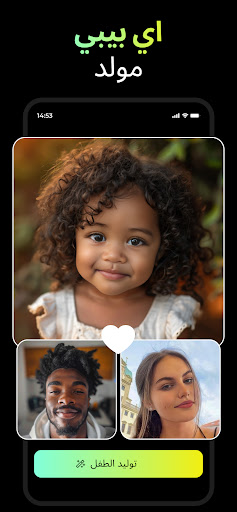
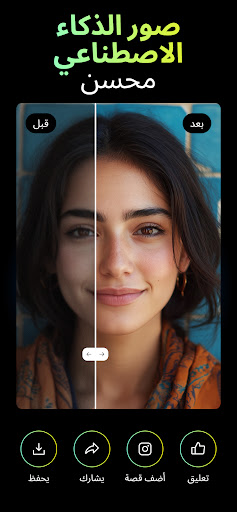
Welcome to Fotorama, your ultimate destination for limitless photographic creativity! This app takes your everyday snapshots and transforms them into professionally crafted visuals. With Fotorama - AI Headshot Generator, experience the ease of creating stunning AI headshots, professional portraits, and capturing the essence of every season directly from your smartphone. It's not just an app; it's your personal AI-powered photo studio that turns the ordinary into the extraordinary with a simple tap.
Key Features:
-AI Headshot Excellence: Effortlessly produce studio-quality AI headshots, perfect for professional profiles, business needs, or social media.
-Thematic Photo Transformations: Dive into a vast array of themed transformations that breathe new life into every photo. A new theme awaits you every day!
-Seasonal & Conceptual Magic: Explore various seasonal and conceptual themes, adding a unique touch to your photos and celebrating each moment in a visually stunning way.
-AI-Crafted Headshots & Portraits: Get personalized, studio-quality headshots and portraits ideal for professional or social media use.
-Easy Social Sharing: Conveniently share your AI photo creations across different platforms, showcasing your unique style and Fotorama's AI wizardry.
-Privacy-Centric: Rest assured, knowing that Fotorama employs advanced security measures to protect your data.
Trendy Fotorama - AI Headshot Generator Styles:
- AI Business Portraits
- Professional Headshots
- LinkedIn Headshots
- AI Headshots
- AI Portrait Photos
- Trend AI Filters
- AI Baby Photos
- Realistic AI Photos
- Old Money Style
- AI Urban Street Art
- Wedding Photos
- Aesthetic Photos
- Holiday Photos
- Cinematic Photos
- Summer & Winter Vibes
- AI Vintage Film Photos
-Trend AI Filters
Fotorama - AI Headshot Generator is where your imagination meets the pinnacle of AI photo technology. Each interaction opens a door to a world where AI headshots and AI photo transformations redefine the boundaries of digital photography. Try Fotorama - AI Headshot Generator today and unleash the full potential of AI in your photography journey.
Privacy: https://appnation.co/privacy
Terms: https://appnation.co/terms
أظهر المزيد

1. قم بتنزيل برنامج MEmu واكمال تثبيته

2. قم بتشغيل برنامج MEmu وفتح Google Play على الصفحة الرئيسية

3. ابح Fotorama - AI Photo Generator في Google Play
Install
4. تنزيل وتثبيت Fotorama - AI Photo Generator
5. انقر على الرمز للتشغيل بعد اكتمال التثبيت

6. استخدم MEmu لتجربة Fotorama - AI Photo Generator على جهاز الكمبيوتر الخاص بك.
تطبيق MEmuهو افضل محاكى اندرويد مجانى وبالفعل 50 مليون شخص يستمتعون حاليا بتجربه اللعب عليه. تمكّنك تقنية MEmu الافتراضية من تشغيل آلاف ألعاب Android بسلاسة على الكمبيوتر الشخصي ، حتى أكثرها استخدامًا للرسومات.
شاشة أكبر وجرافيك افضل ووقت أطول بدون حدود البطارية وباقة التليفون
لوحة مفاتيح كاملة تدعم تحكم كامل عن طريق لوحة المفاتيح و الفأره وجيم باد
عدة العاب وحسابات ومهمات علي جهاز الكمبيوتر في وقت معين عن طريق Memu متعدد النوافذ
Use Fotorama - AI Photo Generator on PC by following steps: