Freepik: Design & edit with AI
تم التحديث
الإصدار الحالي
4.0.8
تقديم

لا داعي للقلق بشأن الشحن الزائد عند استخدام Freepik: Design & edit with AI على هاتفك. تحرر من قيود الشاشة الصغيرة واستمتع به على شاشة أكبر باستخدام لوحة المفاتيح والفأرة. يوفر MEmu جميع الميزات الرائعة التي تتوقعها: تثبيت سريع، إعداد سهل، أدوات تحكم بديهية، ودون قيود على عمر البطارية، أو استخدام البيانات، أو المكالمات الواردة. يُعد MEmu 9 الجديد الخيار الأمثل لتجربة Freepik: Design & edit with AI على جهاز الكمبيوتر. بفضل تقنية التشفير الفريدة، يتيح لك مدير الحسابات المتعددة تشغيل حسابين أو أكثر في وقت واحد. والأهم من ذلك، أن محرك المحاكاة الفريد يستغل أداء جهاز الكمبيوتر بالكامل، مما يُحسّن تجربة التطبيق ويجعل كل شيء سلسًا للغاية.
أظهر المزيد
قم بتنزيل Freepik: Design & edit with AI على الكمبيوتر بإستخدام جهاز مقلد أندروز MEmu.استمتع بمتعة اللعب على الشاشة الكبيرة. Welcome to Freepik, your go-to app for all your design needs!
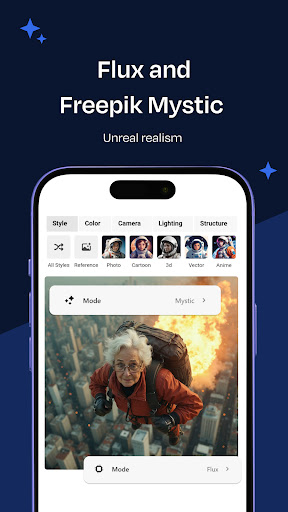
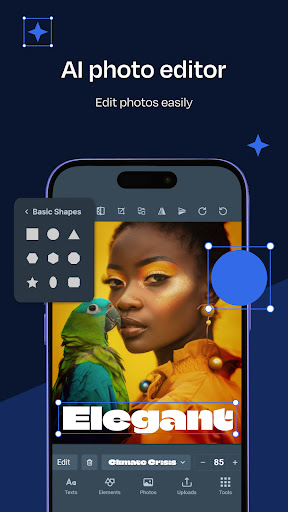
Welcome to Freepik, your go-to app for all your design needs!
Create stunning designs with easy-to-use design tools like the Freepik AI image generator on your iPhone or iPad. Discover Freepik evergreen stock library, including icons, vectors, images, PSD, templates, videos, and mockups. Make your designs pop with must-try features like background remover and Reimagine. Here’s a list of the most popular ones:
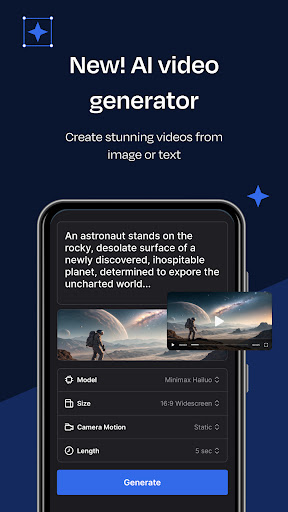
- NEW AI video generator: Enter images or describe your scene and create stunning videos by choosing between different generation modes.
- Freepik Designer: Your online editor to create or edit your designs with top AI tools and features. Perfect for personalizing logos, posts, invitations, business cards, posters, and templates with your unique touch.
- Photo editor: Fine-tune your images with this intuitive online tool. Adjust colors, apply filters, and make your images look their best effortlessly.
- Background remover: Remove backgrounds in a snap and get your photos ready for any project. Just take a photo or pick one from your gallery. With one click, the background is gone. Then you can either add a new background or download the image as a PNG file instantly.
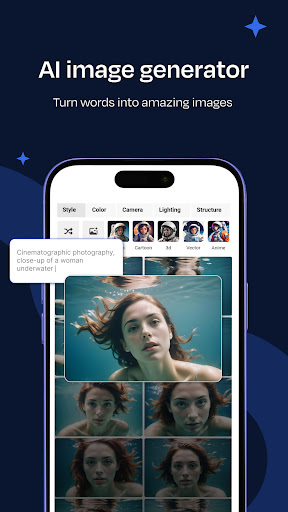
- Freepik AI image generator: Create images instantly using your own words with our AI-powered text-to-image tool. Experiment with a variety of models to choose, whether you're looking for high quality or faster generation, Flux variants or Freepik Mystic will cover your needs. Play around with Structure and use any image to match your image’s overall structure and form.
- Reimagine: Generate multiple variations of any image in real time and explore different styles to match your creative vision. You can recreate an image as many times as you want, preserving the composition at all times.
- Sketch to image: Turn a doodle into detailed images in real-time. Upload your drawing or create one on a blank canvas, and our AI will bring it to life, turning your ideas into reality.
Download the APP today, and let’s make something beautiful together!
أظهر المزيد

1. قم بتنزيل برنامج MEmu واكمال تثبيته

2. قم بتشغيل برنامج MEmu وفتح Google Play على الصفحة الرئيسية

3. ابح Freepik: Design & edit with AI في Google Play
Install
4. تنزيل وتثبيت Freepik: Design & edit with AI
5. انقر على الرمز للتشغيل بعد اكتمال التثبيت

6. استخدم MEmu لتجربة Freepik: Design & edit with AI على جهاز الكمبيوتر الخاص بك.
تطبيق MEmuهو افضل محاكى اندرويد مجانى وبالفعل 50 مليون شخص يستمتعون حاليا بتجربه اللعب عليه. تمكّنك تقنية MEmu الافتراضية من تشغيل آلاف ألعاب Android بسلاسة على الكمبيوتر الشخصي ، حتى أكثرها استخدامًا للرسومات.
شاشة أكبر وجرافيك افضل ووقت أطول بدون حدود البطارية وباقة التليفون
لوحة مفاتيح كاملة تدعم تحكم كامل عن طريق لوحة المفاتيح و الفأره وجيم باد
عدة العاب وحسابات ومهمات علي جهاز الكمبيوتر في وقت معين عن طريق Memu متعدد النوافذ
Use Freepik: Design & edit with AI on PC by following steps: