GPS Map Camera & Compass
تم التحديث
الإصدار الحالي
2.5
تقديم

لا داعي للقلق بشأن الشحن الزائد عند استخدام GPS Map Camera & Compass على هاتفك. تحرر من قيود الشاشة الصغيرة واستمتع به على شاشة أكبر باستخدام لوحة المفاتيح والفأرة. يوفر MEmu جميع الميزات الرائعة التي تتوقعها: تثبيت سريع، إعداد سهل، أدوات تحكم بديهية، ودون قيود على عمر البطارية، أو استخدام البيانات، أو المكالمات الواردة. يُعد MEmu 9 الجديد الخيار الأمثل لتجربة GPS Map Camera & Compass على جهاز الكمبيوتر. بفضل تقنية التشفير الفريدة، يتيح لك مدير الحسابات المتعددة تشغيل حسابين أو أكثر في وقت واحد. والأهم من ذلك، أن محرك المحاكاة الفريد يستغل أداء جهاز الكمبيوتر بالكامل، مما يُحسّن تجربة التطبيق ويجعل كل شيء سلسًا للغاية.
أظهر المزيد
قم بتنزيل GPS Map Camera & Compass على الكمبيوتر بإستخدام جهاز مقلد أندروز MEmu.استمتع بمتعة اللعب على الشاشة الكبيرة. GPS Map Camera & Compass is the best app to plan your trips around the world with powerful GPS features.
GPS Map Camera & Compass is the best app to plan your trips around the world with powerful GPS features.
Best Features:
GPS Map Camera
Compass
Speedometer
Altimeter
Current Location Tracker
Traffic Updates
3D Street Panorama View
Weather
Area Calculator
GPS Map Camera:
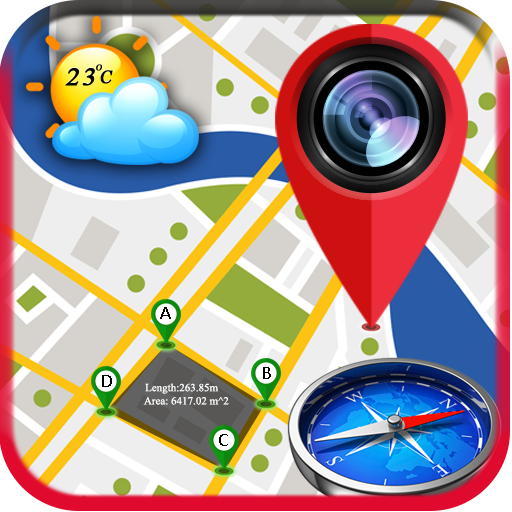
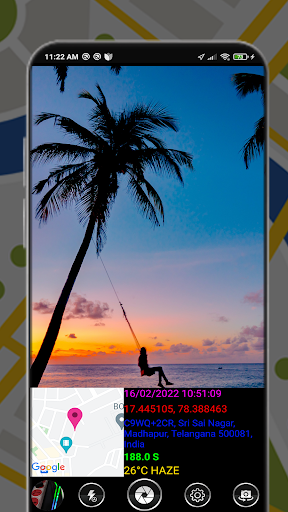
You can send your location Image by the camera preview with Google Maps, Compass, Weather, address, time, and date as the Image.
How this feature works:
✔ When the camera starts, the camera preview shows Compass view, map with address, weather, compass heading, latitude and longitude, date, and time.
✔ You Can Manually Set The Color for Date & Time, Latitude n Longitude, Address, Compass Heading.
✔ You can share your Photo with Location with your beloved friends or family members.
✔ You can Share it on Facebook, Twitter, Google+, Whatsapp, Instagram..etc
Compass:
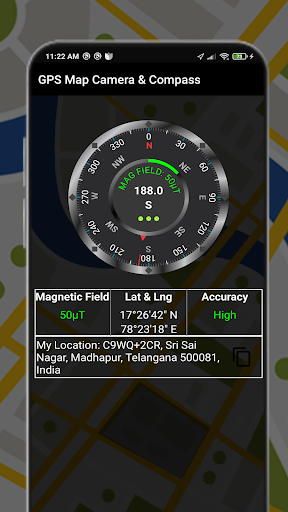
A compass is an instrument used for navigation and orientation that shows direction relative to the geographic North. Geographic North is computed given the magnetic North and the magnetic declination at your current location. Find and keep track of the right heading. Get information about your current position or a target position. Simple to use, use it like a real compass.
3D Street Panorama View:
3D Street Panorama View Allows you to determine Your location in 3D View by dragging markers on the map. Street Panorama View featured in Google Maps and Google Earth provides 3D panoramic views from positions along many streets in the world.
Weather:
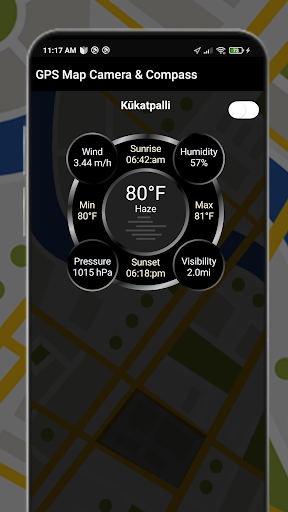
Pay attention to your city's weather conditions, always make your life in advance to make decisions, to your travel escort. You can get weather forecast updates for the next 7 days. You can also easily search for weather in other locations.
Speedometer:
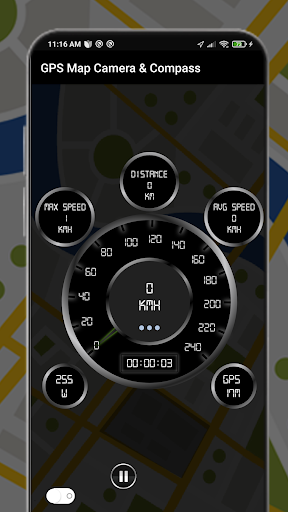
Speedometer is a free GPS tool that shows useful speed and distance information for your journey with Analog and digital speedometers. Drive safely and forget about fines forever. You can easily reset the information.
Information displayed
☑️ Current speed
☑️ Average speed
☑️ Maximum speed
☑️ Traveled Time
☑️ Distance
Area Calculator:
Area Calculator is the best tool for measuring areas on the map. Once you place your points on the map and then calculate the area between all points with great accuracy. You can also calculate the total Area of any Route.
Hope GPS Maps Camera & Compass is very helpful for everyone.
أظهر المزيد

1. قم بتنزيل برنامج MEmu واكمال تثبيته

2. قم بتشغيل برنامج MEmu وفتح Google Play على الصفحة الرئيسية

3. ابح GPS Map Camera & Compass في Google Play
Install
4. تنزيل وتثبيت GPS Map Camera & Compass
5. انقر على الرمز للتشغيل بعد اكتمال التثبيت

6. استخدم MEmu لتجربة GPS Map Camera & Compass على جهاز الكمبيوتر الخاص بك.
تطبيق MEmuهو افضل محاكى اندرويد مجانى وبالفعل 50 مليون شخص يستمتعون حاليا بتجربه اللعب عليه. تمكّنك تقنية MEmu الافتراضية من تشغيل آلاف ألعاب Android بسلاسة على الكمبيوتر الشخصي ، حتى أكثرها استخدامًا للرسومات.
شاشة أكبر وجرافيك افضل ووقت أطول بدون حدود البطارية وباقة التليفون
لوحة مفاتيح كاملة تدعم تحكم كامل عن طريق لوحة المفاتيح و الفأره وجيم باد
عدة العاب وحسابات ومهمات علي جهاز الكمبيوتر في وقت معين عن طريق Memu متعدد النوافذ
Use GPS Map Camera & Compass on PC by following steps: