HONOR Health
تم التحديث
الإصدار الحالي
17.21.0.302
تقديم

لا داعي للقلق بشأن الشحن الزائد عند استخدام HONOR Health على هاتفك. تحرر من قيود الشاشة الصغيرة واستمتع به على شاشة أكبر باستخدام لوحة المفاتيح والفأرة. يوفر MEmu جميع الميزات الرائعة التي تتوقعها: تثبيت سريع، إعداد سهل، أدوات تحكم بديهية، ودون قيود على عمر البطارية، أو استخدام البيانات، أو المكالمات الواردة. يُعد MEmu 9 الجديد الخيار الأمثل لتجربة HONOR Health على جهاز الكمبيوتر. بفضل تقنية التشفير الفريدة، يتيح لك مدير الحسابات المتعددة تشغيل حسابين أو أكثر في وقت واحد. والأهم من ذلك، أن محرك المحاكاة الفريد يستغل أداء جهاز الكمبيوتر بالكامل، مما يُحسّن تجربة التطبيق ويجعل كل شيء سلسًا للغاية.
أظهر المزيد
قم بتنزيل HONOR Health على الكمبيوتر بإستخدام جهاز مقلد أندروز MEmu.استمتع بمتعة اللعب على الشاشة الكبيرة. تطبيق Honor Health عبارة عن منصة برمجية تقوم بتسجيل وتحليل بيانات الحركة والصحة، وتوصيل الأجهزة وإدارتها، وتوفر منصة برمجية لخدمة التمارين للمستخدم.
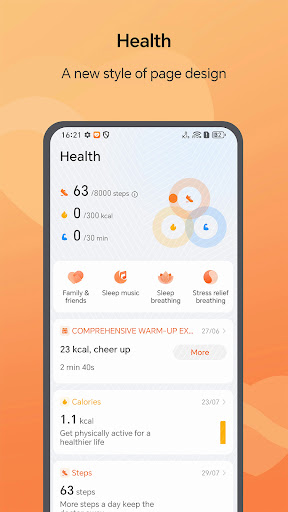
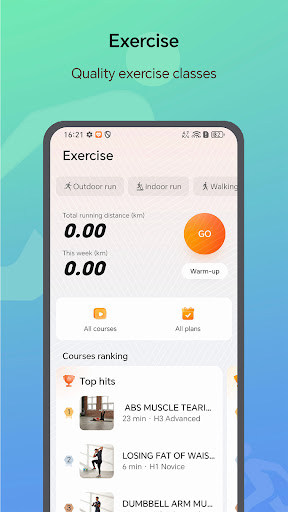
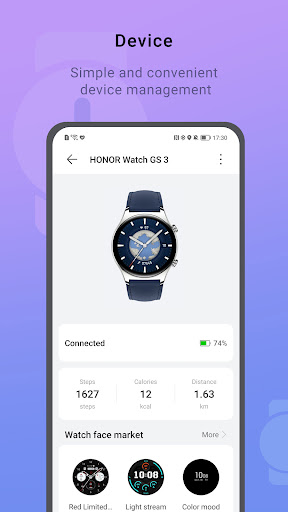
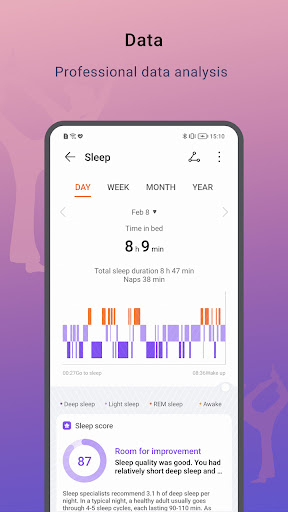
تطبيق Honor Health عبارة عن منصة برمجية تقوم بتسجيل وتحليل بيانات الحركة والصحة، وتوصيل الأجهزة وإدارتها، وتوفر منصة برمجية لخدمة التمارين للمستخدم.
الأجهزة المدعومة: ساعة هونر GS3/ سوار هونر 7/ ساعة هونر 4
[تتبع التمرين]
قم بتخطيط الدورة التدريبية الخاصة بك، وتحقق من مراقبة التقدم ومساعدتك على تحقيق أهدافك. يتضمن نوع التمرين بشكل أساسي المشي والجري وركوب الدراجات، ويمكنك تتبعه من خلال الهاتف المحمول.
[رصد المعلومات الصحية]
تحقق من معدل ضربات القلب والإجهاد والنوم والوزن وتفاصيل الدورة لتتبع صحتك بسهولة.
اطلب من المستخدم الإذن لعرض دفتر عناوين هاتفك وسجل المكالمات واستقبال الرسائل القصيرة وعرض الرسائل القصيرة وإرسال الرسائل القصيرة والاستماع إلى المكالمات والاستماع إلى حالة الطاقة. يتيح لك ذلك بقاء هاتفك على اطلاع دائم والتحقق من سجل مكالماتك وإجراء المكالمات وإرسال وقراءة الرسائل القصيرة على Table دون الحاجة إلى فحص هاتفك بشكل متكرر.
[الأذونات التالية مطلوبة لتطبيق الخدمة]
- الموقع: يستخدم لتسجيل الحركة ودعم الأجهزة القابلة للارتداء للحصول على معلومات الطقس. لضمان استمرارية ودقة مسارات الجري والمشي وركوب الدراجات، نقوم بجمع بيانات موقعك حتى لو كان إجراء التطبيق قيد التشغيل في الخلفية.
- أذونات الهاتف: تُستخدم للرد أو إجراء المكالمات من الأجهزة القابلة للارتداء المطابقة.
- إذن الرسائل القصيرة: يُستخدم لإرسال واستقبال الرسائل النصية القصيرة من الأجهزة القابلة للارتداء المطابقة.
- أذونات سجل المكالمات: يتم استخدامها لمطابقة الأجهزة القابلة للارتداء لعرض سجلات المكالمات.
- أذونات التطبيقات المثبتة: لعرض التطبيقات المثبتة التي يمكنها إرسال إشعار بعد فتح إذن الإشعار.
- أذونات الكاميرا: تُستخدم لمسح الرمز ضوئيًا لتوصيل الجهاز وإضافة الأصدقاء والعائلة وفتح شريحة eSIM والوصول إلى ألبومات الصور وما إلى ذلك.
- أذونات التخزين: تُستخدم لمسح الرمز ضوئيًا لتوصيل الأجهزة، وإضافة الأصدقاء والعائلة، وفتح بطاقات eSIM، والوصول إلى ألبومات الصور، وما إلى ذلك.
- أذونات جهات الاتصال: يتم استخدامها لتحديد جهات الاتصال عند إعداد جهات اتصال مشتركة على جهاز قابل للارتداء مطابق.
- أذونات الأجهزة القريبة: استخدم الإصدار بعد Android TER M7 لتوصيل جهاز يمكن ارتداؤه أو جهاز لياقة بدنية.12
- أذونات تمارين اللياقة البدنية: يتم استخدامها للحصول على معلومات الحركة المسجلة بواسطة هاتفك بحيث لا يزال بإمكانك حساب بيانات حركتك عند استخدام جهازك القابل للارتداء.
- إذن التقويم: لتسجيل وعرض برنامج اللياقة البدنية الخاص بك، يقترح YOYO جدولة الاستعلامات عند ترك البطاقة، وما إلى ذلك.
- أذونات الإشعار: تُستخدم لإرسال إشعار مثل الأجهزة والرياضة والنظام وما إلى ذلك إلى إشعار من التطبيق.
- الميكروفون: يستخدم لتسجيل ومشاركة مقاطع الفيديو لمسارات الحركة.
[ تنصل]
يتم دعم هذه الميزات بواسطة جهاز استشعار مخصص، وهو غير مناسب للاستخدام الطبي وهو متاح فقط لمستخدم اللياقة العامة. يرجى الرجوع إلى وصف الأجهزة للحصول على التفاصيل.
1. تحسين استقرار التطبيق وتحسين تجربة المستخدم
أظهر المزيد

1. قم بتنزيل برنامج MEmu واكمال تثبيته

2. قم بتشغيل برنامج MEmu وفتح Google Play على الصفحة الرئيسية

3. ابح HONOR Health في Google Play
Install
4. تنزيل وتثبيت HONOR Health
5. انقر على الرمز للتشغيل بعد اكتمال التثبيت

6. استخدم MEmu لتجربة HONOR Health على جهاز الكمبيوتر الخاص بك.
تطبيق MEmuهو افضل محاكى اندرويد مجانى وبالفعل 50 مليون شخص يستمتعون حاليا بتجربه اللعب عليه. تمكّنك تقنية MEmu الافتراضية من تشغيل آلاف ألعاب Android بسلاسة على الكمبيوتر الشخصي ، حتى أكثرها استخدامًا للرسومات.
شاشة أكبر وجرافيك افضل ووقت أطول بدون حدود البطارية وباقة التليفون
لوحة مفاتيح كاملة تدعم تحكم كامل عن طريق لوحة المفاتيح و الفأره وجيم باد
عدة العاب وحسابات ومهمات علي جهاز الكمبيوتر في وقت معين عن طريق Memu متعدد النوافذ
Use HONOR Health on PC by following steps: