MadMuscles
تم التحديث
الإصدار الحالي
3.8.1
تقديم

لا داعي للقلق بشأن الشحن الزائد عند استخدام MadMuscles على هاتفك. تحرر من قيود الشاشة الصغيرة واستمتع به على شاشة أكبر باستخدام لوحة المفاتيح والفأرة. يوفر MEmu جميع الميزات الرائعة التي تتوقعها: تثبيت سريع، إعداد سهل، أدوات تحكم بديهية، ودون قيود على عمر البطارية، أو استخدام البيانات، أو المكالمات الواردة. يُعد MEmu 9 الجديد الخيار الأمثل لتجربة MadMuscles على جهاز الكمبيوتر. بفضل تقنية التشفير الفريدة، يتيح لك مدير الحسابات المتعددة تشغيل حسابين أو أكثر في وقت واحد. والأهم من ذلك، أن محرك المحاكاة الفريد يستغل أداء جهاز الكمبيوتر بالكامل، مما يُحسّن تجربة التطبيق ويجعل كل شيء سلسًا للغاية.
أظهر المزيد
قم بتنزيل MadMuscles على الكمبيوتر بإستخدام جهاز مقلد أندروز MEmu.استمتع بمتعة اللعب على الشاشة الكبيرة. MadMuscles is a fitness app designed to help people gain muscle, lose weight, look hot and feel incredible.
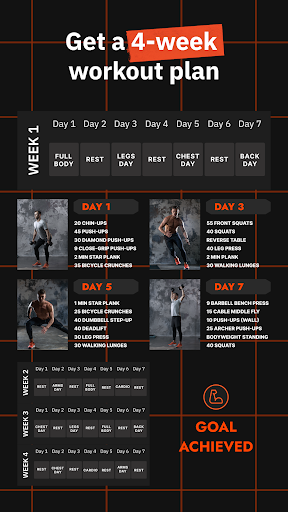
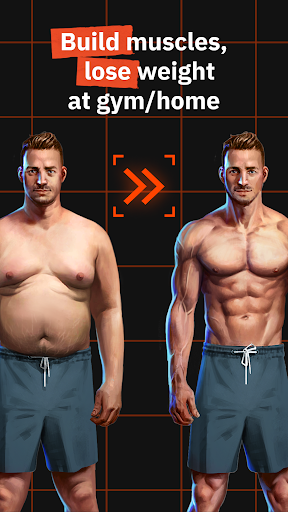
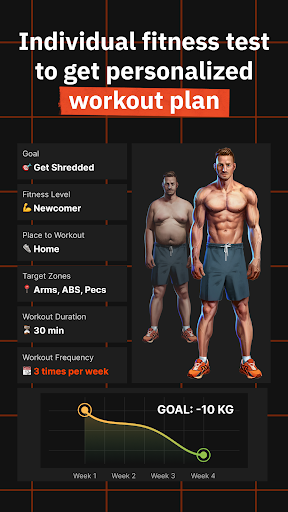
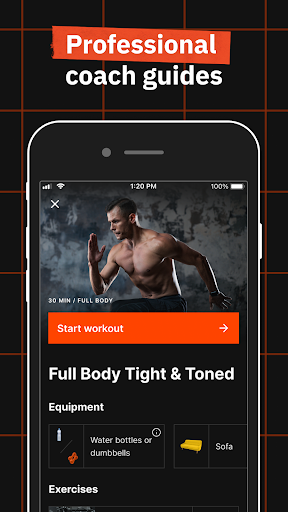
MadMuscles is a fitness app designed to help people gain muscle, lose weight, look hot and feel incredible. We make workouts accessible, effective and joyful by creating personalized workout plans tailored to each user’s needs and desires. No more excuses. It’s time to get the mad muscles you’ve always wanted!
What makes MadMuscles effective?
• Static and dynamic workouts for the best results
Our workouts are designed for people with different fitness levels, lifestyles and goals: gain muscle, lose weight or get shredded. MadMuscles helps to work on different parts of the body – from stronger arms to toned legs, no muscle group is left behind. You can choose whether you want to workout at home or go to the gym – we’ve got you covered either way.
• Video tutorials
Don’t worry if you don’t know how to do a certain exercise – our high-quality professional video tutorials will show exactly how it’s done.
• Exercise swap
Don’t like the exercise in your workout plan? Swap it with the one you actually like. The app will choose an exercise for the same muscle group and of the same difficulty.
• Achievements
Get rewarded for your hard work. Achievements will make working out fun and will keep you motivated.
• Analytical reports
Like stats and want to see how your progress in numbers? Get your first report after a week of training. Calories you’ve lost, workouts you’ve completed, steps you’ve walked – these reports will motivate you to keep going.
• Sync with Google Health
Sync MadMuscles with Google Health for better results.
• Useful and fun challenges
Make your body hot and your mind sharp. Develop healthy habits and discipline by trying our numerous challenges. You’ll never experience lack of motivation again – MadMuscles will not let you give up!
• Personalized meal plans
Nutrition is a key element in any body transformation process. Our meal plans are adjusted to your preferences and restrictions, with easy and quick recipes and a shopping list that will make cooking healthy and delicious meals easier.
• Analytical Reports
Like stats and want to see how your progress in numbers? Get your first report after a week of training. Calories you’ve lost, workouts you’ve completed, steps you’ve walked – these reports will motivate you to keep going.
• Photos: Templates & Comparison
Track your visual progress and take “before - after” photos by using templates. Compare photos with ease and make your friends jealous by sharing your results on social networks.
Privacy policy: https://madmuscles.com/privacy-policy
Terms of use: https://madmuscles.com/terms-of-service
أظهر المزيد

1. قم بتنزيل برنامج MEmu واكمال تثبيته

2. قم بتشغيل برنامج MEmu وفتح Google Play على الصفحة الرئيسية

3. ابح MadMuscles في Google Play
Install
4. تنزيل وتثبيت MadMuscles
5. انقر على الرمز للتشغيل بعد اكتمال التثبيت

6. استخدم MEmu لتجربة MadMuscles على جهاز الكمبيوتر الخاص بك.
تطبيق MEmuهو افضل محاكى اندرويد مجانى وبالفعل 50 مليون شخص يستمتعون حاليا بتجربه اللعب عليه. تمكّنك تقنية MEmu الافتراضية من تشغيل آلاف ألعاب Android بسلاسة على الكمبيوتر الشخصي ، حتى أكثرها استخدامًا للرسومات.
شاشة أكبر وجرافيك افضل ووقت أطول بدون حدود البطارية وباقة التليفون
لوحة مفاتيح كاملة تدعم تحكم كامل عن طريق لوحة المفاتيح و الفأره وجيم باد
عدة العاب وحسابات ومهمات علي جهاز الكمبيوتر في وقت معين عن طريق Memu متعدد النوافذ
Use MadMuscles on PC by following steps: