LED Keyboard: Colorful Backlit
تم التحديث
الإصدار الحالي
16.6.5
تقديم

لا داعي للقلق بشأن الشحن الزائد عند استخدام LED Keyboard: Colorful Backlit على هاتفك. تحرر من قيود الشاشة الصغيرة واستمتع به على شاشة أكبر باستخدام لوحة المفاتيح والفأرة. يوفر MEmu جميع الميزات الرائعة التي تتوقعها: تثبيت سريع، إعداد سهل، أدوات تحكم بديهية، ودون قيود على عمر البطارية، أو استخدام البيانات، أو المكالمات الواردة. يُعد MEmu 9 الجديد الخيار الأمثل لتجربة LED Keyboard: Colorful Backlit على جهاز الكمبيوتر. بفضل تقنية التشفير الفريدة، يتيح لك مدير الحسابات المتعددة تشغيل حسابين أو أكثر في وقت واحد. والأهم من ذلك، أن محرك المحاكاة الفريد يستغل أداء جهاز الكمبيوتر بالكامل، مما يُحسّن تجربة التطبيق ويجعل كل شيء سلسًا للغاية.
أظهر المزيد
قم بتنزيل LED Keyboard: Colorful Backlit على الكمبيوتر بإستخدام جهاز مقلد أندروز MEmu.استمتع بمتعة اللعب على الشاشة الكبيرة. LED Keyboard is a versatile keyboard application that provides a unique typing experience with dynamic RGB color effects while typing.
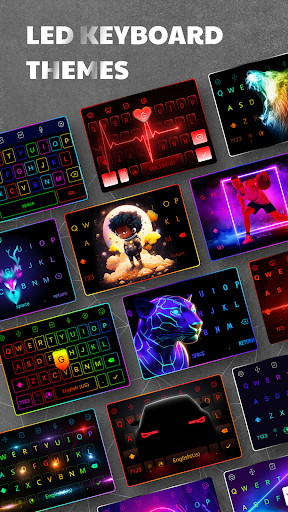
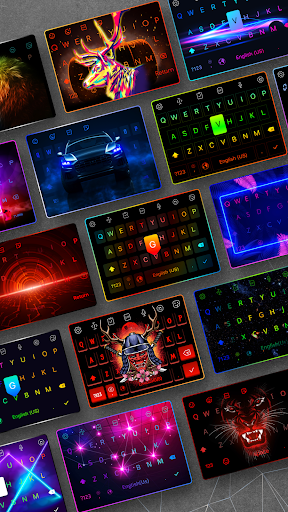
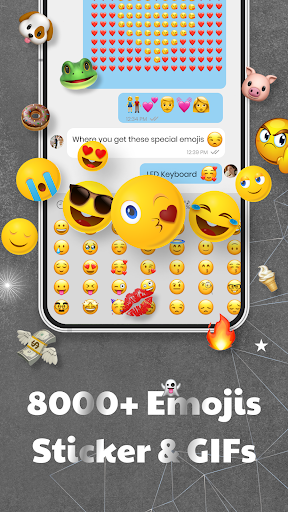
LED Keyboard is a versatile keyboard application that provides a unique typing experience with dynamic RGB color effects while typing. The app combines a full-featured keyboard with basic and advanced functionalities such as word correction, word suggestion, correction, handwriting input, voice input, and multilingual support. Additionally, LED Keyboard incorporates fantastic features that are researched and continually improved to offer the best keyboard experience, including hundreds of exquisite and unique fonts, thousands of emojis, emoticons, animated GIFs, vibrant color keyboard effects, numerous RGB-themed keyboard layouts, secure text input, and the ability to customize your own keyboard with unique effects. Let's explore LED Keyboard together!
Why should you choose LED Keyboard as your primary keyboard?
- Thousands of vibrant RGB-themed layouts with neon color effects running beneath the keys while typing.
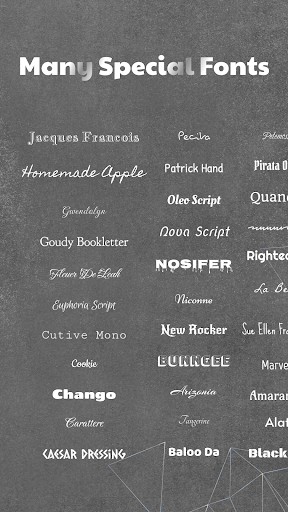
- Hundreds of unique and free fonts available.
- Emojis, emoticons, and facial characters constantly updated and latest.
- Create dynamic keyboards with lively effects similar to mechanical keyboards for computers.
- Customize keyboard layouts with font combinations and background themes of your choice.
Themes & Custom theme:
- Choose from a wide array of pre-designed keyboard themes, including:
- LED RGB themes with color effects running beneath the keys.
- Monochromatic color themes for simplicity lovers.
- Image background themes with options to use pre-existing images or your own.
- AI-generated keyboard themes for an imaginative touch.
- Gradient themes with a spectrum of colors running in the background.
Create dynamic keyboards:
- Create neon, RGB keyboards with dynamic color effects running beneath the keys while typing, making it lively and engaging.
- Personalize your keyboard by incorporating your own images.
- Customize with hundreds of distinctive fonts.
- Adjust key sizes to fit your finger comfortably.
Hundreds of unique and free fonts:
- Use fonts on the keyboard as well as in messaging apps such as Messenger, Message, Tiktok, WhatsApp, and Facebook posts.
- Custom fonts will make your content stand out even more.
Emojis, emoticons, stickers, GIFs:
- Easily convey emotions with emojis and emoticons.
- Spice up your conversations with humorous stickers and GIFs.
- Stay updated with the latest emojis.
Faster typing:
- Convert speech to text directly within the keyboard for easier typing.
- Swipe to text for faster typing.
- AI-powered keyboard automatically corrects words and suggests the next word as you type.
Gaming keyboard:
- With vibrant color effects reminiscent of mechanical keyboards, imagine using it for chatting while gaming; it's unique.
- We have nearly all the effects available on computer keyboards and more.
Secure
- We absolutely do not collect any information you type; we are committed to ensuring that everything you type is known only to you.
- With nearly 100 million users, we affirm this commitment.
Note
When installing the app, your phone will warn you about data collection and personal information. This warning applies to all keyboard apps, not just LED Keyboard. We are committed to not collecting any user data.
For additional feature suggestions or feedback on the app, please contact us:
Email: ledkeyboard.feedback@gmail.com
Facebook: https://www.facebook.com/Led-Keyboard-RGB-Keyboard-839146486458313/
أظهر المزيد

1. قم بتنزيل برنامج MEmu واكمال تثبيته

2. قم بتشغيل برنامج MEmu وفتح Google Play على الصفحة الرئيسية

3. ابح LED Keyboard: Colorful Backlit في Google Play
Install
4. تنزيل وتثبيت LED Keyboard: Colorful Backlit
5. انقر على الرمز للتشغيل بعد اكتمال التثبيت

6. استخدم MEmu لتجربة LED Keyboard: Colorful Backlit على جهاز الكمبيوتر الخاص بك.
تطبيق MEmuهو افضل محاكى اندرويد مجانى وبالفعل 50 مليون شخص يستمتعون حاليا بتجربه اللعب عليه. تمكّنك تقنية MEmu الافتراضية من تشغيل آلاف ألعاب Android بسلاسة على الكمبيوتر الشخصي ، حتى أكثرها استخدامًا للرسومات.
شاشة أكبر وجرافيك افضل ووقت أطول بدون حدود البطارية وباقة التليفون
لوحة مفاتيح كاملة تدعم تحكم كامل عن طريق لوحة المفاتيح و الفأره وجيم باد
عدة العاب وحسابات ومهمات علي جهاز الكمبيوتر في وقت معين عن طريق Memu متعدد النوافذ
Use LED Keyboard: Colorful Backlit on PC by following steps: