LED Keyboard: Colorful Backlit
Updated
Current Version
16.6.5
Offered By

Stop worrying about high battery drain when using LED Keyboard: Colorful Backlit on your phone. Free yourself from the tiny screen and enjoy the app on a much larger display. From now on, get a full-screen experience of your app with the convenience of a keyboard and mouse. MEmu offers you all the surprising features you’d expect: quick installation and easy setup, intuitive controls, and no more worries about battery life, mobile data, or unexpected calls. The all-new MEmu 9 is the choice for using LED Keyboard: Colorful Backlit on your computer. With the MEmu multi-instance manager, you can run two or more accounts at the same time. Most importantly, our exclusive emulation engine unlocks your PC’s full potential, delivering smooth and enjoyable performance.
Show more
Enjoy superb experience of using LED Keyboard: Colorful Backlit on PC with MEMU App Player. It's a powerful free Android emulator which provides you with thousands of android apps for their desktop version. Enjoy connecting with friends and polishing your work with higher efficiency! LED Keyboard is a versatile keyboard application that provides a unique typing experience with dynamic RGB color effects while typing.

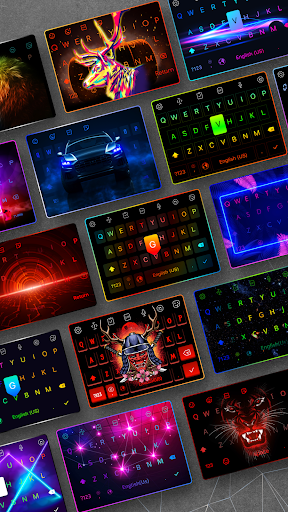
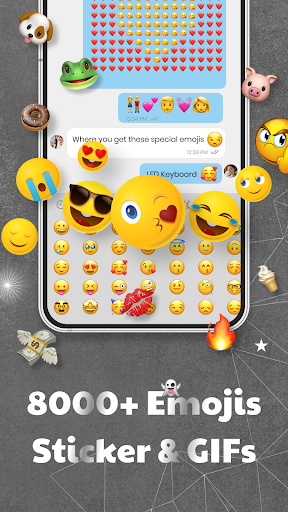
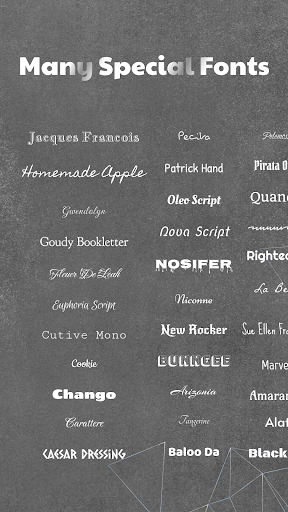
LED Keyboard is a versatile keyboard application that provides a unique typing experience with dynamic RGB color effects while typing. The app combines a full-featured keyboard with basic and advanced functionalities such as word correction, word suggestion, correction, handwriting input, voice input, and multilingual support. Additionally, LED Keyboard incorporates fantastic features that are researched and continually improved to offer the best keyboard experience, including hundreds of exquisite and unique fonts, thousands of emojis, emoticons, animated GIFs, vibrant color keyboard effects, numerous RGB-themed keyboard layouts, secure text input, and the ability to customize your own keyboard with unique effects. Let's explore LED Keyboard together!
Why should you choose LED Keyboard as your primary keyboard?
- Thousands of vibrant RGB-themed layouts with neon color effects running beneath the keys while typing.
- Hundreds of unique and free fonts available.
- Emojis, emoticons, and facial characters constantly updated and latest.
- Create dynamic keyboards with lively effects similar to mechanical keyboards for computers.
- Customize keyboard layouts with font combinations and background themes of your choice.
Themes & Custom theme:
- Choose from a wide array of pre-designed keyboard themes, including:
- LED RGB themes with color effects running beneath the keys.
- Monochromatic color themes for simplicity lovers.
- Image background themes with options to use pre-existing images or your own.
- AI-generated keyboard themes for an imaginative touch.
- Gradient themes with a spectrum of colors running in the background.
Create dynamic keyboards:
- Create neon, RGB keyboards with dynamic color effects running beneath the keys while typing, making it lively and engaging.
- Personalize your keyboard by incorporating your own images.
- Customize with hundreds of distinctive fonts.
- Adjust key sizes to fit your finger comfortably.
Hundreds of unique and free fonts:
- Use fonts on the keyboard as well as in messaging apps such as Messenger, Message, Tiktok, WhatsApp, and Facebook posts.
- Custom fonts will make your content stand out even more.
Emojis, emoticons, stickers, GIFs:
- Easily convey emotions with emojis and emoticons.
- Spice up your conversations with humorous stickers and GIFs.
- Stay updated with the latest emojis.
Faster typing:
- Convert speech to text directly within the keyboard for easier typing.
- Swipe to text for faster typing.
- AI-powered keyboard automatically corrects words and suggests the next word as you type.
Gaming keyboard:
- With vibrant color effects reminiscent of mechanical keyboards, imagine using it for chatting while gaming; it's unique.
- We have nearly all the effects available on computer keyboards and more.
Secure
- We absolutely do not collect any information you type; we are committed to ensuring that everything you type is known only to you.
- With nearly 100 million users, we affirm this commitment.
Note
When installing the app, your phone will warn you about data collection and personal information. This warning applies to all keyboard apps, not just LED Keyboard. We are committed to not collecting any user data.
For additional feature suggestions or feedback on the app, please contact us:
Email: ledkeyboard.feedback@gmail.com
Facebook: https://www.facebook.com/Led-Keyboard-RGB-Keyboard-839146486458313/
Show more

1. Download MEmu installer and finish the setup

2. Start MEmu then open Google Play on the desktop

3. Search LED Keyboard: Colorful Backlit in Google Play
Install
4. Download and Install LED Keyboard: Colorful Backlit
5. On install completion click the icon to start

6. Enjoy using LED Keyboard: Colorful Backlit on PC with MEmu
MEmu Play is the best Android emulator, and 100 million users already enjoy its superb Android app experience. Powered by advanced virtualization technology, it lets you enjoy thousands of Android apps smoothly on your PC—including the most graphics-intensive ones.
Bigger screen with better graphics; Long duration, without limitation of battery or mobile data.
Full Keymapping support for precise control of keyboard and mouse or gamepad.
Multiple game accounts or tasks on single PC at one time with Multi-Instance manager.
Use LED Keyboard: Colorful Backlit on PC by following steps: