MediBang Paint - Make Art !
تم التحديث
الإصدار الحالي
27.29
تقديم

لا داعي للقلق بشأن الشحن الزائد عند استخدام MediBang Paint - Make Art ! على هاتفك. تحرر من قيود الشاشة الصغيرة واستمتع به على شاشة أكبر باستخدام لوحة المفاتيح والفأرة. يوفر MEmu جميع الميزات الرائعة التي تتوقعها: تثبيت سريع، إعداد سهل، أدوات تحكم بديهية، ودون قيود على عمر البطارية، أو استخدام البيانات، أو المكالمات الواردة. يُعد MEmu 9 الجديد الخيار الأمثل لتجربة MediBang Paint - Make Art ! على جهاز الكمبيوتر. بفضل تقنية التشفير الفريدة، يتيح لك مدير الحسابات المتعددة تشغيل حسابين أو أكثر في وقت واحد. والأهم من ذلك، أن محرك المحاكاة الفريد يستغل أداء جهاز الكمبيوتر بالكامل، مما يُحسّن تجربة التطبيق ويجعل كل شيء سلسًا للغاية.
أظهر المزيد
قم بتنزيل MediBang Paint - Make Art ! على الكمبيوتر بإستخدام جهاز مقلد أندروز MEmu.استمتع بمتعة اللعب على الشاشة الكبيرة. “Draw Anywhere, With Anything.
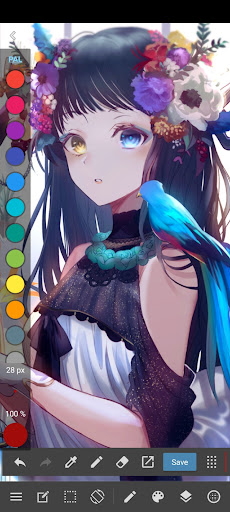
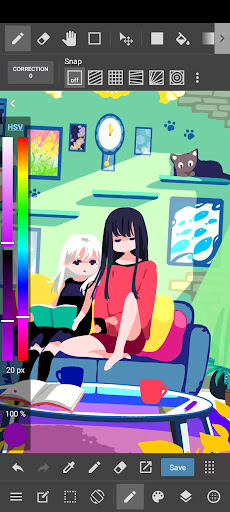
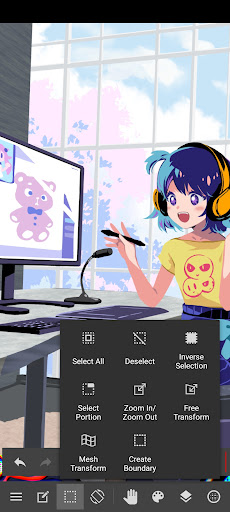
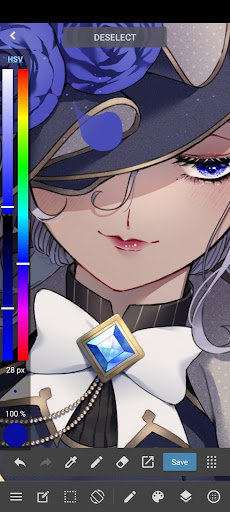
“Draw Anywhere, With Anything.”
MediBang Paint is an art app with more than 100 million downloads in over 150 countries!
【Key Features】
Everything You Need to Make Art
・180 default brushes that anyone can easily adjust to their liking. You can even make your own brushes too!
・700 additional brushes included in all MediBang Premium plans!
・Make comic panels easily with a professional feel, using any of MediBang’s 1000 screentones, and 60 fonts available.
・Use filters, fun background brushes, and more resources to give your art a special finish!
Unlimited device usage
・MediBang Paint allows users to create across multiple platforms with no restriction on the number of devices registered to one account.
・Want to switch between desktop and mobile devices? MediBang Paint’s cloud feature lets you switch easily from drawing at home to drawing on the go.
Group Project: Keep everyone on the same page.
・Draw on the same canvas with your friends! Join up to 3 teams (unlimited teams for Premium users) and work together on a project, or just sketch for fun!
・For professional comic artists, make it easier and more stress-free than ever for your team to complete pages faster together.
Timelapse
・Easily activate from the menu tab and show off your art process when you’re done!
・Share your speedpaints on social media with #medibangpaint and #timelapse
Simple interface
・MediBang Paint is an user-friendly painting app with a simple UI that lets you focus on making art over figuring out a complex interface. It won’t intimidate a beginner artist, and won’t distract a pro either!
・MediBang’s lightweight software requires minimum storage space, and you won’t suffer from any brush lag or slow loading times. You can save your work on both the cloud and desktop, easy!
【Further Support】
・Access https://medibangpaint.com/use for illustration tutorials and useful info!
・Check out our official YouTube channel https://www.youtube.com/@MediBangPaintOfficial/shorts updated twice a week!
・Various templates and practice materials are available for free in the MediBang Library!
【Operating Environment】
・OS: Android 8.0 or later
*In order to use cloud features, users need to create a free MediBang account at https://medibang.com/
*App performance may vary depending on the device condition
أظهر المزيد

1. قم بتنزيل برنامج MEmu واكمال تثبيته

2. قم بتشغيل برنامج MEmu وفتح Google Play على الصفحة الرئيسية

3. ابح MediBang Paint - Make Art ! في Google Play
Install
4. تنزيل وتثبيت MediBang Paint - Make Art !
5. انقر على الرمز للتشغيل بعد اكتمال التثبيت

6. استخدم MEmu لتجربة MediBang Paint - Make Art ! على جهاز الكمبيوتر الخاص بك.
تطبيق MEmuهو افضل محاكى اندرويد مجانى وبالفعل 50 مليون شخص يستمتعون حاليا بتجربه اللعب عليه. تمكّنك تقنية MEmu الافتراضية من تشغيل آلاف ألعاب Android بسلاسة على الكمبيوتر الشخصي ، حتى أكثرها استخدامًا للرسومات.
شاشة أكبر وجرافيك افضل ووقت أطول بدون حدود البطارية وباقة التليفون
لوحة مفاتيح كاملة تدعم تحكم كامل عن طريق لوحة المفاتيح و الفأره وجيم باد
عدة العاب وحسابات ومهمات علي جهاز الكمبيوتر في وقت معين عن طريق Memu متعدد النوافذ
Use MediBang Paint - Make Art ! on PC by following steps: