MedRight for Medical Services
تم التحديث
الإصدار الحالي
10.4.1
تقديم

لا داعي للقلق بشأن الشحن الزائد عند استخدام MedRight for Medical Services على هاتفك. تحرر من قيود الشاشة الصغيرة واستمتع به على شاشة أكبر باستخدام لوحة المفاتيح والفأرة. يوفر MEmu جميع الميزات الرائعة التي تتوقعها: تثبيت سريع، إعداد سهل، أدوات تحكم بديهية، ودون قيود على عمر البطارية، أو استخدام البيانات، أو المكالمات الواردة. يُعد MEmu 9 الجديد الخيار الأمثل لتجربة MedRight for Medical Services على جهاز الكمبيوتر. بفضل تقنية التشفير الفريدة، يتيح لك مدير الحسابات المتعددة تشغيل حسابين أو أكثر في وقت واحد. والأهم من ذلك، أن محرك المحاكاة الفريد يستغل أداء جهاز الكمبيوتر بالكامل، مما يُحسّن تجربة التطبيق ويجعل كل شيء سلسًا للغاية.
أظهر المزيد
قم بتنزيل MedRight for Medical Services على الكمبيوتر بإستخدام جهاز مقلد أندروز MEmu.استمتع بمتعة اللعب على الشاشة الكبيرة. Register to our new App and ease every step of your healthcare cycle.
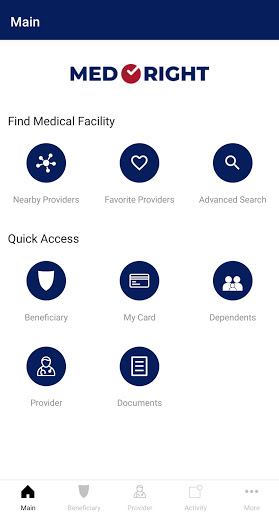
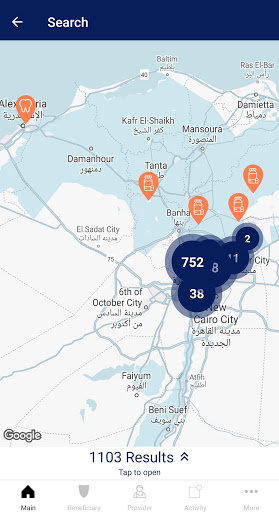
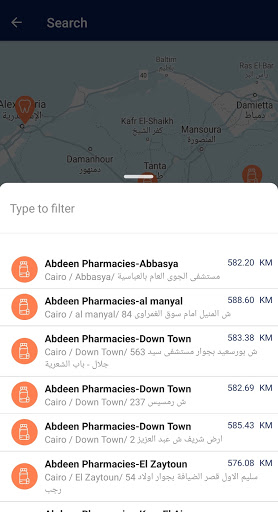
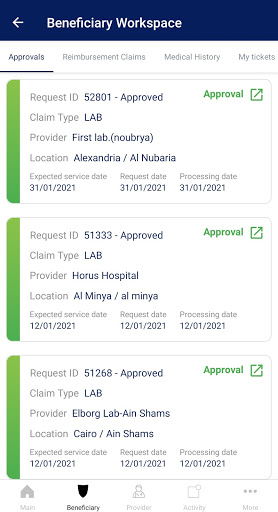
Register to our new App and ease every step of your healthcare cycle
Med Right mobile application has been updated to serve you the following:
• Search your medical network & nearest medical providers to your location.
• Mark your preferred medical providers.
• Access your E-card (digital card)
• Check your benefits & policy
• Review and manage all your dependents related information
• Request your services/approvals & track them
• Receive immediate notifications for your requests & its status
• Monitor your utilization & review your medical history
• Submit your reimbursement claims/requests & track their progress
• Submit any complaints or suggestions
• Request a Doctor’s appointment
• Request Medication Delivery
How to register to your app?
You will need to sign up with your registered mobile number within Med Right’s database. You can register/edit your mobile number through your company’s HR team or by sending an email to info@med-right.com using your corporate’s business email. This is a mandatory step to be able to use our app since it will grant you access to all your confidential medical data.
Medical Facility lookup
• Nearby Providers on Map
• Location Search on Map
• Smart Search
• Advanced Search
• Favorite Providers
E-Card
• Beneficiary Electronic Medical Card
Approvals Management
• Request Approval directly from the mobile app (In-Patient and Out-Patient)
• Track Approval Requests
• Receive Notifications for processed approvals
• Check Approvals History
Claims Management
• Submit Reimbursement Claims
• Track Claim Status
• Check Claims History
• Receive Claim Processing Notification
Medical History
• Medical File (Medical Conditions, Medical Episodes, Share Medical File with Patient Physician)
• Review Diagnostic Test Results
• Chronic Drugs (Review Chronic Application and Chronic Drugs Monthly Dispensation)
Doctor Appointments
• Schedule Doctor Visit
• Check Doctor Visit History
Tickets
• Open Tickets and Submit Enquiries
• Track Tickets
• Receive Notifications
• Check Ticket History
Payments Management
• Review Payment History
• Track Submitted Batches
• Receive Payment Notifications
أظهر المزيد

1. قم بتنزيل برنامج MEmu واكمال تثبيته

2. قم بتشغيل برنامج MEmu وفتح Google Play على الصفحة الرئيسية

3. ابح MedRight for Medical Services في Google Play
Install
4. تنزيل وتثبيت MedRight for Medical Services
5. انقر على الرمز للتشغيل بعد اكتمال التثبيت

6. استخدم MEmu لتجربة MedRight for Medical Services على جهاز الكمبيوتر الخاص بك.
تطبيق MEmuهو افضل محاكى اندرويد مجانى وبالفعل 50 مليون شخص يستمتعون حاليا بتجربه اللعب عليه. تمكّنك تقنية MEmu الافتراضية من تشغيل آلاف ألعاب Android بسلاسة على الكمبيوتر الشخصي ، حتى أكثرها استخدامًا للرسومات.
شاشة أكبر وجرافيك افضل ووقت أطول بدون حدود البطارية وباقة التليفون
لوحة مفاتيح كاملة تدعم تحكم كامل عن طريق لوحة المفاتيح و الفأره وجيم باد
عدة العاب وحسابات ومهمات علي جهاز الكمبيوتر في وقت معين عن طريق Memu متعدد النوافذ
Use MedRight for Medical Services on PC by following steps: