My BMW
تم التحديث
الإصدار الحالي
4.11.3
تقديم

لا داعي للقلق بشأن الشحن الزائد عند استخدام My BMW على هاتفك. تحرر من قيود الشاشة الصغيرة واستمتع به على شاشة أكبر باستخدام لوحة المفاتيح والفأرة. يوفر MEmu جميع الميزات الرائعة التي تتوقعها: تثبيت سريع، إعداد سهل، أدوات تحكم بديهية، ودون قيود على عمر البطارية، أو استخدام البيانات، أو المكالمات الواردة. يُعد MEmu 9 الجديد الخيار الأمثل لتجربة My BMW على جهاز الكمبيوتر. بفضل تقنية التشفير الفريدة، يتيح لك مدير الحسابات المتعددة تشغيل حسابين أو أكثر في وقت واحد. والأهم من ذلك، أن محرك المحاكاة الفريد يستغل أداء جهاز الكمبيوتر بالكامل، مما يُحسّن تجربة التطبيق ويجعل كل شيء سلسًا للغاية.
أظهر المزيد
قم بتنزيل My BMW على الكمبيوتر بإستخدام جهاز مقلد أندروز MEmu.استمتع بمتعة اللعب على الشاشة الكبيرة. With a modern design and intuitive user guidance features, the My BMW App is made to help you navigate a completely new mobility experience.
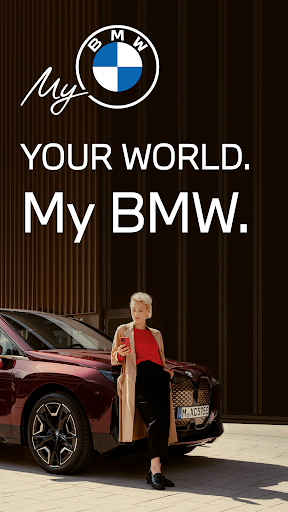
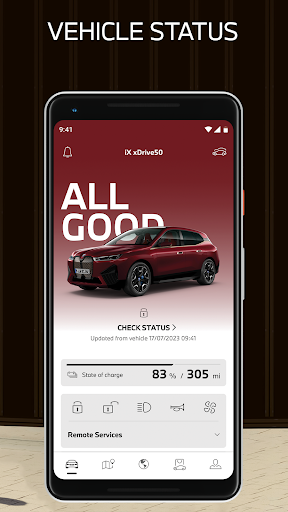
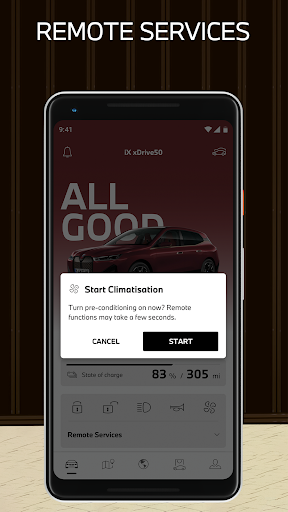
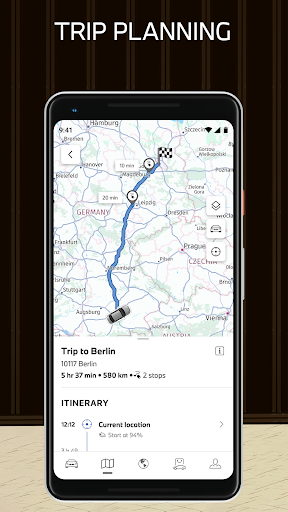
With a modern design and intuitive user guidance features, the My BMW App is made to help you navigate a completely new mobility experience. Check the status of your BMW, use one of the many remote control features, plan trips in advance, book your next service appointment, or discover the world of BMW – all from the convenience of your smartphone.
The My BMW App at a glance:
•Immediate access to vehicle status and functions
•Smart e-mobility services
•Extensive navigation and map features for planning trips
•Stories and news from the world of BMW
•Direct access to your BMW Service
•Use app in demo mode even without owning vehicle
•Regular updates and upgrades for all features
Discover the highlights of the My BMW App:
CHECK YOUR VEHICLE STATUS
“All Good” – The My BMW App provides you with an overview of crucial status information like your BMW’s drive-ready state, enabling you to:
•View your vehicle's location
•Check your current fuel level and range
•Check that doors and windows are locked
•Keep vehicle software up to date
OPERATE YOUR VEHICLE REMOTELY
Control the functions of your BMW directly from your smartphone:
•Schedule and activate air conditioning
•Lock and unlock the doors, operate the horn and flashers
•Record images from the vehicle environment
•Set up your BMW Digital Key
PLAN TRIPS
Search for and send locations directly to the navigation system, including destinations, filling and charging stations, and car parks:
•Plan trips and keep an eye on the traffic situation
•Detailed information on filling stations and charging stations
•Find parking at your destination
•Consider charging stop and times in load-optimized route planning
ENHANCED ELECTROMOBILITY
Smart support of your electromobility for range planning and charging management:
•Plan electric range and charging
•Find charging stations nearby
•View your charging history at any time
•Manage and redeem BMW Points
EXPLORE THE WORLD OF BMW
Stay up to date and find the right products for your BMW:
•Discover exclusive stories and news from BMW
•Receive messages in the Message Center
•Link directly to the BMW Shop and BMW Financial Services
MANAGE REQUIRED SERVICES
The My BMW App is your direct line to your retailer if service is needed:
•Keep an eye on required services
•Book service appointments via the app
•View maintenance and repair requirements by video
EXPERIENCE THE My BMW APP WITH DEMO MODE
Explore the benefits of the My BMW app even without owning a vehicle:
• Select an attractive BMW demo vehicle in the app garage
• Get to know the variety of app functions, e.g. for electric mobility
• Use of My BMW app to get you into the world of BMW
Download the My BMW App now and try out its many features.
The My BMW App is optimised for vehicles built from 2014 onwards. The availability of individual app functions depends on your vehicle equipment and your BMW ConnectedDrive contract. The availability of app functions may vary between countries.
أظهر المزيد

1. قم بتنزيل برنامج MEmu واكمال تثبيته

2. قم بتشغيل برنامج MEmu وفتح Google Play على الصفحة الرئيسية

3. ابح My BMW في Google Play
Install
4. تنزيل وتثبيت My BMW
5. انقر على الرمز للتشغيل بعد اكتمال التثبيت

6. استخدم MEmu لتجربة My BMW على جهاز الكمبيوتر الخاص بك.
تطبيق MEmuهو افضل محاكى اندرويد مجانى وبالفعل 50 مليون شخص يستمتعون حاليا بتجربه اللعب عليه. تمكّنك تقنية MEmu الافتراضية من تشغيل آلاف ألعاب Android بسلاسة على الكمبيوتر الشخصي ، حتى أكثرها استخدامًا للرسومات.
شاشة أكبر وجرافيك افضل ووقت أطول بدون حدود البطارية وباقة التليفون
لوحة مفاتيح كاملة تدعم تحكم كامل عن طريق لوحة المفاتيح و الفأره وجيم باد
عدة العاب وحسابات ومهمات علي جهاز الكمبيوتر في وقت معين عن طريق Memu متعدد النوافذ
Use My BMW on PC by following steps: