My BMW
Updated
Current Version
4.11.3
Offered By

Stop worrying about high battery drain when using My BMW on your phone. Free yourself from the tiny screen and enjoy the app on a much larger display. From now on, get a full-screen experience of your app with the convenience of a keyboard and mouse. MEmu offers you all the surprising features you’d expect: quick installation and easy setup, intuitive controls, and no more worries about battery life, mobile data, or unexpected calls. The all-new MEmu 9 is the choice for using My BMW on your computer. With the MEmu multi-instance manager, you can run two or more accounts at the same time. Most importantly, our exclusive emulation engine unlocks your PC’s full potential, delivering smooth and enjoyable performance.
Show more
Enjoy superb experience of using My BMW on PC with MEMU App Player. It's a powerful free Android emulator which provides you with thousands of android apps for their desktop version. Enjoy connecting with friends and polishing your work with higher efficiency! With a modern design and intuitive user guidance features, the My BMW App is made to help you navigate a completely new mobility experience.
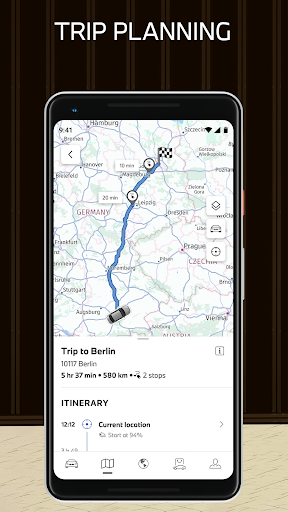
With a modern design and intuitive user guidance features, the My BMW App is made to help you navigate a completely new mobility experience. Check the status of your BMW, use one of the many remote control features, plan trips in advance, book your next service appointment, or discover the world of BMW – all from the convenience of your smartphone.
The My BMW App at a glance:
•Immediate access to vehicle status and functions
•Smart e-mobility services
•Extensive navigation and map features for planning trips
•Stories and news from the world of BMW
•Direct access to your BMW Service
•Use app in demo mode even without owning vehicle
•Regular updates and upgrades for all features
Discover the highlights of the My BMW App:
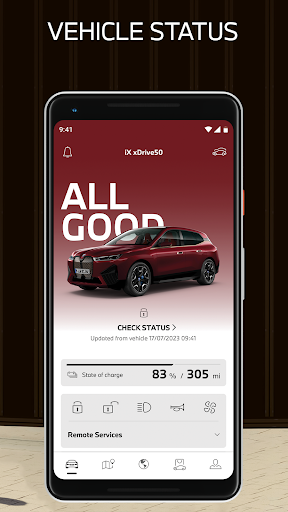
CHECK YOUR VEHICLE STATUS
“All Good” – The My BMW App provides you with an overview of crucial status information like your BMW’s drive-ready state, enabling you to:
•View your vehicle's location
•Check your current fuel level and range
•Check that doors and windows are locked
•Keep vehicle software up to date
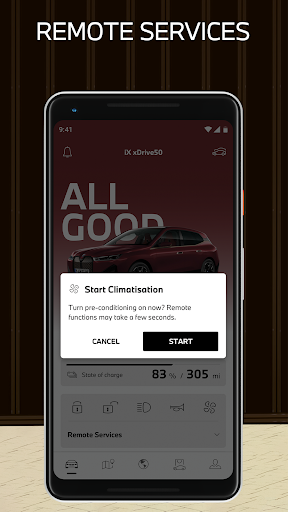
OPERATE YOUR VEHICLE REMOTELY
Control the functions of your BMW directly from your smartphone:
•Schedule and activate air conditioning
•Lock and unlock the doors, operate the horn and flashers
•Record images from the vehicle environment
•Set up your BMW Digital Key
PLAN TRIPS
Search for and send locations directly to the navigation system, including destinations, filling and charging stations, and car parks:
•Plan trips and keep an eye on the traffic situation
•Detailed information on filling stations and charging stations
•Find parking at your destination
•Consider charging stop and times in load-optimized route planning
ENHANCED ELECTROMOBILITY
Smart support of your electromobility for range planning and charging management:
•Plan electric range and charging
•Find charging stations nearby
•View your charging history at any time
•Manage and redeem BMW Points
EXPLORE THE WORLD OF BMW
Stay up to date and find the right products for your BMW:
•Discover exclusive stories and news from BMW
•Receive messages in the Message Center
•Link directly to the BMW Shop and BMW Financial Services
MANAGE REQUIRED SERVICES
The My BMW App is your direct line to your retailer if service is needed:
•Keep an eye on required services
•Book service appointments via the app
•View maintenance and repair requirements by video
EXPERIENCE THE My BMW APP WITH DEMO MODE
Explore the benefits of the My BMW app even without owning a vehicle:
• Select an attractive BMW demo vehicle in the app garage
• Get to know the variety of app functions, e.g. for electric mobility
• Use of My BMW app to get you into the world of BMW
Download the My BMW App now and try out its many features.
The My BMW App is optimised for vehicles built from 2014 onwards. The availability of individual app functions depends on your vehicle equipment and your BMW ConnectedDrive contract. The availability of app functions may vary between countries.
Show more

1. Download MEmu installer and finish the setup

2. Start MEmu then open Google Play on the desktop

3. Search My BMW in Google Play
Install
4. Download and Install My BMW
5. On install completion click the icon to start

6. Enjoy using My BMW on PC with MEmu
MEmu Play is the best Android emulator, and 100 million users already enjoy its superb Android app experience. Powered by advanced virtualization technology, it lets you enjoy thousands of Android apps smoothly on your PC—including the most graphics-intensive ones.
Bigger screen with better graphics; Long duration, without limitation of battery or mobile data.
Full Keymapping support for precise control of keyboard and mouse or gamepad.
Multiple game accounts or tasks on single PC at one time with Multi-Instance manager.
Use My BMW on PC by following steps: