Nomad Sculpt
تم التحديث
الإصدار الحالي
1.94
تقديم

لا داعي للقلق بشأن الشحن الزائد عند استخدام Nomad Sculpt على هاتفك. تحرر من قيود الشاشة الصغيرة واستمتع به على شاشة أكبر باستخدام لوحة المفاتيح والفأرة. يوفر MEmu جميع الميزات الرائعة التي تتوقعها: تثبيت سريع، إعداد سهل، أدوات تحكم بديهية، ودون قيود على عمر البطارية، أو استخدام البيانات، أو المكالمات الواردة. يُعد MEmu 9 الجديد الخيار الأمثل لتجربة Nomad Sculpt على جهاز الكمبيوتر. بفضل تقنية التشفير الفريدة، يتيح لك مدير الحسابات المتعددة تشغيل حسابين أو أكثر في وقت واحد. والأهم من ذلك، أن محرك المحاكاة الفريد يستغل أداء جهاز الكمبيوتر بالكامل، مما يُحسّن تجربة التطبيق ويجعل كل شيء سلسًا للغاية.
أظهر المزيد
قم بتنزيل Nomad Sculpt على الكمبيوتر بإستخدام جهاز مقلد أندروز MEmu.استمتع بمتعة اللعب على الشاشة الكبيرة. This is a trial version, there is a one time permanent in-app-purchase to unlock everything:.
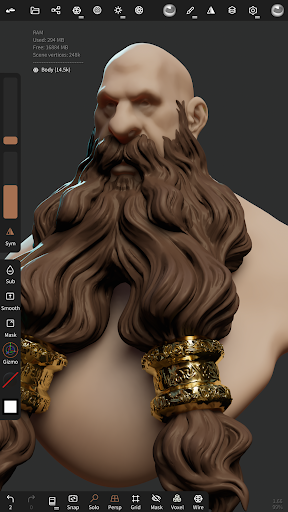
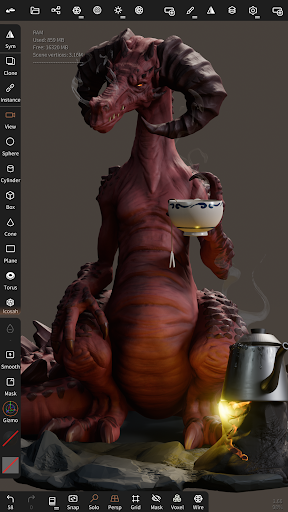
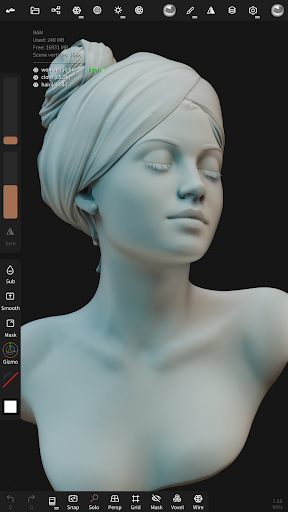
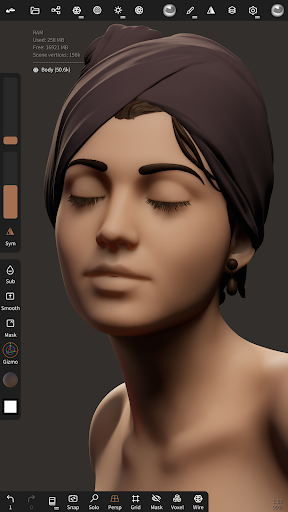
This is a trial version, there is a one time permanent in-app-purchase to unlock everything:
The limited features are:
- undo/redo limited to 4 actions
- one layer per object
- no export
- limited internal project management (cannot re-open project)
• Sculpting tools
Clay, flatten, smooth, mask and many other brushes will let you shape your creation.
You can also use the trim boolean cutting tool with lasso, rectangle and other shapes, for hardsurface purposes.
• Stroke customization
Falloff, alphas, tilings, pencil pressure and other stroke parameters can be customized.
You can save and load your tools preset as well.
• Painting tools
Vertex painting with color, roughness and metalness.
You can easily manage all your material presets as well.
• Layers
Record your sculpting and painting operations in separate layers for easier iteration during the creation process.
Both the sculpting and painting changes are recorded.
• Multiresolution sculpting
Go back and forth between multiple resolution of your mesh for a flexible workflow.
• Voxel remeshing
Remesh quickly your mesh to get a uniform level of detail.
It can be used to quickly sketch a rough shape at the beginning of the creation process.
• Dynamic topology
Refine locally your mesh under your brush to get an automatic level of detail.
You can even keep your layers, as they will be automatically updated!
• Decimate
Reduce the number of polygons by keeping as many details as possible.
• Face Group
Segment your mesh into subgroups with the face group tool.
• Automatic UV unwrap
The automatic UV unwrapper can use face groups to control the unwrapping process.
• Baking
You can transfer vertex data such as color, roughness, metalness and small scaled detail in to textures.
You can also do the opposite, transfering textures data into vertex data or layers.
• Primitive shape
Cylinder, torus, tube, lathe and other primitives can be used to quickly start new shapes from scratch.
• PBR rendering
Beautiful PBR rendering by default, with lighting and shadows.
You can always switch to matcap for a more standard shading for sculpting purposes.
• Post processing
Screen Space Reflection, Depth of Field, Ambient Occlusion, Tone mapping, etc
• Export and Import
Supported formats include glTF, OBJ, STL or PLY files.
• Interface
Easy-to-use interface, designed for mobile experience.
Customization is possible as well!
أظهر المزيد

1. قم بتنزيل برنامج MEmu واكمال تثبيته

2. قم بتشغيل برنامج MEmu وفتح Google Play على الصفحة الرئيسية

3. ابح Nomad Sculpt في Google Play
Install
4. تنزيل وتثبيت Nomad Sculpt
5. انقر على الرمز للتشغيل بعد اكتمال التثبيت

6. استخدم MEmu لتجربة Nomad Sculpt على جهاز الكمبيوتر الخاص بك.
تطبيق MEmuهو افضل محاكى اندرويد مجانى وبالفعل 50 مليون شخص يستمتعون حاليا بتجربه اللعب عليه. تمكّنك تقنية MEmu الافتراضية من تشغيل آلاف ألعاب Android بسلاسة على الكمبيوتر الشخصي ، حتى أكثرها استخدامًا للرسومات.
شاشة أكبر وجرافيك افضل ووقت أطول بدون حدود البطارية وباقة التليفون
لوحة مفاتيح كاملة تدعم تحكم كامل عن طريق لوحة المفاتيح و الفأره وجيم باد
عدة العاب وحسابات ومهمات علي جهاز الكمبيوتر في وقت معين عن طريق Memu متعدد النوافذ
Use Nomad Sculpt on PC by following steps: