ReadEra – book reader pdf epub
تم التحديث
الإصدار الحالي
24.12.20+2070
تقديم

لا داعي للقلق بشأن الشحن الزائد عند استخدام ReadEra – book reader pdf epub على هاتفك. تحرر من قيود الشاشة الصغيرة واستمتع به على شاشة أكبر باستخدام لوحة المفاتيح والفأرة. يوفر MEmu جميع الميزات الرائعة التي تتوقعها: تثبيت سريع، إعداد سهل، أدوات تحكم بديهية، ودون قيود على عمر البطارية، أو استخدام البيانات، أو المكالمات الواردة. يُعد MEmu 9 الجديد الخيار الأمثل لتجربة ReadEra – book reader pdf epub على جهاز الكمبيوتر. بفضل تقنية التشفير الفريدة، يتيح لك مدير الحسابات المتعددة تشغيل حسابين أو أكثر في وقت واحد. والأهم من ذلك، أن محرك المحاكاة الفريد يستغل أداء جهاز الكمبيوتر بالكامل، مما يُحسّن تجربة التطبيق ويجعل كل شيء سلسًا للغاية.
أظهر المزيد
قم بتنزيل ReadEra – book reader pdf epub على الكمبيوتر بإستخدام جهاز مقلد أندروز MEmu.استمتع بمتعة اللعب على الشاشة الكبيرة. ReadEra — book reader allows reading books for free, offline in PDF, EPUB, Microsoft Word (DOC, DOCX, RTF), Kindle (MOBI, AZW3), DJVU, FB2, TXT, ODT and CHM formats.
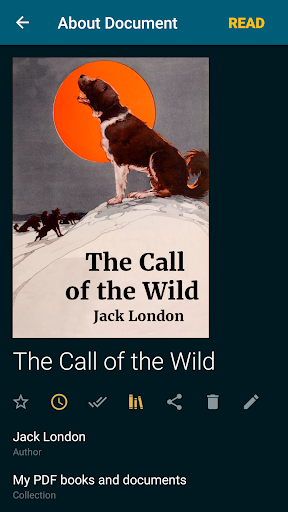
ReadEra — book reader allows reading books for free, offline in PDF, EPUB, Microsoft Word (DOC, DOCX, RTF), Kindle (MOBI, AZW3), DJVU, FB2, TXT, ODT and CHM formats.
No ads
Read books without ads. The ReadEra program for reading books and viewing PDF documents neither contains ads nor imposes internal purchases.
No register
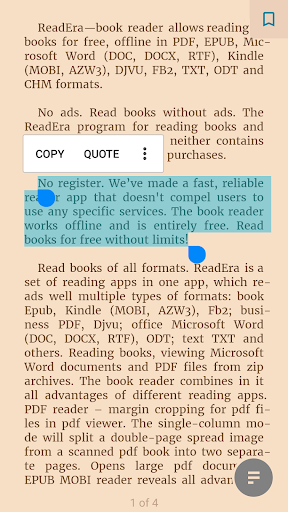
We’ve made a fast, reliable reader app that doesn't compel users to use any specific services. The book reader works offline and is entirely free. Read books for free without limits!
Read books of all formats
ReadEra is a set of reading apps in one app, which reads well multiple types of formats: book Epub, Kindle (MOBI, AZW3), Fb2; business PDF, Djvu; office Microsoft Word (DOC, DOCX, RTF), ODT; text TXT and others. Reading books, viewing Microsoft Word documents and PDF files from zip archives.
The book reader combines in it all advantages of different reading apps.
PDF reader – margin cropping for pdf files in pdf viewer. The single-column mode will split a double-page spread image from a scanned pdf book into two separate pages. Opens large pdf documents.
EPUB reader & MOBI reader reveals all advantages of the EPUB and MOBI formats for eBooks.
WORD reader forms contents of a book by titles.
FB2 reader opens books of fb2 format from zip archive; no need to unpack.
The reader for books, ReadEra, reads all popular formats of books, journals, articles and other documents in one app.
Best book manager for your library
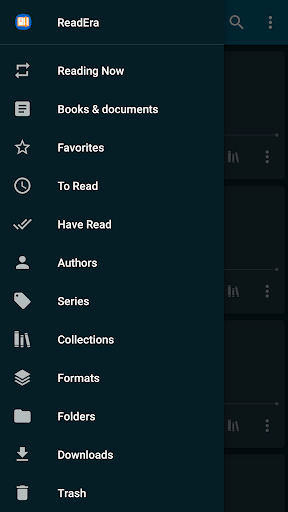
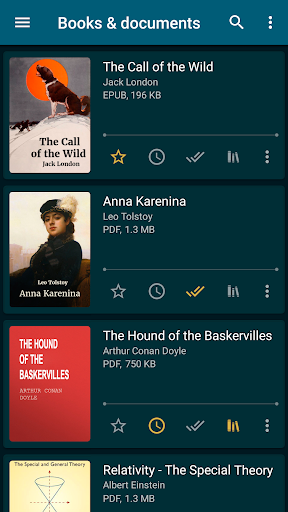
Auto-detection of books and documents. Just download an Epub book, PDF journal, Microsoft Word documents or PDF article from the Internet so they appear in the reader for reading. Easy navigation through folders and downloads. Grouping books by authors and series. Book reading lists: To Read, Have Read, Favorites. The Collections tool (bookshelves) allows creating personal thematic collections. Books and documents can be added to one or several collections at the same time. We do our best to ensure order in your eBook library.
Navigation through a book
Quick access to the reading settings, table of contents, bookmarks, text highlights, quotes, notes, page browsing history in a book and other eBook options. Navigate the book using the page pointer or the progress line. Footnote texts in Epub, Mobi, Docx, Fb2 formats are printed at the bottom of the page, as in a paper book. Displays the total number of pages of a book and separately pages of a reading chapter.
Convenient reading settings
Auto-saving the current reading page. Nice color modes while reading books: day, night, sepia, console. Horizontal or vertical page flipping mode. Screen orientation, brightness and page margins adjustment, including PDF and DjVu. Adjustable type font, size, boldness, line spacing and hyphenation for Microsoft Word, Epub, Kindle (Mobi, Azw3), Fb2, TXT and ODT. Zoom option for PDF file and Djvu file when you read PDF and read Djvu.
Economized memory usage
The reader doesn’t copy books and documents into its store; detects duplicate files, saves bookmarks and the current reading page, even when files are moved or deleted. For example, even if you delete files and download books again, you’ll be able to continue reading books from the last read page. EBook ReadEra allows storing data on the SD card.
Multi-document mode
The book reader Readera allows reading several books and documents at the same time. For example, you can simultaneously read Epub books and PDF journals by placing them on the device screen in split-screen mode (two windows). Or read Microsoft Word, ODT, PDF documents, Epub/Mobi and Kindle books, switching between them by the "Active apps" system button.
EBook reader ReadEra – best app for reading PDF, Epub, Kindle (Mobi, Azw3), TXT, Fb2 books; Microsoft Word (DOC, DOCX, RTF), ODT documents and PDF viewer for Android.
Read books easily and for free with ReadEra!
أظهر المزيد

1. قم بتنزيل برنامج MEmu واكمال تثبيته

2. قم بتشغيل برنامج MEmu وفتح Google Play على الصفحة الرئيسية

3. ابح ReadEra – book reader pdf epub في Google Play
Install
4. تنزيل وتثبيت ReadEra – book reader pdf epub
5. انقر على الرمز للتشغيل بعد اكتمال التثبيت

6. استخدم MEmu لتجربة ReadEra – book reader pdf epub على جهاز الكمبيوتر الخاص بك.
تطبيق MEmuهو افضل محاكى اندرويد مجانى وبالفعل 50 مليون شخص يستمتعون حاليا بتجربه اللعب عليه. تمكّنك تقنية MEmu الافتراضية من تشغيل آلاف ألعاب Android بسلاسة على الكمبيوتر الشخصي ، حتى أكثرها استخدامًا للرسومات.
شاشة أكبر وجرافيك افضل ووقت أطول بدون حدود البطارية وباقة التليفون
لوحة مفاتيح كاملة تدعم تحكم كامل عن طريق لوحة المفاتيح و الفأره وجيم باد
عدة العاب وحسابات ومهمات علي جهاز الكمبيوتر في وقت معين عن طريق Memu متعدد النوافذ
Use ReadEra – book reader pdf epub on PC by following steps: