Qustodio Parental Control App
تم التحديث
الإصدار الحالي
182.26.7
تقديم

لا داعي للقلق بشأن الشحن الزائد عند استخدام Qustodio Parental Control App على هاتفك. تحرر من قيود الشاشة الصغيرة واستمتع به على شاشة أكبر باستخدام لوحة المفاتيح والفأرة. يوفر MEmu جميع الميزات الرائعة التي تتوقعها: تثبيت سريع، إعداد سهل، أدوات تحكم بديهية، ودون قيود على عمر البطارية، أو استخدام البيانات، أو المكالمات الواردة. يُعد MEmu 9 الجديد الخيار الأمثل لتجربة Qustodio Parental Control App على جهاز الكمبيوتر. بفضل تقنية التشفير الفريدة، يتيح لك مدير الحسابات المتعددة تشغيل حسابين أو أكثر في وقت واحد. والأهم من ذلك، أن محرك المحاكاة الفريد يستغل أداء جهاز الكمبيوتر بالكامل، مما يُحسّن تجربة التطبيق ويجعل كل شيء سلسًا للغاية.
أظهر المزيد
قم بتنزيل Qustodio Parental Control App على الكمبيوتر بإستخدام جهاز مقلد أندروز MEmu.استمتع بمتعة اللعب على الشاشة الكبيرة. Awarded PC Mag’s Editors’ Choice, Qustodio Parental Control App makes parenting easier with daily screen time limits, app monitoring (including social media and YouTube), app blocking, kid tracking, search and message alerts, porn blocking and more.
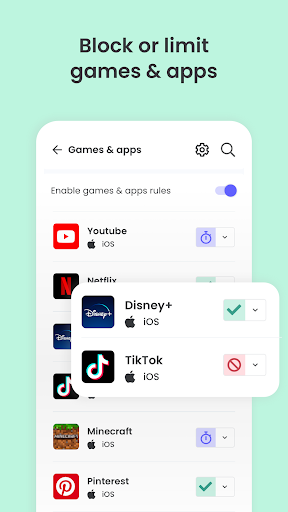
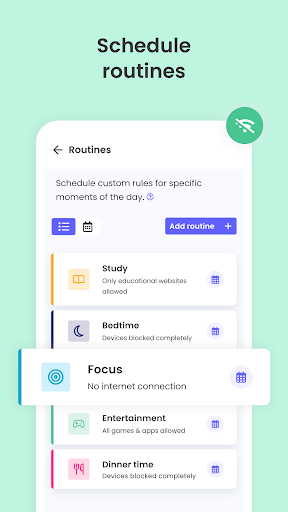
Awarded PC Mag’s Editors’ Choice, Qustodio Parental Control App makes parenting easier with daily screen time limits, app monitoring (including social media and YouTube), app blocking, kid tracking, search and message alerts, porn blocking and more.
- Screen Time Control: Automatically blocks the device after the set time has passed
- Block, Monitor & Parental Filter: Tracks and controls what your kids access on the internet including delicate content and adult content filter
- Family Locator & GPS Family Tracker: Tracks your kid's phone and sends you the GPS location
Start by downloading this Qustodio Parental Control App onto your device. Then download the Kids App Qustodio companion app onto your child’s devices. Together, the apps allow you to seamlessly manage your child’s daily screen time allowance on linked mobile, tablet or desktop devices across platforms including Android, iOS and other major operating systems.
Protect your child’s online safety
✓ Filter web (block games, porn, gambling and lock out unwanted content)
✓ Receive alerts about web activity and blocked websites
✓ Block games & apps
✓ Enforce safe search
Nurture healthy habits
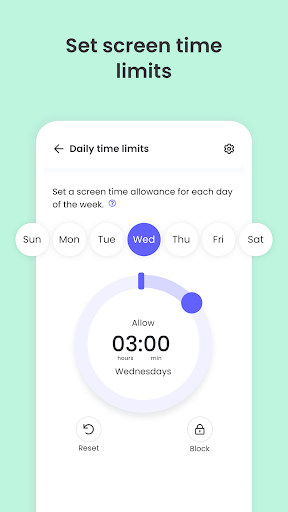
✓ Set daily screen time limits
✓ Schedule restricted times
✓ Pause the internet at the click of a button
✓ Set limits on games & apps
✓ Custom routines for apps and websites
Have full visibility
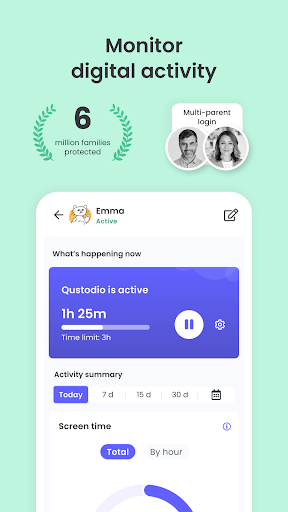
✓ 30-day online activity reports
✓ App download alerts
✓ Monitor Youtube activity
✓ AI-powered search alerts
✓ AI-powered message alerts
✓ Track calls and SMS messaging
✓ Supervise together: Invite another parent/guardian to monitor and set rules for your child (co-parent)
✓ Install a panic button onto your kid's device
✓ Install Qustodio to monitor screen time on any iOS, Windows, Mac, Android or Kindle device
Locate your family
✓ GPS location monitoring (geolocation kid tracker)
✓ Find your child’s phone
✓ Locate kids on the move
✓ Share your location
✓ Save your favorite places
Choose Qustodio’s free parental control plan or upgrade to the premium plan for full access to all the features.
How to protect, block, & monitor screen time with Qustodio Parental Control Apps:
1 – First download Qustodio Parental Control App onto your device (usually your mobile phone or laptop), create an account or log in
2 – Then install Kids App Qustodio on the device you want to supervise
3 – Log in and follow the quick setup instructions
4 – Once done, inappropriate websites will be blocked automatically
5 – To monitor activity and screen time use this Qustodio Parental Control App on a Parent’s device or log in to your online Qustodio Family Screen Time dashboard (https://family.qustodio.com)
Our FAQ:
• Does Qustodio Parental Control family screen time blocker app support Android 8 (Oreo): Yes.
• Does Qustodio family screen time blocker app work on other platforms besides Android? Qustodio can protect Windows, Mac, iOS, Kindle and Android.
• What languages do you support? Qustodio is available in English, Spanish, French, Italian, Portuguese, German, Japanese and Chinese.
For support. Contact us here: https://www.qustodio.com/help and support@qustodio.com
Notes:
This app uses the Device Administrator permission. This will prevent a user from uninstalling Qustodio Family Screen Time App without your knowledge.
This app uses Accessibility services to build an excellent device experience that helps users with behavioral disabilities set appropriate levels of access and monitoring of screen time, web content and apps, in order to limit their risks and enjoy life normally.
Troubleshooting notes:
Huawei devices owners: Battery-saving mode needs to be disabled for Qustodio.
أظهر المزيد

1. قم بتنزيل برنامج MEmu واكمال تثبيته

2. قم بتشغيل برنامج MEmu وفتح Google Play على الصفحة الرئيسية

3. ابح Qustodio Parental Control App في Google Play
Install
4. تنزيل وتثبيت Qustodio Parental Control App
5. انقر على الرمز للتشغيل بعد اكتمال التثبيت

6. استخدم MEmu لتجربة Qustodio Parental Control App على جهاز الكمبيوتر الخاص بك.
تطبيق MEmuهو افضل محاكى اندرويد مجانى وبالفعل 50 مليون شخص يستمتعون حاليا بتجربه اللعب عليه. تمكّنك تقنية MEmu الافتراضية من تشغيل آلاف ألعاب Android بسلاسة على الكمبيوتر الشخصي ، حتى أكثرها استخدامًا للرسومات.
شاشة أكبر وجرافيك افضل ووقت أطول بدون حدود البطارية وباقة التليفون
لوحة مفاتيح كاملة تدعم تحكم كامل عن طريق لوحة المفاتيح و الفأره وجيم باد
عدة العاب وحسابات ومهمات علي جهاز الكمبيوتر في وقت معين عن طريق Memu متعدد النوافذ
Use Qustodio Parental Control App on PC by following steps: