Thenics
تم التحديث
الإصدار الحالي
5.2.9
تقديم

لا داعي للقلق بشأن الشحن الزائد عند استخدام Thenics على هاتفك. تحرر من قيود الشاشة الصغيرة واستمتع به على شاشة أكبر باستخدام لوحة المفاتيح والفأرة. يوفر MEmu جميع الميزات الرائعة التي تتوقعها: تثبيت سريع، إعداد سهل، أدوات تحكم بديهية، ودون قيود على عمر البطارية، أو استخدام البيانات، أو المكالمات الواردة. يُعد MEmu 9 الجديد الخيار الأمثل لتجربة Thenics على جهاز الكمبيوتر. بفضل تقنية التشفير الفريدة، يتيح لك مدير الحسابات المتعددة تشغيل حسابين أو أكثر في وقت واحد. والأهم من ذلك، أن محرك المحاكاة الفريد يستغل أداء جهاز الكمبيوتر بالكامل، مما يُحسّن تجربة التطبيق ويجعل كل شيء سلسًا للغاية.
أظهر المزيد
قم بتنزيل Thenics على الكمبيوتر بإستخدام جهاز مقلد أندروز MEmu.استمتع بمتعة اللعب على الشاشة الكبيرة. Thenics helps you to achieve impressive Calisthenics skills and functional muscles.
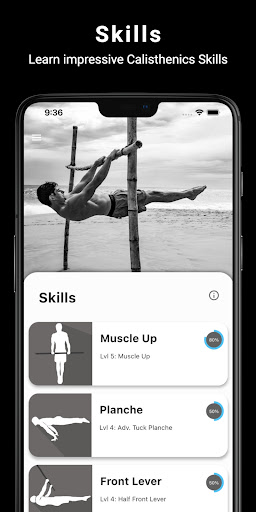
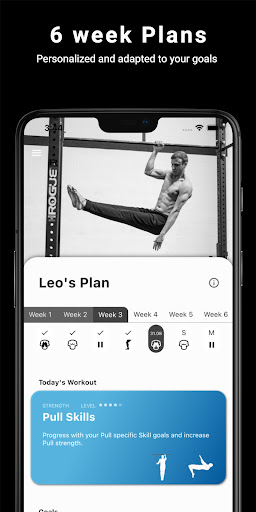
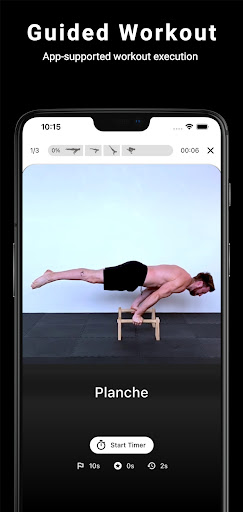
Thenics helps you to achieve impressive Calisthenics skills and functional muscles. There are a lot of trend sports (Street Workout, CrossFit) and Calisthenics Movements (Bar Brothers, Barstarzz) where you will see these skills.
Skills:
* Muscle Up
* Planche
* Front Lever
* Back Lever
* Pistol Squat
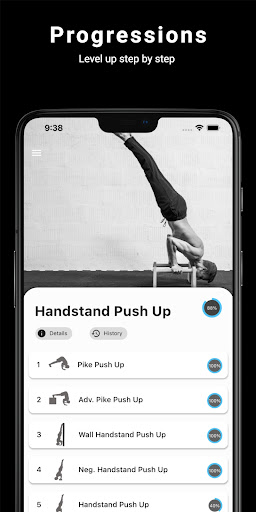
* Handstand Push Up
* V-Sit
Thenics Pro Skills:
* One Arm Pull Up
* Human Flag
* One Arm Push Up
* One Arm Handstand
* Shrimp Squat
* Hefesto
Thenics will guide you with descriptions and technique explanation of the skills and progressions. Every skill is divided into several PROGRESSIONS which include different workouts. Thereby you are able to learn skills step by step adapted to your current level.
How is Thenics different to other fitness apps?
Your goal isn't just to lift more weight or execute more reps. The Workouts and Progressions lead you to achieving new impressive skills. Additionally you will gain strength and get lean functional muscles!
How to plan your workouts?
- Can I work on multiple skills in parallel?
- How long should I rest?
- How to combine basic workouts with skill training?
A good answer to that highly depends on your specific goals and conditions.
The THENICS COACH will generate personalized Workout plans for you, adapted to your goals and conditions.
أظهر المزيد

1. قم بتنزيل برنامج MEmu واكمال تثبيته

2. قم بتشغيل برنامج MEmu وفتح Google Play على الصفحة الرئيسية

3. ابح Thenics في Google Play
Install
4. تنزيل وتثبيت Thenics
5. انقر على الرمز للتشغيل بعد اكتمال التثبيت

6. استخدم MEmu لتجربة Thenics على جهاز الكمبيوتر الخاص بك.
تطبيق MEmuهو افضل محاكى اندرويد مجانى وبالفعل 50 مليون شخص يستمتعون حاليا بتجربه اللعب عليه. تمكّنك تقنية MEmu الافتراضية من تشغيل آلاف ألعاب Android بسلاسة على الكمبيوتر الشخصي ، حتى أكثرها استخدامًا للرسومات.
شاشة أكبر وجرافيك افضل ووقت أطول بدون حدود البطارية وباقة التليفون
لوحة مفاتيح كاملة تدعم تحكم كامل عن طريق لوحة المفاتيح و الفأره وجيم باد
عدة العاب وحسابات ومهمات علي جهاز الكمبيوتر في وقت معين عن طريق Memu متعدد النوافذ
Use Thenics on PC by following steps: