WaveEditor Record & Edit Audio
تم التحديث
الإصدار الحالي
1.115
تقديم

لا داعي للقلق بشأن الشحن الزائد عند استخدام WaveEditor Record & Edit Audio على هاتفك. تحرر من قيود الشاشة الصغيرة واستمتع به على شاشة أكبر باستخدام لوحة المفاتيح والفأرة. يوفر MEmu جميع الميزات الرائعة التي تتوقعها: تثبيت سريع، إعداد سهل، أدوات تحكم بديهية، ودون قيود على عمر البطارية، أو استخدام البيانات، أو المكالمات الواردة. يُعد MEmu 9 الجديد الخيار الأمثل لتجربة WaveEditor Record & Edit Audio على جهاز الكمبيوتر. بفضل تقنية التشفير الفريدة، يتيح لك مدير الحسابات المتعددة تشغيل حسابين أو أكثر في وقت واحد. والأهم من ذلك، أن محرك المحاكاة الفريد يستغل أداء جهاز الكمبيوتر بالكامل، مما يُحسّن تجربة التطبيق ويجعل كل شيء سلسًا للغاية.
أظهر المزيد
قم بتنزيل WaveEditor Record & Edit Audio على الكمبيوتر بإستخدام جهاز مقلد أندروز MEmu.استمتع بمتعة اللعب على الشاشة الكبيرة. Take Control of Your Audio with WaveEditor.
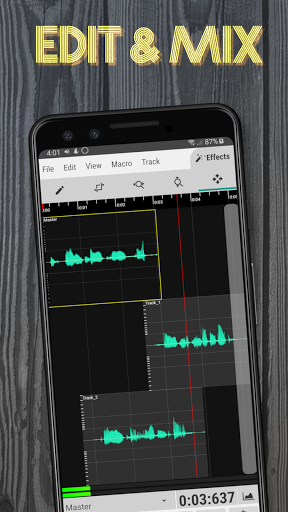
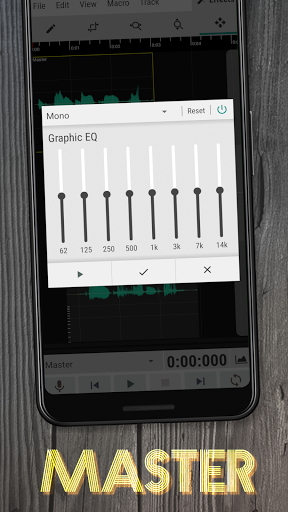
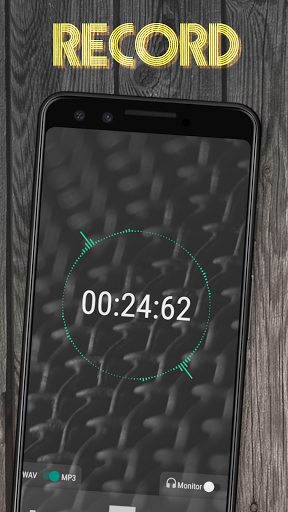
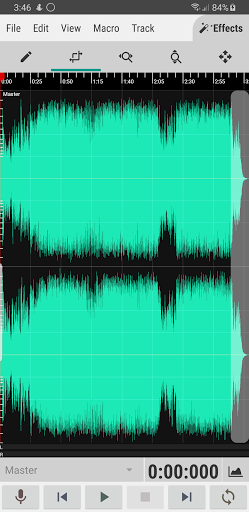
Take Control of Your Audio with WaveEditor
Edit, record, and master your audio files on the go with WaveEditor, a powerful and user-friendly app for Android. Whether you're a musician, podcaster, or just want to clean up some recordings, WaveEditor has everything you need.
Key Features:
• Multi-Track mixing and editing
• WAV and MP3 recording formats
• Visual analysis tools (Amplitude meter, Oscilloscope, FFT, Waterfall, Spectrogram, and Vectorscope)
• Supported import formats: 3gp, aac, aif, aifc, aiff, alac, amr, au, caf, flac, htk, iff, m4a, mat4, mat5, mp3, mp4, ogg, paf, pcm, pvf, raw, sd2, sf, snd, svx, voc, w64, wav, xi
• Supported export formats: aiff, caf, flac, m4a, mp3, ogg, pcm, wav
• Standalone and in-editor audio recording
• USB Microphone support (More info: https://sbaud.io/wavstudio-usb-microphone-support/)
• Built-in file browser for loading and saving files
• 32-bit floating point signal processing
• Atomic sample viewing, selection, and editing.
• Macro processes such as fade, reverse, & invert
• The ability to undo/redo mistakes & copy/paste.
• Separate batch format conversion utility
• Recorder widget available for Pro users
• Come back to and finish an edit later with saved sessions
Effects
• Chorus(Pro)
• Crusher (Pro)
• Delay (Pro)
• Distortion (Pro)
• Phaser (Pro)
• Reverb (Pro)
• De-Esser
• Filter
• Graphic EQ
• Parametric EQ (Pro)
• Stereo Mixer
• Compressor (Pro)
• Multi-band Compressor (Pro)
• Gain
• Limiter
• Noise Gate
• Normalization
• Insert Silence
• Silence Removal
• Tone Generator
• Resample
• Granular Stretch
• Pitch Correction (Pro)
• Pitch Shift (Pro)
• Tapestop
• Time Stretch (Pro)
Free vs. Pro
The free version of WaveEditor is packed with features, but the Pro version unlocks even more power:
• No ads: Focus on your audio without interruptions.
• All effects: Access the full suite of audio enhancement tools.
• Recorder widget: Quickly start recording from your home screen (Pro feature).
Get Started Today!
Download WaveEditor for Android and see what you can create.
Permission Details
• Read/Write Storage - Used for importing and exporting audio files from storage. Required to use app.
• Record - Used for recording audio from mic. Optional, but required to use recorder.
License Info
This app uses the following libraries:
LAME (www.mp3dev.org) released under the LGPLv2.1 (www.gnu.org/licenses/lgpl-2.1.html)
libsndfile (www.mega-nerd.com/libsndfile/) released under the LGPLv2.1 (www.gnu.org/licenses/lgpl-2.1.html)
Secret Rabbit Code (www.mega-nerd.com/SRC/) released under the 2-Clause BSD License (www.opensource.org/licenses/BSD-2-Clause)
libvorbis (www.xiph.org/vorbis/) released under a BSD-style license (www.opensource.org/licenses/BSD-3-Clause)
libusb (http://libusb.info/) released under the LGPLv2.1 (http://www.gnu.org/licenses/lgpl-2.1.html)
libFLAC (https://xiph.org/flac/) released under a BSD-style license (www.opensource.org/licenses/BSD-3-Clause)
mpg123(https://www.mpg123.de/) released under the LGPLv2.1 (http://www.gnu.org/licenses/lgpl-2.1.html)
jTransforms(https://sites.google.com/site/piotrwendykier/software/jtransforms) released under the 2-Clause BSD License (www.opensource.org/licenses/BSD-2-Clause)
The source code for the libraries used in this app can be found here : https://sbaud.io/wavstudio-audio-editor-recorder/
أظهر المزيد

1. قم بتنزيل برنامج MEmu واكمال تثبيته

2. قم بتشغيل برنامج MEmu وفتح Google Play على الصفحة الرئيسية

3. ابح WaveEditor Record & Edit Audio في Google Play
Install
4. تنزيل وتثبيت WaveEditor Record & Edit Audio
5. انقر على الرمز للتشغيل بعد اكتمال التثبيت

6. استخدم MEmu لتجربة WaveEditor Record & Edit Audio على جهاز الكمبيوتر الخاص بك.
تطبيق MEmuهو افضل محاكى اندرويد مجانى وبالفعل 50 مليون شخص يستمتعون حاليا بتجربه اللعب عليه. تمكّنك تقنية MEmu الافتراضية من تشغيل آلاف ألعاب Android بسلاسة على الكمبيوتر الشخصي ، حتى أكثرها استخدامًا للرسومات.
شاشة أكبر وجرافيك افضل ووقت أطول بدون حدود البطارية وباقة التليفون
لوحة مفاتيح كاملة تدعم تحكم كامل عن طريق لوحة المفاتيح و الفأره وجيم باد
عدة العاب وحسابات ومهمات علي جهاز الكمبيوتر في وقت معين عن طريق Memu متعدد النوافذ
Use WaveEditor Record & Edit Audio on PC by following steps: