WaveEditor Record & Edit Audio
更新日
現在のバージョン
1.115
提供元

スマートフォンは不要!パソコンと同じようにキーボードとマウスで操作できます。MEmu Playは、あなたが待ち望んでいたすべての楽しみをお届けします。バッテリー残量や小さな画面を気にすることなく、WaveEditor Record & Edit Audioをご利用ください。最新のMEmu 9は、WaveEditor Record & Edit AudioをPCで体験するのに最適です!完璧なキーマッピングシステムにより、PCのようなスムーズな操作性を実現します。マルチインスタンス機能により、複数のアプリケーションを同時に実行できます。独自の仮想化エンジンがPCのパフォーマンスを最大限に引き出します。アプリを使用するだけでなく、高品質な体験を得ることができます。
もっと見る
WaveEditor Record & Edit AudioをPCでダウンロード!大画面でより楽しむ。電源が落ちてしまうとか通信料が足りないとかの問題を心配する必要がなく、PCの大画面でより快適にゲームを楽しましょう! Take Control of Your Audio with WaveEditor.
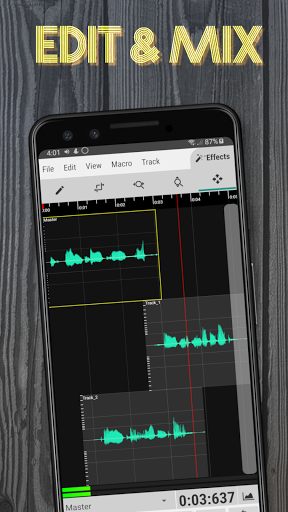
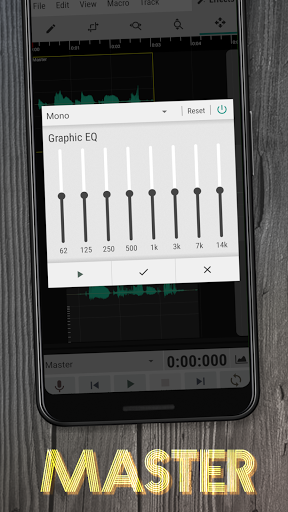
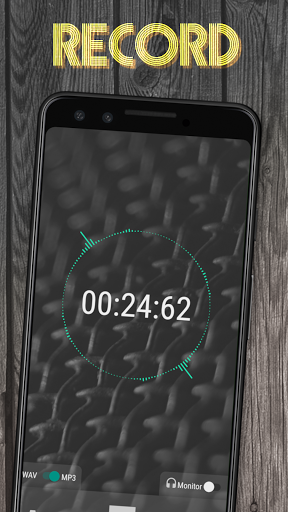
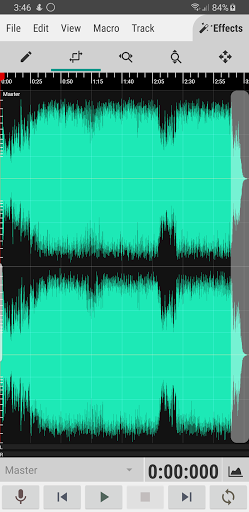
Take Control of Your Audio with WaveEditor
Edit, record, and master your audio files on the go with WaveEditor, a powerful and user-friendly app for Android. Whether you're a musician, podcaster, or just want to clean up some recordings, WaveEditor has everything you need.
Key Features:
• Multi-Track mixing and editing
• WAV and MP3 recording formats
• Visual analysis tools (Amplitude meter, Oscilloscope, FFT, Waterfall, Spectrogram, and Vectorscope)
• Supported import formats: 3gp, aac, aif, aifc, aiff, alac, amr, au, caf, flac, htk, iff, m4a, mat4, mat5, mp3, mp4, ogg, paf, pcm, pvf, raw, sd2, sf, snd, svx, voc, w64, wav, xi
• Supported export formats: aiff, caf, flac, m4a, mp3, ogg, pcm, wav
• Standalone and in-editor audio recording
• USB Microphone support (More info: https://sbaud.io/wavstudio-usb-microphone-support/)
• Built-in file browser for loading and saving files
• 32-bit floating point signal processing
• Atomic sample viewing, selection, and editing.
• Macro processes such as fade, reverse, & invert
• The ability to undo/redo mistakes & copy/paste.
• Separate batch format conversion utility
• Recorder widget available for Pro users
• Come back to and finish an edit later with saved sessions
Effects
• Chorus(Pro)
• Crusher (Pro)
• Delay (Pro)
• Distortion (Pro)
• Phaser (Pro)
• Reverb (Pro)
• De-Esser
• Filter
• Graphic EQ
• Parametric EQ (Pro)
• Stereo Mixer
• Compressor (Pro)
• Multi-band Compressor (Pro)
• Gain
• Limiter
• Noise Gate
• Normalization
• Insert Silence
• Silence Removal
• Tone Generator
• Resample
• Granular Stretch
• Pitch Correction (Pro)
• Pitch Shift (Pro)
• Tapestop
• Time Stretch (Pro)
Free vs. Pro
The free version of WaveEditor is packed with features, but the Pro version unlocks even more power:
• No ads: Focus on your audio without interruptions.
• All effects: Access the full suite of audio enhancement tools.
• Recorder widget: Quickly start recording from your home screen (Pro feature).
Get Started Today!
Download WaveEditor for Android and see what you can create.
Permission Details
• Read/Write Storage - Used for importing and exporting audio files from storage. Required to use app.
• Record - Used for recording audio from mic. Optional, but required to use recorder.
License Info
This app uses the following libraries:
LAME (www.mp3dev.org) released under the LGPLv2.1 (www.gnu.org/licenses/lgpl-2.1.html)
libsndfile (www.mega-nerd.com/libsndfile/) released under the LGPLv2.1 (www.gnu.org/licenses/lgpl-2.1.html)
Secret Rabbit Code (www.mega-nerd.com/SRC/) released under the 2-Clause BSD License (www.opensource.org/licenses/BSD-2-Clause)
libvorbis (www.xiph.org/vorbis/) released under a BSD-style license (www.opensource.org/licenses/BSD-3-Clause)
libusb (http://libusb.info/) released under the LGPLv2.1 (http://www.gnu.org/licenses/lgpl-2.1.html)
libFLAC (https://xiph.org/flac/) released under a BSD-style license (www.opensource.org/licenses/BSD-3-Clause)
mpg123(https://www.mpg123.de/) released under the LGPLv2.1 (http://www.gnu.org/licenses/lgpl-2.1.html)
jTransforms(https://sites.google.com/site/piotrwendykier/software/jtransforms) released under the 2-Clause BSD License (www.opensource.org/licenses/BSD-2-Clause)
The source code for the libraries used in this app can be found here : https://sbaud.io/wavstudio-audio-editor-recorder/
もっと見る

1. MEmuインストーラーをダウンロードしてセットアップを完了する

2. MEmuを起動し、デスクトップでのPlayストアを開く

3. PlayストアでWaveEditor Record & Edit Audioを検索する
Install
4. WaveEditor Record & Edit Audioをダウンロードしてインストールする
5. インストールが完了したら、アイコンをクリックしてスタート

6. MEmuを使ってパソコンでWaveEditor Record & Edit Audioを体験する
MEmu Playは現在、最高の無料Androidエミュレーターであり、5,000万人のユーザーが優れたAndroidアプリ体験を楽しんでいます。MEmuの仮想化テクノロジーにより、数千ものAndroidアプリをコンピューターでスムーズに実行できます。
大画面でより精細;無限の待機、電池とドラフィックの極限を超え
キーボード・マウス・コントローラーを全力でサポート、より快適
マルチインスタンスで複数のゲームを同時に実行
Use WaveEditor Record & Edit Audio on PC by following steps: