Wise
تم التحديث
الإصدار الحالي
8.91.1
تقديم

لا داعي للقلق بشأن الشحن الزائد عند استخدام Wise على هاتفك. تحرر من قيود الشاشة الصغيرة واستمتع به على شاشة أكبر باستخدام لوحة المفاتيح والفأرة. يوفر MEmu جميع الميزات الرائعة التي تتوقعها: تثبيت سريع، إعداد سهل، أدوات تحكم بديهية، ودون قيود على عمر البطارية، أو استخدام البيانات، أو المكالمات الواردة. يُعد MEmu 9 الجديد الخيار الأمثل لتجربة Wise على جهاز الكمبيوتر. بفضل تقنية التشفير الفريدة، يتيح لك مدير الحسابات المتعددة تشغيل حسابين أو أكثر في وقت واحد. والأهم من ذلك، أن محرك المحاكاة الفريد يستغل أداء جهاز الكمبيوتر بالكامل، مما يُحسّن تجربة التطبيق ويجعل كل شيء سلسًا للغاية.
أظهر المزيد
قم بتنزيل Wise على الكمبيوتر بإستخدام جهاز مقلد أندروز MEmu.استمتع بمتعة اللعب على الشاشة الكبيرة. Make your money work worldwide, for less.
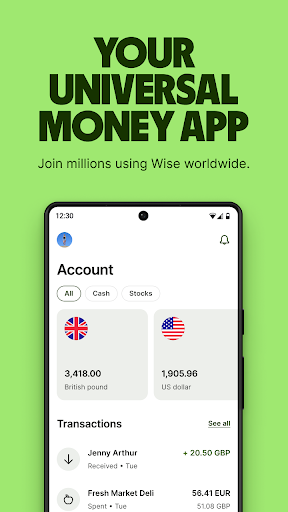
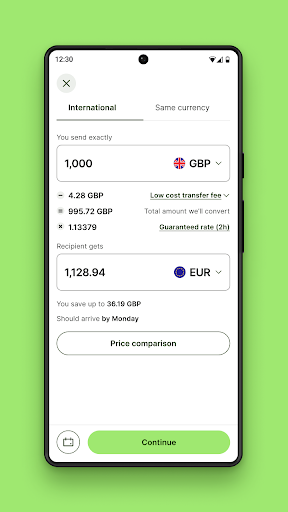
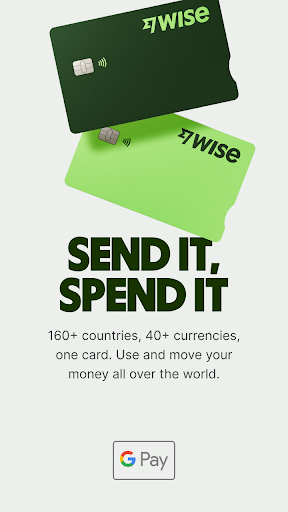
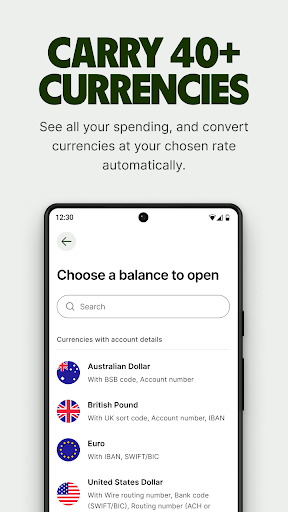
Make your money work worldwide, for less. 160 countries. 40 currencies.
Move, send and spend your money internationally with Wise. Get paid like a local. Keep as many currencies as you want. All without any hidden fees, and all at the real mid-market exchange rate.
Join 16+ million people and businesses worldwide.
— International money transfers —
• Send money to 70+ countries, fast
• Get the real mid-market exchange rate, like on Google, for every money transfer
• Over 52% of transfers are instant, arriving in under 20 seconds
• Secure your transfers with two-factor authentication, encryption and biometrics
— The debit card that’s always got the right currency —
• Spend or withdraw cash in more than 160 countries
• If you don’t have the local currency, we’ll auto-convert what you have with the lowest possible price
• Freeze and unfreeze your card, and update your digital card details
— Get paid like a local —
• Get your own UK account number and sort code, European IBAN, Australian account details and more, as if you had local bank accounts around the world
• Use these account details to get paid in multiple currencies for free, and for direct debits
• Keep up-to-date with instant push notifications for every transaction
— Hold 40 currencies and convert between them instantly —
• No monthly fee and no maintenance fee to keep money in your account, in most cases
• Convert between currencies instantly, at the real exchange rate, for a super-low fee
• Auto-convert currencies at specific rates, and keep up to date with exchange rates with Rate Alerts
— Put your money to work with Assets —
• Try Interest or Stocks in a few taps. Available in the UK, Singapore and multiple EEA countries, for now
• Capital at risk, growth not guaranteed
— A better business account for going global —
• Pay invoices and bills faster, at a better exchange rate
• Use account details to get paid by clients and customers around the world
• Connect to supported platforms like Amazon, Stripe, Xero, and more
Wise is regulated by local authorities around the world.
Send from: GBP (British pound), EUR (Euro), USD (US dollar), AUD (Australian dollar), BGN (Bulgarian lev), BRL (Brazilian real), CAD (Canadian dollar), CHF (Swiss franc), CZK (Czech koruna), DKK (Danish krone), HKD (Hong Kong dollar), HUF (Hungarian forint), JPY (Japanese yen), MYR (Malaysian ringgit), NOK (Norwegian krone), NZD (New Zealand dollar), PLN (Polish zloty), RON (New Romanian leu), SEK (Swedish krona), SGD (Singapore dollar)
Send to: EUR (Euro), USD (US dollar), GBP (British pound), AED (UAE dirham), ARS (Argentine peso), AUD (Australian dollar), BDT (Bangladeshi taka), BGN (Bulgarian lev), BRL (Brazilian real), CAD (Canadian dollar), CHF (Swiss franc), CLP (Chilean peso), CNY (Chinese yuan), CRC (Costa Rican colón), CZK (Czech koruna), DKK (Danish krone), EGP (Egyptian pound), GHS (Ghanaian cedi), GEL (Georgian lari), HKD (Hong Kong dollar), HUF (Hungarian forint), IDR (Indonesian rupiah), ILS (Israeli shekel), INR (Indian rupee), JPY (Japanese yen), KES (Kenyan shilling), KRW (South Korean won), LKR (Sri Lankan rupee), MAD (Moroccan dirham), MXN (Mexican peso), MYR (Malaysian ringgit), NPR (Nepalese rupee), NOK (Norwegian krone), NZD (New Zealand dollar), PEN (Peruvian sol), PHP (Philippine peso), PKR (Pakistan rupee), PLN (Polish zloty), RON (Romanian leu), SEK (Swedish krona), SGD (Singapore dollar), THB (Thai baht), TRY (Turkish lira), UAH (Ukrainian hryvnia), VND (Vietnamese dong), ZAR (South African rand), ZMW (Zambian kwacha)
أظهر المزيد

1. قم بتنزيل برنامج MEmu واكمال تثبيته

2. قم بتشغيل برنامج MEmu وفتح Google Play على الصفحة الرئيسية

3. ابح Wise في Google Play
Install
4. تنزيل وتثبيت Wise
5. انقر على الرمز للتشغيل بعد اكتمال التثبيت

6. استخدم MEmu لتجربة Wise على جهاز الكمبيوتر الخاص بك.
تطبيق MEmuهو افضل محاكى اندرويد مجانى وبالفعل 50 مليون شخص يستمتعون حاليا بتجربه اللعب عليه. تمكّنك تقنية MEmu الافتراضية من تشغيل آلاف ألعاب Android بسلاسة على الكمبيوتر الشخصي ، حتى أكثرها استخدامًا للرسومات.
شاشة أكبر وجرافيك افضل ووقت أطول بدون حدود البطارية وباقة التليفون
لوحة مفاتيح كاملة تدعم تحكم كامل عن طريق لوحة المفاتيح و الفأره وجيم باد
عدة العاب وحسابات ومهمات علي جهاز الكمبيوتر في وقت معين عن طريق Memu متعدد النوافذ
Use Wise on PC by following steps: