
Zoom Workplace for Intune
تم التحديث
الإصدار الحالي
7.0.4.39602
تقديم

لا داعي للقلق بشأن الشحن الزائد عند استخدام Zoom Workplace for Intune على هاتفك. تحرر من قيود الشاشة الصغيرة واستمتع به على شاشة أكبر باستخدام لوحة المفاتيح والفأرة. يوفر MEmu جميع الميزات الرائعة التي تتوقعها: تثبيت سريع، إعداد سهل، أدوات تحكم بديهية، ودون قيود على عمر البطارية، أو استخدام البيانات، أو المكالمات الواردة. يُعد MEmu 9 الجديد الخيار الأمثل لتجربة Zoom Workplace for Intune على جهاز الكمبيوتر. بفضل تقنية التشفير الفريدة، يتيح لك مدير الحسابات المتعددة تشغيل حسابين أو أكثر في وقت واحد. والأهم من ذلك، أن محرك المحاكاة الفريد يستغل أداء جهاز الكمبيوتر بالكامل، مما يُحسّن تجربة التطبيق ويجعل كل شيء سلسًا للغاية.
أظهر المزيد
قم بتنزيل Zoom Workplace for Intune على الكمبيوتر بإستخدام جهاز مقلد أندروز MEmu.استمتع بمتعة اللعب على الشاشة الكبيرة. Zoom Workplace for Intune مخصص للمسؤولين لتنظيم بيئات BYOD والمساعدة في حمايتها من خلال إدارة تطبيقات الهاتف المحمول (MAM).
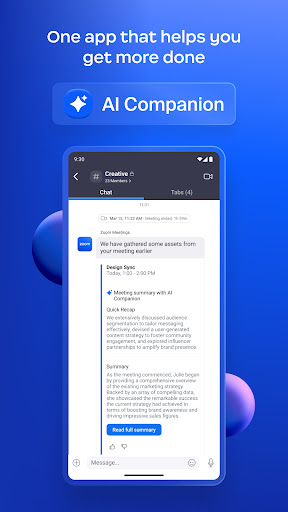
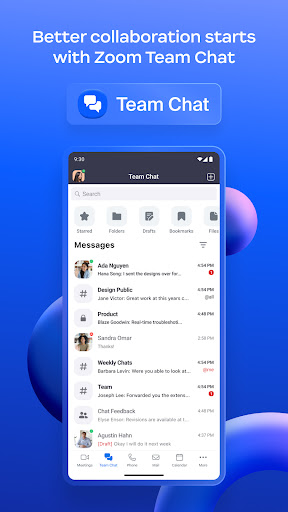
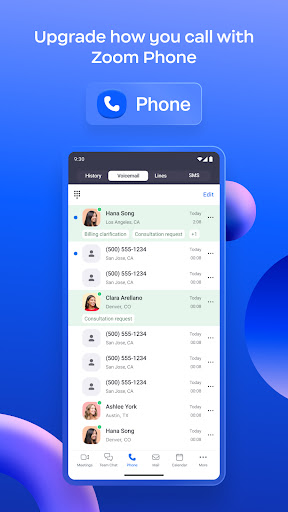
Zoom Workplace for Intune مخصص للمسؤولين لتنظيم بيئات BYOD والمساعدة في حمايتها من خلال إدارة تطبيقات الهاتف المحمول (MAM). يساعد هذا التطبيق المسؤولين على حماية بيانات الشركة مع إبقاء الموظفين على اتصال.
أعد تصور كيفية عملك مع Zoom Workplace، وهو نظام أساسي للتعاون الكل في واحد مدعوم بالذكاء الاصطناعي يجمع بين الدردشة الجماعية والاجتماعات والهاتف والسبورة البيضاء والتقويم والبريد والملاحظات والمزيد.
إذا كنت تبحث عن إصدار المستخدم النهائي من Zoom Workplace، فقم بتنزيله هنا: https://itunes.apple.com/us/app/zoom-cloud-meetings/id546505307?mt=8
يوفر Zoom Workplace for Intune لمستخدمي المؤسسات جميع الميزات التي يتوقعونها من Zoom، مع توفير إمكانات موسعة لإدارة تطبيقات الأجهزة المحمولة لمسؤولي تكنولوجيا المعلومات للمساعدة في منع تسرب معلومات الشركة. وفي حالة فقدان أو سرقة جهاز، يمكن لقسم تكنولوجيا المعلومات إزالة Zoom Workplace من جهاز iPhone أو iPad، بالإضافة إلى أي بيانات حساسة مرتبطة به.
هام: يتطلب هذا البرنامج حساب العمل الخاص بشركتك وبيئة تديرها Microsoft. قد لا تتوفر بعض الوظائف في جميع البلدان. إذا كانت لديك مشكلات مع هذا البرنامج أو كانت لديك أسئلة حول استخدامه (بما في ذلك أسئلة حول سياسة الخصوصية لشركتك)، فيرجى الاتصال بمسؤول تكنولوجيا المعلومات في شركتك.
تابعونا على مواقع التواصل الاجتماعي @zoom
لدي سؤال؟ اتصل بنا على http://support.zoom.us.
أظهر المزيد

1. قم بتنزيل برنامج MEmu واكمال تثبيته

2. قم بتشغيل برنامج MEmu وفتح Google Play على الصفحة الرئيسية

3. ابح Zoom Workplace for Intune في Google Play
Install
4. تنزيل وتثبيت Zoom Workplace for Intune
5. انقر على الرمز للتشغيل بعد اكتمال التثبيت

6. استخدم MEmu لتجربة Zoom Workplace for Intune على جهاز الكمبيوتر الخاص بك.
تطبيق MEmuهو افضل محاكى اندرويد مجانى وبالفعل 50 مليون شخص يستمتعون حاليا بتجربه اللعب عليه. تمكّنك تقنية MEmu الافتراضية من تشغيل آلاف ألعاب Android بسلاسة على الكمبيوتر الشخصي ، حتى أكثرها استخدامًا للرسومات.
شاشة أكبر وجرافيك افضل ووقت أطول بدون حدود البطارية وباقة التليفون
لوحة مفاتيح كاملة تدعم تحكم كامل عن طريق لوحة المفاتيح و الفأره وجيم باد
عدة العاب وحسابات ومهمات علي جهاز الكمبيوتر في وقت معين عن طريق Memu متعدد النوافذ
Use Zoom Workplace for Intune on PC by following steps: