Arknights: Endfield — Valley IV Power Grid Guide
 |
|
Greetings, Endministrator!
In the initial phase, your base's heartbeat relies on burning raw ore—a primitive power source preceding battery technology. This growing foundation, however, brings a growing vulnerability: power overload. A single production hiccup can plunge your entire operation into collapse. That's why forging a stable and far-reaching power grid to your remote mining sectors isn't just a task—it's an urgent lifeline.
What is "Power Grid Expansion"?
In Arknights: Endfield, "Power Grid Expansion" is the foundational process of extending your base's core power network to remote resource nodes. This is achieved by strategically placing Repeaters (for signal transmission) and Pylons (for providing local power). It is arguably the most critical infrastructure project during the pioneering phase.
Here’s why: before unlocking advanced technology like batteries, your base depends entirely on burning Source Ore for power. As you industrialize and add more equipment, power demand spikes. If ore production cannot keep pace, the entire grid risks a catastrophic failure. Successfully connecting to distant mining sites not only secures a massive boost in resource income but also provides the stable, scalable power required to run automated production lines and more advanced facilities.

Arknights: Endfield
Prerequisites for Power Grid Expansion
Before you begin expansion, ensure you meet the following conditions:
- Story Progression: Complete the main storyline quests up to Level 34. This unlocks the entire map of Valley IV and grants access to more advanced infrastructure blueprints, signaling your readiness for large-scale grid projects.
- Map Preparation: Activate all available shortcuts (such as ladders, gates, and teleporters) across the region. This will save considerable time when navigating to deploy and connect your power network components.
- Equipment Check: Double-check your inventory to clearly distinguish between Repeaters and Pylons. Misplacing a Pylon where a Repeater is needed (or vice versa) at a critical junction will prevent your mining drills and other facilities from receiving power, halting your operations.
How to Increase Power Output in Arknights: Endfield
To resolve power shortages, install a Thermal Bank. This structure functions as a power generator by consuming either Originium ore or batteries to produce electricity. You can boost your grid’s output by connecting a source ore supply line directly from your base hub to the Thermal Bank.
For optimal stability, it is strongly recommended to prioritize installing Thermal Banks within or near your AIC core area, ensuring a consistent and centralized power supply for your key operations.

The Thermal Bank is a power generation facility that converts either Originium Ore or Batteries into electricity. It must be connected to your base’s power grid to function.
Power Sources & Output:
- Early Stage / Originium Ore
Burns one unit of Ore to produce 50 Power over 8 seconds. - Upgraded Option / High-Power Battery
Provides greater output per unit of fuel compared to Ore. Ideal for sustaining higher-demand setups once batteries become available.

Mid-Stage Power Source / LC Valley Battery
Consumes one unit to generate 220 Power over 40 seconds.

Mid-to-Late Stage Power Source / SC Valley Battery
Consumes one unit to generate 420 Power over 40 seconds.

Arknights Endfield Power Grid Tricks
Tip 1: Don’t Jump While Wiring
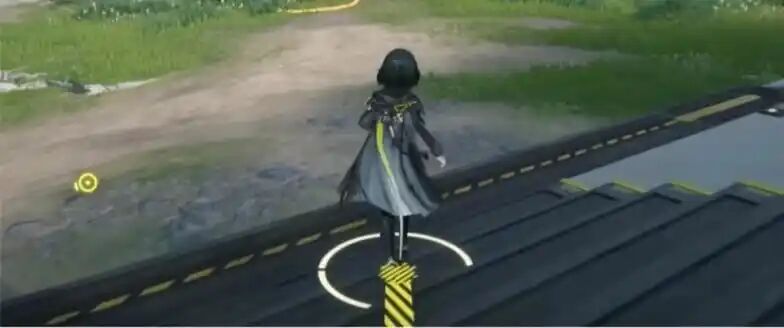
Wire distance is calculated based on your total movement path; jumping will waste available wire length.
Tip 2: Wire from Low to High Elevations

Based on Tip 1, a higher parabolic arc (resulting from jumping or falling) makes it easier to exceed the distance limit. It is recommended to wire from lower to higher ground, or use low jumps tocompress the arc.
Tip 3: Use "Teleportation Magic" to Wire
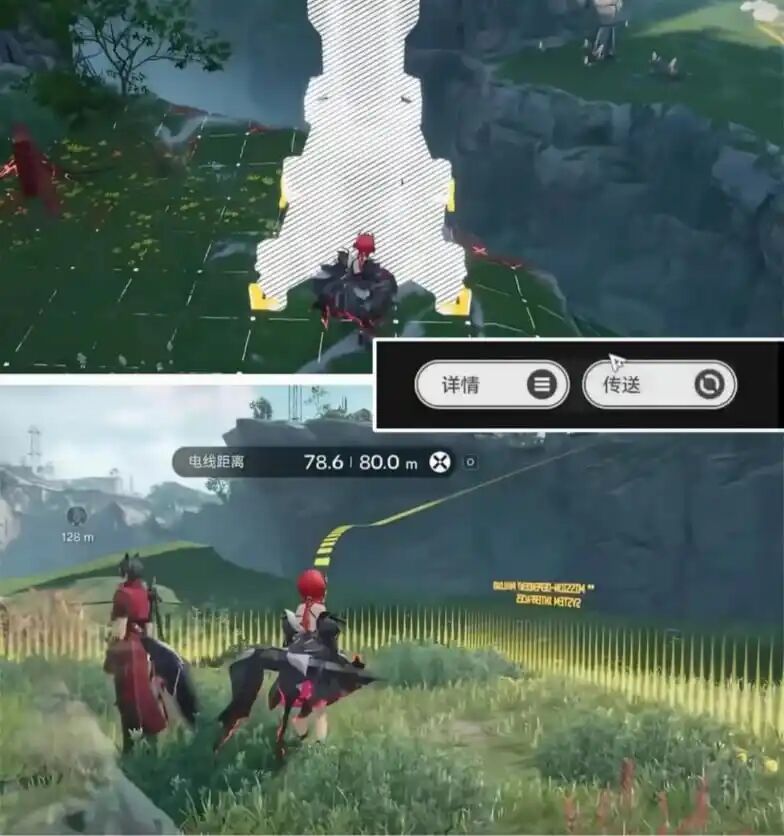
Once you start pulling a power line, the connection is retained even after Teleporting via the map. This allows for cross-map long-distance wiring and significant length savings in specific scenarios.
Tip 4: No Distance Limit Once Connected
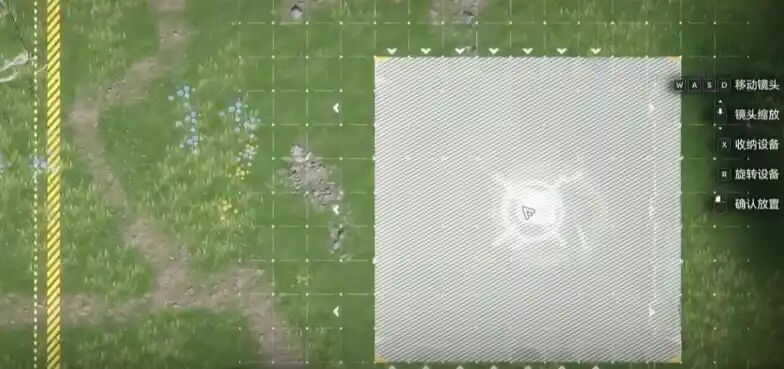
Once the wire is successfully connected to a node, moving further away will not cancel the connection, even if you exceed the initial placement limit.
Understanding Power Grid Connections in Valley IV
Important Note on Node Connection Rules:
When deploying a new node in your power grid, it will automatically draw power from the physically closest active node. The numerical order of placement is for planning reference only and does not control the connection path.
Example:
If Node 8 is physically closer to Node 5 than to Node 7, it will connect to Node 5—even if you placed Node 7 before Node 8. In such cases, you may need to backtrack and adjust connections from earlier nodes to ensure your grid expands as intended.
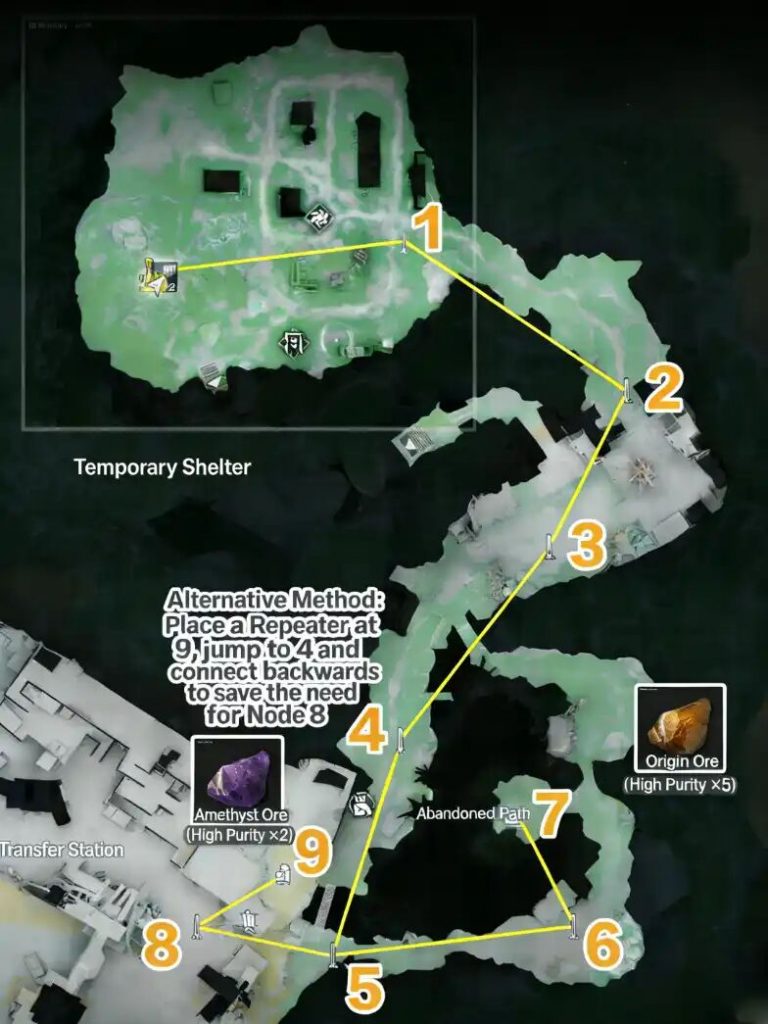
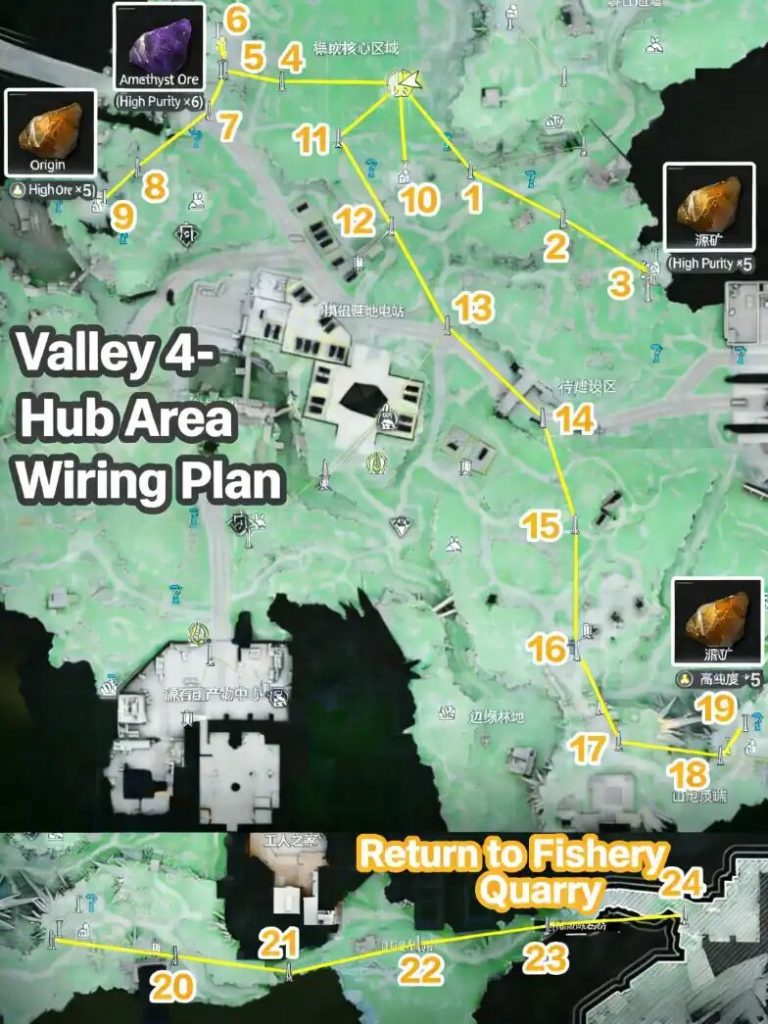
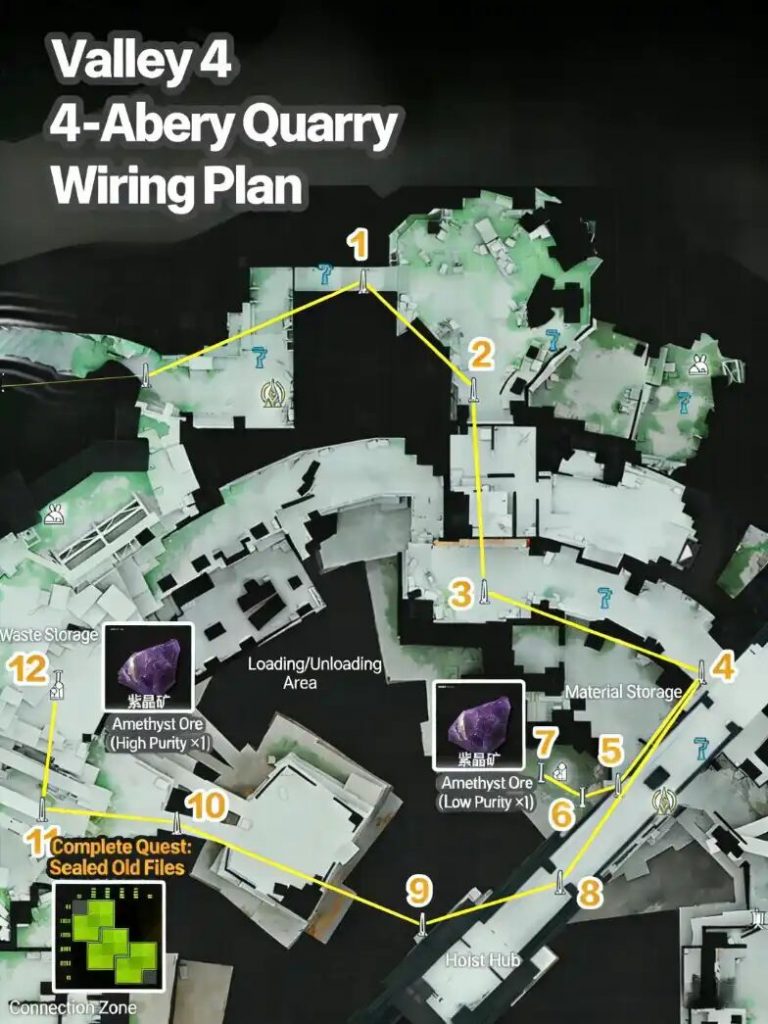
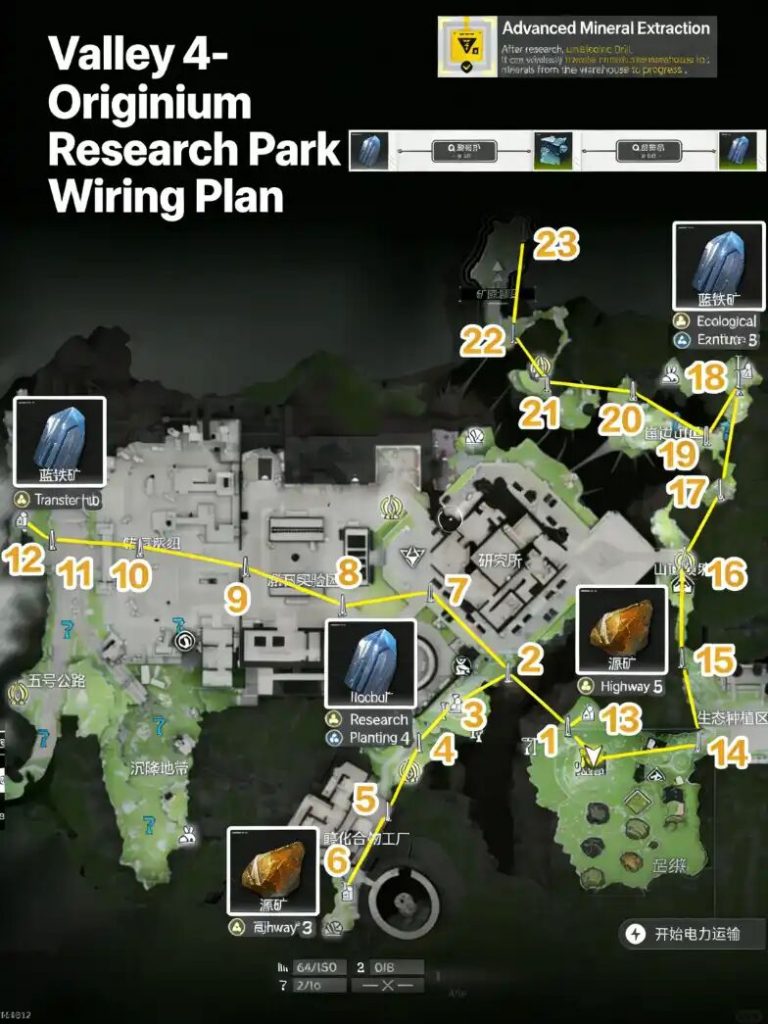
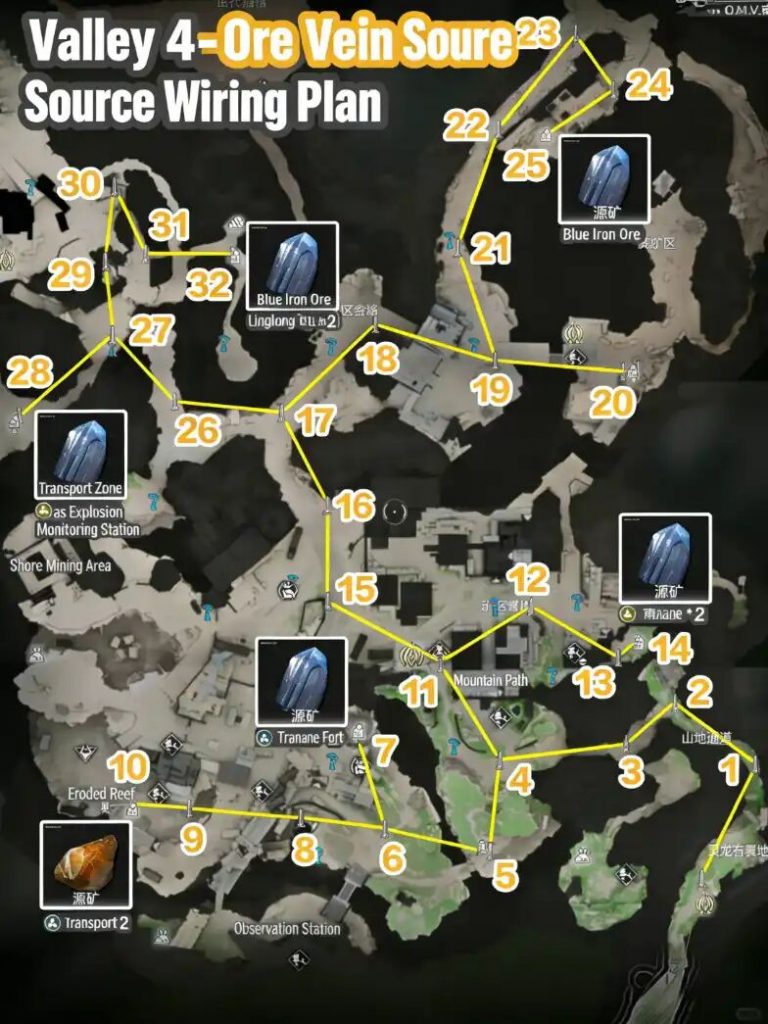
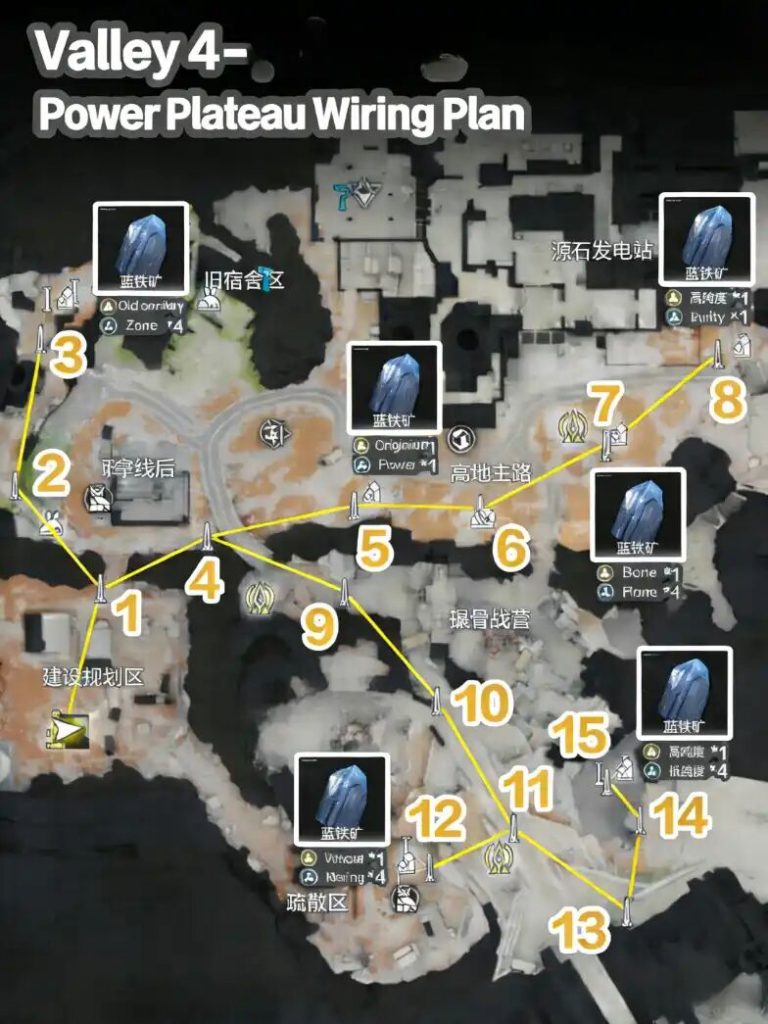
Administrator's Tip: Verifying Your Grid Connection
Once your power grid is set up, open the map to perform a quick status check:
- ✅ Connected & Powered: A mining zone will display a highlighted (active) power icon.
- ⚠️ Disconnected: If the icon appears grey or dimmed, the Pylon at that location has failed to connect to the main grid and requires attention.
Conclusion
Master these layout fundamentals to unlock full automation in Valley IV. Efficient resource flow will prevent power overloads and smoothly power your way to completing your ultimate base design.