Assistive Volume Button
আপডেট করা হয়েছে
বর্তমান সংস্করণ
1775122661
অফার করেছে

আপনার মোবাইলে Assistive Volume Button ব্যবহার করার সময় অতিরিক্ত চার্জ নিয়ে চিন্তা করা বন্ধ করুন, নিজেকে ছোট পর্দা থেকে মুক্ত করুন এবং অনেক বড় ডিসপ্লেতে অ্যাপ ব্যবহার করে উপভোগ করুন। এখন থেকে, কীবোর্ড এবং মাউস দিয়ে আপনার অ্যাপের একটি পূর্ণ-স্ক্রীন অভিজ্ঞতা পান। MEmu আপনাকে সমস্ত আশ্চর্যজনক বৈশিষ্ট্যগুলি অফার করে যা আপনি আশা করেছিলেন: দ্রুত ইনস্টল এবং সহজ সেটআপ, স্বজ্ঞাত নিয়ন্ত্রণ, ব্যাটারির আর কোন সীমাবদ্ধতা নেই, মোবাইল ডেটা এবং বিরক্তিকর কল৷ একদম নতুন MEmu 9 হল আপনার কম্পিউটারে Assistive Volume Button ব্যবহার করার সেরা পছন্দ। MEmu মাল্টি-ইনস্ট্যান্স ম্যানেজার একই সময়ে 2 বা তার বেশি অ্যাকাউন্ট খোলা সম্ভব করে তোলে। এবং সবচেয়ে গুরুত্বপূর্ণ, আমাদের একচেটিয়া ইমুলেশন ইঞ্জিন আপনার পিসির সম্পূর্ণ সম্ভাবনা প্রকাশ করতে পারে, সবকিছুকে মসৃণ এবং উপভোগ্য করে তুলতে পারে।
বেশি দেখান
Download Assistive Volume Button on PC with MEmu Android Emulator. Enjoy playing on big screen. স্ক্রিনে ফোনের ভৌত ভলিউম এবং পাওয়ার কী সিমুলেট করুন।.
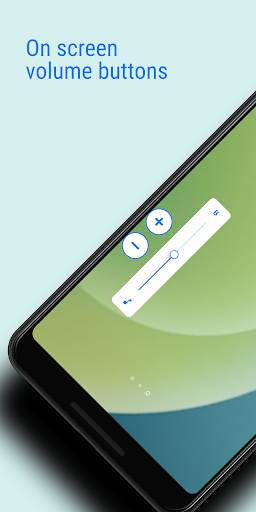
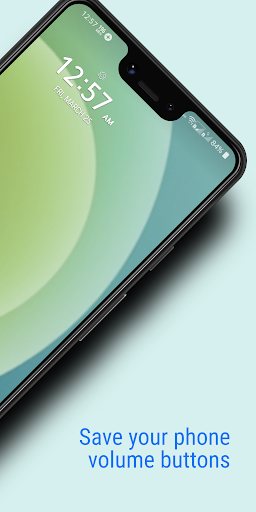
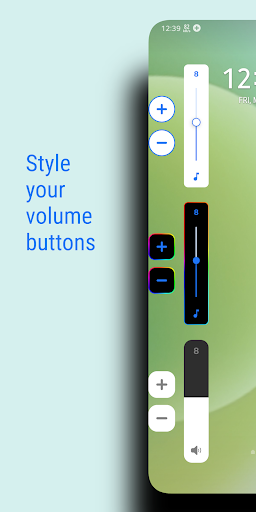
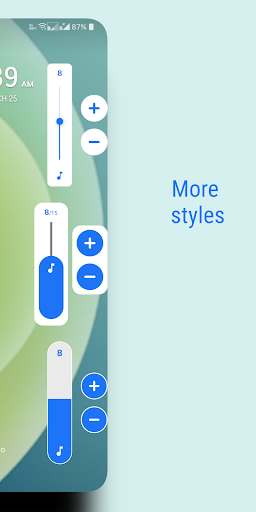
স্ক্রিনে ফোনের ভৌত ভলিউম এবং পাওয়ার কী সিমুলেট করুন।
সহায়ক ভলিউম বোতাম স্ক্রিনের প্রান্তে ভলিউম এবং পাওয়ার বোতামগুলি দেখায় যা ফোনের ভৌত কীগুলির ভলিউম নিয়ন্ত্রণ এবং স্ক্রিন অন/অফ কার্যকারিতা সিমুলেট করে।
অ্যাপটি অ্যাপের নিজস্ব ভলিউম স্লাইডার বা সিস্টেম ভলিউম স্লাইডার দেখানোর বিকল্পও প্রদান করে।
বোতামগুলি স্ক্রিনে সরানো যেতে পারে যাতে পাশের প্রান্তে যেকোনো জায়গায় স্থাপন করা যায়।
অ্যান্ড্রয়েড, iOS, MIUI, RGB এবং আরও অনেক কিছুর মতো পূর্বনির্ধারিত স্টাইল এবং আকার, স্বচ্ছতা, রঙ এবং আরও অনেক কিছুর মতো চেহারা সহ বোতাম এবং স্লাইডারগুলি কাস্টমাইজ করুন।
প্রিমিয়াম বৈশিষ্ট্য
খুব দরকারী প্রিমিয়াম বৈশিষ্ট্য যা একটি বিজ্ঞাপন দেখেও সক্রিয় করা যেতে পারে:
ভলিউম বুস্টার - ফোনের সর্বোচ্চ ভলিউমের চেয়ে আপনার স্পিকারের ভলিউম বেশি বাড়ান।
কম উজ্জ্বলতা - সিস্টেমের সর্বনিম্ন স্ক্রিন উজ্জ্বলতার নীচে স্ক্রিনের উজ্জ্বলতা কমিয়ে দিন।
স্বয়ংক্রিয় স্ক্রিন চালু/বন্ধ - প্রক্সিমিটি সেন্সর ইনপুটের উপর ভিত্তি করে, পাওয়ার কী টিপে না দিয়েই স্ক্রিন চালু/বন্ধ করুন।
একক বোতাম
স্ক্রিনে শুধুমাত্র একটি বোতাম দেখান এবং এটিতে ট্যাপ করলে আপনার পছন্দের স্লাইডারগুলি খুলবে:
• মিডিয়া ভলিউম
• মিডিয়া বুস্টার (স্পিকার বুস্টার / ভলিউম বুস্টার)
• রিং ভলিউম
• বিজ্ঞপ্তি ভলিউম
• কল ভলিউম
• উজ্জ্বলতা
• অন্ধকার (কম উজ্জ্বলতা)
একক বোতামের সাহায্যে, আপনি মিডিয়া ভলিউমের বিস্তৃত পরিসর স্বাভাবিক থেকে বর্ধিত ভলিউম এবং উজ্জ্বলতা স্বাভাবিক উজ্জ্বলতা থেকে সিস্টেমের সর্বনিম্ন উজ্জ্বলতার চেয়ে কম পর্যন্ত নিয়ন্ত্রণ করতে পারেন।
পাওয়ার বোতাম (অ্যান্ড্রয়েড 9+)
পাওয়ার বোতাম দেখায় যা স্ক্রিন বন্ধ করার জন্য ফোনের ফিজিক্যাল পাওয়ার কী অনুকরণ করে।
অটো স্ক্রিন চালু
স্ক্রিন চালু করার জন্য প্রক্সিমিটি সেন্সর ব্যবহার করুন।
যখন আপনি ফোনের প্রক্সিমিটি সেন্সরের উপর কার্সার রাখবেন, তখন স্ক্রিনটি স্বয়ংক্রিয়ভাবে চালু হবে।
ব্যবহার: যখন আপনি আপনার পকেট থেকে ফোনটি বের করবেন, তখন আপনার ফোনের স্ক্রিনটি কোনও কী টিপে না চাপিয়েই চালু হবে।
তাই এখন এটি পাওয়ার কী-এর কার্যকারিতাকে সত্যিকার অর্থে স্ক্রিন থেকে পাওয়ার বোতাম দিয়ে স্ক্রিন বন্ধ করে এবং প্রক্সিমিটি সেন্সর দিয়ে স্ক্রিন চালু করে অনুকরণ করে।
প্রতি অ্যাপ কনফিগারেশন
আপনি প্রতিটি অ্যাপের ভলিউম, উজ্জ্বলতা এবং বোতামের দৃশ্যমানতা সেট করতে পারেন।
আপনি যখন নির্দিষ্ট অ্যাপ খুলবেন, তখন আপনার নির্ধারিত কনফিগারেশন প্রয়োগ করা হবে।
কীবোর্ড
টাইপিংয়ে বাধা এড়াতে, অ্যাপটি কীবোর্ড খোলার সময় স্বয়ংক্রিয়ভাবে বোতামগুলিকে উপরে সরিয়ে দেয় যাতে এটি আপনার টাইপিংয়ে বাধা না দেয়।
WIDGET
হোম স্ক্রিনের জন্য অ্যাপটি নিম্নলিখিত উইজেট অফার করে:
• ভলিউম বোতাম
• মিউট বোতাম
• পাওয়ার বোতাম
অ্যাক্সেসিবিলিটি
এই অ্যাপটি নিম্নলিখিত বৈশিষ্ট্যগুলি কাজ করার জন্য অ্যাক্সেসিবিলিটি API ব্যবহার করে:
• পাওয়ার বোতাম
• প্রতিটি অ্যাপের জন্য কনফিগারেশন
• কীবোর্ডের প্রতি সংবেদনশীল
বিঃদ্রঃ
ব্যাকগ্রাউন্ডে পরিষেবা চালানোর জন্য অ্যাপটির অনুমতি প্রয়োজন।
কিছু ফোন ব্যাকগ্রাউন্ড পরিষেবা বন্ধ করে দেয়। সেই ব্যবহারকারীদের অ্যাপে উল্লেখিত পদক্ষেপগুলি অনুসরণ করতে হবে।
বেশি দেখান

1. MEmu ইনস্টলার ডাউনলোড করুন এবং সেটআপ শেষ করুন

2. MEmu শুরু করুন তারপর ডেস্কটপে Google Play খুলুন

3. Google Play এ Assistive Volume Button খুঁজুন
Install
4. Assistive Volume Button ডাউনলোড এবং ইনস্টল করুন
5. ইনস্টল সমাপ্তি শুরু করতে আইকনে ক্লিক করুন

6. MEmu ব্যবহার করে আপনার কম্পিউটারে Assistive Volume Button উপভোগ করুন
MEmu Play হল সেরা অ্যান্ড্রয়েড এমুলেটর, যার ১০ কোটিরও বেশি ব্যবহারকারী এর উন্নত অ্যান্ড্রয়েড অ্যাপ অভিজ্ঞতা উপভোগ করছেন। MEmu 9 এর ভার্চুয়ালাইজেশন প্রযুক্তি আপনাকে আপনার কম্পিউটারে হাজার হাজার অ্যান্ড্রয়েড অ্যাপ মসৃণভাবে চালাতে দেয়, এমনকি সবচেয়ে চাহিদাসম্পন্ন অ্যাপগুলিও।
ভালো গ্রাফিক্সের সাথে বড় স্ক্রীন; লম্বা অবধি, ব্যাটারি বা মোবাইল ডাটা'র কোন সীমা ছাড়া।
কীবোর্ড এবং মাউস বা গেমপ্যাডের সুনির্দিষ্ট নিয়ন্ত্রণের জন্য সম্পূর্ণ কীম্যাপিং সমর্থন।
মাল্টি-ইনস্ট্যান্স ম্যানেজারের সাথে একটি পিসিতে একাধিক গেম অ্যাকাউন্ট বা কাজ।
নিম্নলিখিত ধাপগুলোর মাধ্যমে পিসি এ Assistive Volume Button ব্যবহার করুন: