Google Ads
আপডেট করা হয়েছে
বর্তমান সংস্করণ
অফার করেছে

আপনার মোবাইলে Google Ads ব্যবহার করার সময় অতিরিক্ত চার্জ নিয়ে চিন্তা করা বন্ধ করুন, নিজেকে ছোট পর্দা থেকে মুক্ত করুন এবং অনেক বড় ডিসপ্লেতে অ্যাপ ব্যবহার করে উপভোগ করুন। এখন থেকে, কীবোর্ড এবং মাউস দিয়ে আপনার অ্যাপের একটি পূর্ণ-স্ক্রীন অভিজ্ঞতা পান। MEmu আপনাকে সমস্ত আশ্চর্যজনক বৈশিষ্ট্যগুলি অফার করে যা আপনি আশা করেছিলেন: দ্রুত ইনস্টল এবং সহজ সেটআপ, স্বজ্ঞাত নিয়ন্ত্রণ, ব্যাটারির আর কোন সীমাবদ্ধতা নেই, মোবাইল ডেটা এবং বিরক্তিকর কল৷ একদম নতুন MEmu 9 হল আপনার কম্পিউটারে Google Ads ব্যবহার করার সেরা পছন্দ। MEmu মাল্টি-ইনস্ট্যান্স ম্যানেজার একই সময়ে 2 বা তার বেশি অ্যাকাউন্ট খোলা সম্ভব করে তোলে। এবং সবচেয়ে গুরুত্বপূর্ণ, আমাদের একচেটিয়া ইমুলেশন ইঞ্জিন আপনার পিসির সম্পূর্ণ সম্ভাবনা প্রকাশ করতে পারে, সবকিছুকে মসৃণ এবং উপভোগ্য করে তুলতে পারে।
বেশি দেখান
Download Google Ads on PC with MEmu Android Emulator. Enjoy playing on big screen. The Google Ads mobile app helps you stay connected to your campaigns while on the go with your smartphone.
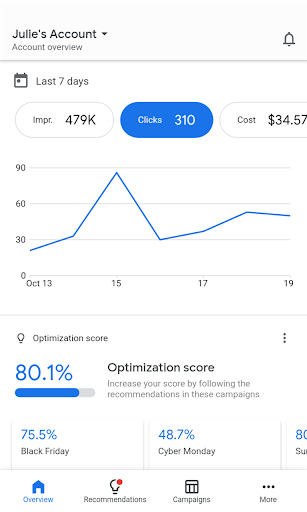
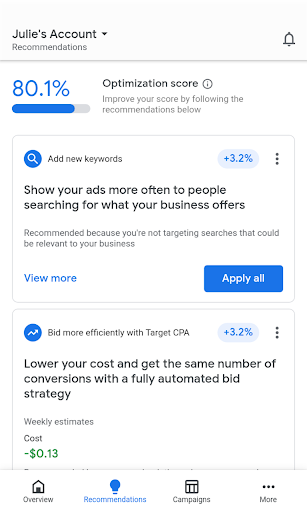
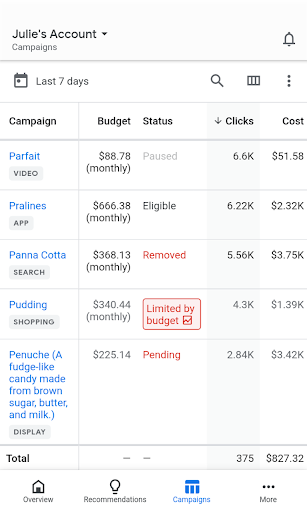
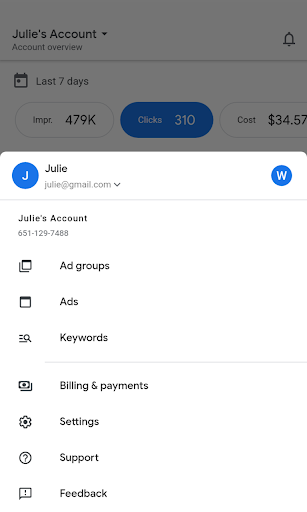
The Google Ads mobile app helps you stay connected to your campaigns while on the go with your smartphone. You can track your ad campaigns in real-time, review high-impact recommendations to optimize performance, and take action quickly and easily, no matter where your business takes you.
Use the Google Ads app to:
* View and monitor your ad performance and campaign stats on the go, such as conversions, impressions, and clicks
* Manage and make quick updates to campaigns, bids, budgets, keywords, and more
* Create, add, and edit ads to drive sales, reach new online users and customers, and grow your business
* See your optimization score and apply recommendations based on strategic insights
* Get real-time notifications and alerts, such as performance summaries or ad disapprovals
* Call or chat with an expert for support, wherever you may be
Download the Google Ads mobile app to get the most out of your account today!
বেশি দেখান

1. MEmu ইনস্টলার ডাউনলোড করুন এবং সেটআপ শেষ করুন

2. MEmu শুরু করুন তারপর ডেস্কটপে Google Play খুলুন

3. Google Play এ Google Ads খুঁজুন
Install
4. Google Ads ডাউনলোড এবং ইনস্টল করুন
5. ইনস্টল সমাপ্তি শুরু করতে আইকনে ক্লিক করুন

6. MEmu ব্যবহার করে আপনার কম্পিউটারে Google Ads উপভোগ করুন
MEmu Play হল সেরা অ্যান্ড্রয়েড এমুলেটর, যার ১০ কোটিরও বেশি ব্যবহারকারী এর উন্নত অ্যান্ড্রয়েড অ্যাপ অভিজ্ঞতা উপভোগ করছেন। MEmu 9 এর ভার্চুয়ালাইজেশন প্রযুক্তি আপনাকে আপনার কম্পিউটারে হাজার হাজার অ্যান্ড্রয়েড অ্যাপ মসৃণভাবে চালাতে দেয়, এমনকি সবচেয়ে চাহিদাসম্পন্ন অ্যাপগুলিও।
ভালো গ্রাফিক্সের সাথে বড় স্ক্রীন; লম্বা অবধি, ব্যাটারি বা মোবাইল ডাটা'র কোন সীমা ছাড়া।
কীবোর্ড এবং মাউস বা গেমপ্যাডের সুনির্দিষ্ট নিয়ন্ত্রণের জন্য সম্পূর্ণ কীম্যাপিং সমর্থন।
মাল্টি-ইনস্ট্যান্স ম্যানেজারের সাথে একটি পিসিতে একাধিক গেম অ্যাকাউন্ট বা কাজ।
নিম্নলিখিত ধাপগুলোর মাধ্যমে পিসি এ Google Ads ব্যবহার করুন: