Huelite 3.0
আপডেট করা হয়েছে
বর্তমান সংস্করণ
3.5.0
অফার করেছে

আপনার মোবাইলে Huelite 3.0 ব্যবহার করার সময় অতিরিক্ত চার্জ নিয়ে চিন্তা করা বন্ধ করুন, নিজেকে ছোট পর্দা থেকে মুক্ত করুন এবং অনেক বড় ডিসপ্লেতে অ্যাপ ব্যবহার করে উপভোগ করুন। এখন থেকে, কীবোর্ড এবং মাউস দিয়ে আপনার অ্যাপের একটি পূর্ণ-স্ক্রীন অভিজ্ঞতা পান। MEmu আপনাকে সমস্ত আশ্চর্যজনক বৈশিষ্ট্যগুলি অফার করে যা আপনি আশা করেছিলেন: দ্রুত ইনস্টল এবং সহজ সেটআপ, স্বজ্ঞাত নিয়ন্ত্রণ, ব্যাটারির আর কোন সীমাবদ্ধতা নেই, মোবাইল ডেটা এবং বিরক্তিকর কল৷ একদম নতুন MEmu 9 হল আপনার কম্পিউটারে Huelite 3.0 ব্যবহার করার সেরা পছন্দ। MEmu মাল্টি-ইনস্ট্যান্স ম্যানেজার একই সময়ে 2 বা তার বেশি অ্যাকাউন্ট খোলা সম্ভব করে তোলে। এবং সবচেয়ে গুরুত্বপূর্ণ, আমাদের একচেটিয়া ইমুলেশন ইঞ্জিন আপনার পিসির সম্পূর্ণ সম্ভাবনা প্রকাশ করতে পারে, সবকিছুকে মসৃণ এবং উপভোগ্য করে তুলতে পারে।
বেশি দেখান
Download Huelite 3.0 on PC with MEmu Android Emulator. Enjoy playing on big screen. We care about the way you control your smart lights.
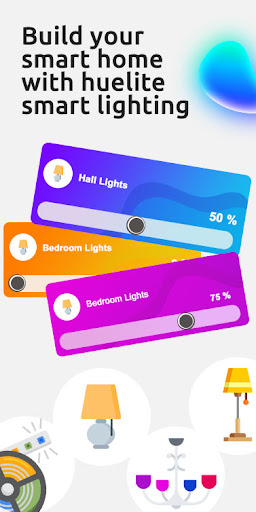
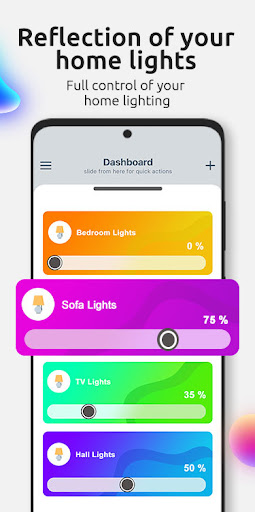
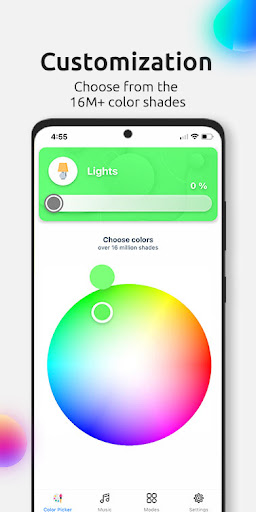
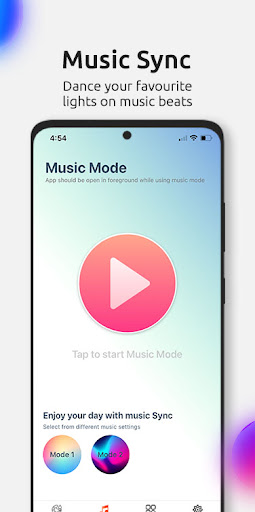
We care about the way you control your smart lights. We make it easy to get started with Wi-Fi-enabled, bright, colorful smart lights that need no hub. Yep, you can start with just one device.
Huelite App can not only help give you the best start but will turn your experience up a notch. Automate your wake up Schedule, or set up your movie-watching Scene (then set up voice control so you don’t even have to leave the sofa), or play with Preset Effects next time you’re entertaining.
The Huelite app is packed full of features like:
-The Basics: on/off, dimming, change between the 16 Million color options.
-Music Sync: Now synchronize smart lights at the beats of music, colors so live that you have to experience yourself.
-Control from Anywhere in the World: With Huelite App, you can control your Huelite devices remotely from anywhere in the world.
-Voice Control: Control your lights hands-free from Amazon Alexa and Google Assistant.
-Group Control: Create groups to control multiple lights including on/off and dimming with one touch from the Home Dashboard.
-Light your Routine: Set your schedule to switch lights on/off.
-Preset Scenes: Choose from the built-in scenes for romantic dinner, movie night, and many more, all in one place.
-Help Button: find How-To guides, learn about integration partners, or shop for Huelite products, and much more.
Stay in touch.
Need a helping hand, or want to offer us some advice? We would love to hear from you about your Huelite experience. You can reach us at support@huelite.in.
Products available at www.huelite.in
বেশি দেখান

1. MEmu ইনস্টলার ডাউনলোড করুন এবং সেটআপ শেষ করুন

2. MEmu শুরু করুন তারপর ডেস্কটপে Google Play খুলুন

3. Google Play এ Huelite 3.0 খুঁজুন
Install
4. Huelite 3.0 ডাউনলোড এবং ইনস্টল করুন
5. ইনস্টল সমাপ্তি শুরু করতে আইকনে ক্লিক করুন

6. MEmu ব্যবহার করে আপনার কম্পিউটারে Huelite 3.0 উপভোগ করুন
MEmu Play হল সেরা অ্যান্ড্রয়েড এমুলেটর, যার ১০ কোটিরও বেশি ব্যবহারকারী এর উন্নত অ্যান্ড্রয়েড অ্যাপ অভিজ্ঞতা উপভোগ করছেন। MEmu 9 এর ভার্চুয়ালাইজেশন প্রযুক্তি আপনাকে আপনার কম্পিউটারে হাজার হাজার অ্যান্ড্রয়েড অ্যাপ মসৃণভাবে চালাতে দেয়, এমনকি সবচেয়ে চাহিদাসম্পন্ন অ্যাপগুলিও।
ভালো গ্রাফিক্সের সাথে বড় স্ক্রীন; লম্বা অবধি, ব্যাটারি বা মোবাইল ডাটা'র কোন সীমা ছাড়া।
কীবোর্ড এবং মাউস বা গেমপ্যাডের সুনির্দিষ্ট নিয়ন্ত্রণের জন্য সম্পূর্ণ কীম্যাপিং সমর্থন।
মাল্টি-ইনস্ট্যান্স ম্যানেজারের সাথে একটি পিসিতে একাধিক গেম অ্যাকাউন্ট বা কাজ।
নিম্নলিখিত ধাপগুলোর মাধ্যমে পিসি এ Huelite 3.0 ব্যবহার করুন: