Access Dots - iOS 14 cam/mic access indicators!
Aktualizováno
Aktuální verze
AD_3.6_BETA
Od vývojáře

Přestaňte se obávat přebíjení při používání Access Dots - iOS 14 cam/mic access indicators! na mobilním telefonu, uvolněte se z malé obrazovky a užívejte si aplikace na mnohem větším displeji. „Společnost MEmu vám nabízí všechny překvapivé funkce, které jste očekávali: rychlá instalace a snadné nastavení, intuitivní ovládání, žádná omezení baterií, mobilní data a rušivá volání. Zcela nový přístroj MEmu 9 je nejlepší volbou použití Access Dots - iOS 14 cam/mic access indicators! ve vašem počítači. díky naší absorpci umožňuje správce více instancí otevření 2 nebo více účtů současně. A co je nejdůležitější, náš exkluzivní emulační modul může uvolnit plný potenciál vašeho počítače, učinit vše plynulým a příjemným.
Show more
Vychutnejte si vynikající zážitek z přehrávání Access Dots - iOS 14 cam/mic access indicators! na PC s MEMU App Player. Je to silný bezplatný emulátor pro Android, který vám umožní hrát tisíce her v systému Android. Did you know that once you grant access to your phone's camera/microphone/GPS location to any third-party App, they can use it silently in the background?
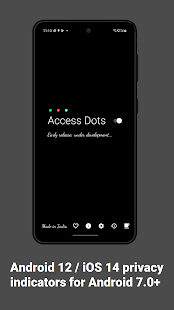
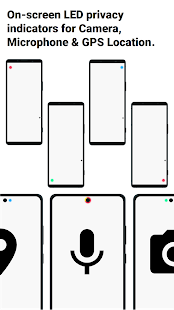
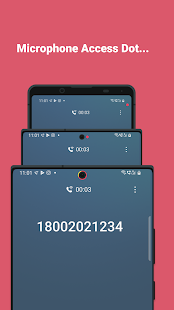
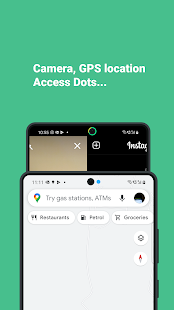
Did you know that once you grant access to your phone's camera/microphone/GPS location to any third-party App, they can use it silently in the background?
And do you feel envious about the new iOS 14's privacy feature - shows an indicator whenever camera or microphone is accessed? Or you can't wait for Android 12's implementation of the same feature?
Presenting Access Dots for Android, supporting all the way down to Android 7.0!
Access Dots, adds the same iOS 14 style indicators (few pixels light up as a dot) to the top right (default) corner of your screen whenever any third-party App uses your phone's camera/microphone/GPS location. Access Dots will be visible even on your lockscreen!
Configuring the App is as simple as enabling the Access Dots Accessibility Service (Toggle switch in the App > (More) Downloaded Services/Installed Services > Access Dots > Enable). By default the App is configured to show iOS 14 style colored access dots - green for camera access, orange for microphone access and blue for GPS location. The App itself does not request for camera or microphone access, however, to be able to monitor GPS access by any App, 'Access Dots' require GPS location permission.
Access Dots is in early BETA, under development, so far it has the following features:
● Display Access Dots whenever phone's camera/microphone/GPS location is engaged by a third-party App.
● Maintain an Access Log, which can be accessed from the App's main settings screen. The Access Log shows when the camera/microphone/GPS location was accessed, which App was in foreground at the time of access initiation and how long did the access last.
● Assign any color to either of the Access Dots.
● On Android 10+, Access Dots by default sticks beside your camera cutout (if your device has.) You can configure the location of Access Dots to the point of specifying X/Y coordinates.
● If your device supports 'Energy Ring - Universal Edition!' App, then you can wrap Access Dots around the punch hole camera as well.
● The size of Access Dots can be adjusted.
While it's free to change the Access Dots' color to whatever you want, consider making a donation to support the development and have access to few extra configurations like changing the 'size' of the dot or its location on the screen. :)
Note: Please make sure the App is whitelisted under any kind of optimization setting your device has, if the App is killed from background by the System, you may have to restart phone to get the Access Dots active again.
Show more

1. Stáhněte si instalační program MEmu a dokončete instalaci

2. Spusťte MEmu a poté otevřete Google Play na ploše

3. Vyhledejte Access Dots - iOS 14 cam/mic access indicators! v Google Play
Install
4. Stáhněte a nainstalujte Access Dots - iOS 14 cam/mic access indicators!
5. Po dokončení instalace klikněte na ikonu pro spuštění

6. Užívejte si používání Access Dots - iOS 14 cam/mic access indicators! na PC s MEmu
MEmu je bezplatný a vynikající emulátor Androidu s 50 miliony uživatelů, který poskytuje vynikající zážitek z aplikací. Virtualizační technologie MEmu 9 vám umožňuje plynule spouštět aplikace pro Android na vašem počítači, a to i ty nejnáročnější.
Větší obrazovka s lepší grafikou; Dlouhá výdrž bez omezení baterie nebo mobilních dat.
Plná podpora mapování kláves pro přesné ovládání klávesnice a myši nebo gamepadu.
Více herních účtů nebo úkolů na jednom počítači najednou s Multi-Instance Managerem.
Use Access Dots - iOS 14 cam/mic access indicators! on PC by following steps: