PoMelo File Explorer - File Manager & Cleaner
Aktualizováno
Aktuální verze
1.0.9
Od vývojáře

Přestaňte se obávat přebíjení při používání PoMelo File Explorer - File Manager & Cleaner na mobilním telefonu, uvolněte se z malé obrazovky a užívejte si aplikace na mnohem větším displeji. „Společnost MEmu vám nabízí všechny překvapivé funkce, které jste očekávali: rychlá instalace a snadné nastavení, intuitivní ovládání, žádná omezení baterií, mobilní data a rušivá volání. Zcela nový přístroj MEmu 9 je nejlepší volbou použití PoMelo File Explorer - File Manager & Cleaner ve vašem počítači. díky naší absorpci umožňuje správce více instancí otevření 2 nebo více účtů současně. A co je nejdůležitější, náš exkluzivní emulační modul může uvolnit plný potenciál vašeho počítače, učinit vše plynulým a příjemným.
Show more
Vychutnejte si vynikající zážitek z přehrávání PoMelo File Explorer - File Manager & Cleaner na PC s MEMU App Player. Je to silný bezplatný emulátor pro Android, který vám umožní hrát tisíce her v systému Android. PoMelo File Explorer is a file management tool that can help you quickly find files stored on the device and automatically organize them into collections.

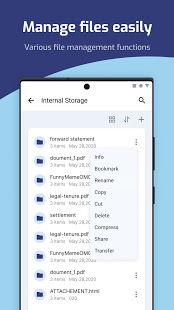
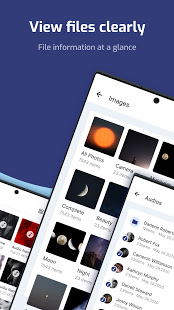
PoMelo File Explorer is a file management tool that can help you quickly find files stored on the device and automatically organize them into collections. You can view, delete, move, rename or remark any files and find the files through an index search with filters quickly.
# Free Up Phone Space
By analyzing the files on your device, you can easily find and delete junk files, free up your phone space and make your Android phone run faster.Leave your phone space for things that are really important.
# Analyze Storage
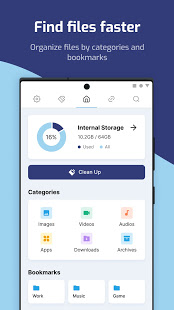
A visual space to help you easily view the storage space occupied by the current mobile device, and easily manage it. Enter file management through internal storage, and powerful multiple functions help you easily manage your device files.
# Optimize Phone
Not only can you view your files, but you can also keep your phone clean. You can speed up your phone, clean up junk files, scan for viruses, CPU cooler, battery saver easily.
# Manage Apps
Easy to manage all applications in your device, you can view the package name and size of the application, and easily backup, stop and uninstall.
# Categories View
On the homepage, you can directly view the files in your device through various types, including pictures, videos, videos, apps, downloads, archives, etc. And you can also view your internal files clearly in grid or list view.
# Bookmarks
You can bookmark your favorite folder and it will appear on the homepage, so that you can quickly appear on the homepage. You can bookmark your favorite folder and it will appear on the homepage, so that you can quickly enter the folder in the future, reducing the trouble of searching.
# Search Bar
We provide a globally search engine, you can search for files in storage and SD card anywhere in the app. And provide search record storage to facilitate future search and optimization.
# Share files
With the built-in wifi file transfer, this free file manager can use wifi and hotspots to transfer files to another mobile phone and PC even if there is no Internet connection. Without limiting the file size and type, users can transfer any file extremely quickly, including applications, videos, music, pictures, etc.
Show more

1. Stáhněte si instalační program MEmu a dokončete instalaci

2. Spusťte MEmu a poté otevřete Google Play na ploše

3. Vyhledejte PoMelo File Explorer - File Manager & Cleaner v Google Play
Install
4. Stáhněte a nainstalujte PoMelo File Explorer - File Manager & Cleaner
5. Po dokončení instalace klikněte na ikonu pro spuštění

6. Užívejte si používání PoMelo File Explorer - File Manager & Cleaner na PC s MEmu
MEmu je bezplatný a vynikající emulátor Androidu s 50 miliony uživatelů, který poskytuje vynikající zážitek z aplikací. Virtualizační technologie MEmu 9 vám umožňuje plynule spouštět aplikace pro Android na vašem počítači, a to i ty nejnáročnější.
Větší obrazovka s lepší grafikou; Dlouhá výdrž bez omezení baterie nebo mobilních dat.
Plná podpora mapování kláves pro přesné ovládání klávesnice a myši nebo gamepadu.
Více herních účtů nebo úkolů na jednom počítači najednou s Multi-Instance Managerem.
Use PoMelo File Explorer - File Manager & Cleaner on PC by following steps: