
BinManager: BIN Generator
Aktualizováno
Aktuální verze
2.4.0
Od vývojáře

Přestaňte se obávat přebíjení při používání BinManager: BIN Generator na mobilním telefonu, uvolněte se z malé obrazovky a užívejte si aplikace na mnohem větším displeji. „Společnost MEmu vám nabízí všechny překvapivé funkce, které jste očekávali: rychlá instalace a snadné nastavení, intuitivní ovládání, žádná omezení baterií, mobilní data a rušivá volání. Zcela nový přístroj MEmu 9 je nejlepší volbou použití BinManager: BIN Generator ve vašem počítači. díky naší absorpci umožňuje správce více instancí otevření 2 nebo více účtů současně. A co je nejdůležitější, náš exkluzivní emulační modul může uvolnit plný potenciál vašeho počítače, učinit vše plynulým a příjemným.
Show more
Užijte si skvělý zážitek z používání BinManager: BIN Generator u na PC s MEmu Play. Je to výkonný bezplatný emulátor Androidu, který vám nabízí tisíce aplikací pro Android ve verzi pro stolní počítače. Užívejte si spojení s přáteli a vylepšujte svou práci s vyšší efektivitou! BinManager: BIN Generator helps developers, QA engineers, and students prepare safe sandbox data when building or reviewing payment flows.
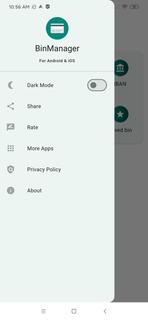
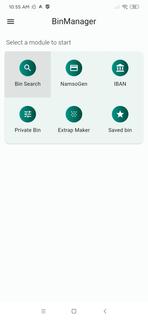
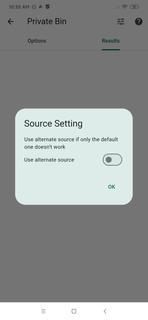
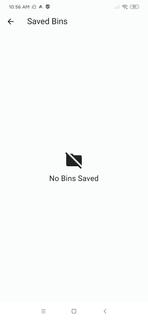
BinManager: BIN Generator helps developers, QA engineers, and students prepare safe sandbox data when building or reviewing payment flows. It focuses on structured identifiers and reference fields so you can run demos, classroom exercises, and staging checks without exposing real cardholder information. Moreover, it avoids live processing and keeps activities within an educational and testing context. For users looking for a reliable toolkit, BinManager: BIN Generator APK supports practical training and controlled QA tasks with simple steps.Features of BinManager: BIN GeneratorNamso Gen style BIN generatorBinManager: BIN Generator lets you create structured test BINs in a Namso Gen style for demos, sandbox sessions, and QA checks. You can quickly prepare sample identifiers that match the expected format for forms and flows. This speeds up test-data preparation while keeping your activity separate from real customer data.IBAN generator and validatorYou can build and verify IBANs to check format and structure for development or classroom use. The validator helps confirm that sample accounts follow standard rules before you move on to integration steps. This saves time during early testing and reduces avoidable format errors.Detailed BIN lookupBinManager: BIN Generator provides issuer, country, card brand, and card type details so you can see how identifiers map to attributes. This helps you verify routing or UI logic that depends on issuer metadata. As a result, you can confirm card classification behavior before testing broader scenarios.Private BIN search and saved setsYou can find specific BINs with a focused search and then save frequently used entries for future sessions. Saved lists help standardize repeated QA work across teammates and test cycles. This keeps your staging runs consistent and easy to reproduce.Form fill helpers for UI checksThe Extrap Maker produces dummy expiry dates and CVV placeholders to populate forms. With these placeholders ready, you can check validation states, error messages, and field behaviors without relying on any live data. It makes interface testing faster and more controlled.Important use notes for BinManager: BIN GeneratorThis app is designed strictly for educational and testing purposes. It does not process real transactions and does not require live cardholder data. Use only in sandbox or classroom environments, follow your organizationâs policies, and comply with local laws. Do not attempt real payments with any data created inside the app.How to use BinManager: BIN Generator on AndroidUse this guide to prepare sample identifiers and form data for sandbox checks. The process keeps your test runs organized from generation to lookup and validation, so you can focus on results. If you plan to download BinManager: BIN Generator, follow these steps after installation.Open the app and choose a task such as Generate BIN, Lookup BIN, or IBAN Tools. This helps you begin in the right section.For BIN generation, enter the required pattern if needed and create your structured test BINs. Then note the outputs you want to reuse.To check issuer details, run a BIN lookup to view bank, country, brand, and card type. Confirm that your interface or routing logic reacts as expected.For IBAN work, create a sample IBAN and validate its format. Adjust inputs until the validator confirms a proper structure.When preparing forms, use the Extrap Maker to add expiry dates and CVV placeholders. Finally, save commonly used BINs to keep future QA sessions consistent.Start testing with BinManager: BIN GeneratorBinManager: BIN Generator supports classroom practice and QA workflows with focused tools for BIN and IBAN data. It helps you simulate flows safely and keep test inputs organized from start to finish. Download BinManager: BIN Generator APK on APKPure to prepare safe test data and organize your workflows.
Show more

1. Stáhněte si instalační program MEmu a dokončete instalaci

2. Spusťte MEmu a poté otevřete Google Play na ploše

3. Vyhledejte BinManager: BIN Generator v Google Play
Install
4. Stáhněte a nainstalujte BinManager: BIN Generator
5. Po dokončení instalace klikněte na ikonu pro spuštění

6. Užívejte si používání BinManager: BIN Generator na PC s MEmu
MEmu je bezplatný a vynikající emulátor Androidu s 50 miliony uživatelů, který poskytuje vynikající zážitek z aplikací. Virtualizační technologie MEmu 9 vám umožňuje plynule spouštět aplikace pro Android na vašem počítači, a to i ty nejnáročnější.
Větší obrazovka s lepší grafikou; Dlouhá výdrž bez omezení baterie nebo mobilních dat.
Plná podpora mapování kláves pro přesné ovládání klávesnice a myši nebo gamepadu.
Více herních účtů nebo úkolů na jednom počítači najednou s Multi-Instance Managerem.
Use BinManager: BIN Generator on PC by following steps: