
Sportsurge - Live Sports TV
Aktualizováno
Aktuální verze
1.0.0
Od vývojáře

Přestaňte se obávat přebíjení při používání Sportsurge - Live Sports TV na mobilním telefonu, uvolněte se z malé obrazovky a užívejte si aplikace na mnohem větším displeji. „Společnost MEmu vám nabízí všechny překvapivé funkce, které jste očekávali: rychlá instalace a snadné nastavení, intuitivní ovládání, žádná omezení baterií, mobilní data a rušivá volání. Zcela nový přístroj MEmu 9 je nejlepší volbou použití Sportsurge - Live Sports TV ve vašem počítači. díky naší absorpci umožňuje správce více instancí otevření 2 nebo více účtů současně. A co je nejdůležitější, náš exkluzivní emulační modul může uvolnit plný potenciál vašeho počítače, učinit vše plynulým a příjemným.
Show more
Užijte si skvělý zážitek z používání Sportsurge - Live Sports TV u na PC s MEmu Play. Je to výkonný bezplatný emulátor Androidu, který vám nabízí tisíce aplikací pro Android ve verzi pro stolní počítače. Užívejte si spojení s přáteli a vylepšujte svou práci s vyšší efektivitou! Sportsurge - Live Sports TV helps you keep up with basketball, football, baseball, and global soccer without opening multiple apps.
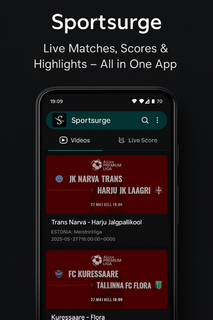
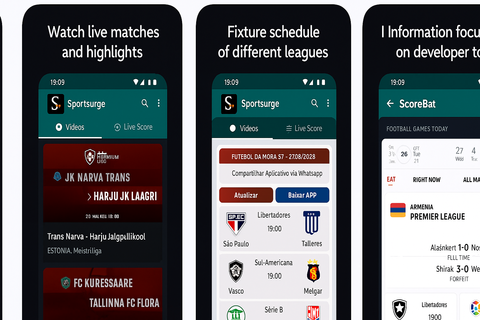
Sportsurge - Live Sports TV helps you keep up with basketball, football, baseball, and global soccer without opening multiple apps. It suits users who check scores during busy days, want quick schedules before a game night, or need TV details for the next match. Coverage spans NBA, NFL, MLB, UEFA Champions League, Premier League, Copa Libertadores, and more, while local matches are also included. Because it focuses on information, Sportsurge - Live Sports TV APK stays lightweight and fast for frequent checks. Sportsurge - Live Sports TV featuresReal-time scores across major leaguesSportsurge - Live Sports TV shows live scores as games progress in the NBA, NFL, MLB, and top soccer competitions. You can glance at current results and see changes as they happen without heavy loading. Standings links and tables are available so you can understand how today’s results affect the bigger picture.Broadcasting details for where and how to watchBefore a game starts, you can view broadcasting information that points to channels or services carrying the event. This helps you plan viewing without searching through multiple sources. The app keeps this info close to the schedule so you can move from fixture to viewing details in one place.Fixtures organized by date and competitionUse simple filters to browse upcoming fixtures by day, week, or specific competition. Sorting by league makes it easy to jump from the Premier League to the UEFA Champions League or Copa Libertadores. Clear date headers and competition labels reduce scrolling and help you find the next kickoff quickly.Match previews and highlightsFor each game, you can read a concise preview and later find highlight recaps. This keeps you informed before the whistle and helps you catch up after the final score. Previews and highlights are displayed alongside fixtures and scores for a smooth flow from schedule to recap.Fast, lightweight interfaceThe app uses a clean layout with quick navigation tabs so you can move from scores to schedules in seconds. Pages load fast, which is useful during busy matchdays. The straightforward design supports frequent checks without draining attention or mobile data. Important notes about Sportsurge - Live Sports TVBefore you proceed, consider the following points that shape how the app works and what to expect during use. Information focus: the app delivers scores, schedules, previews, highlights, and broadcasting details. It is not a streaming service. Copyright disclaimer: Sportsurge only displays public sports trailers and scoreboards and does not host or stream copyrighted content. Transparency: contains ads. No data shared with third parties. The app may collect device IDs. Naming note: some users also search for “SportSurge,” but the app name shown here is Sportsurge - Live Sports TV. Coverage scope: marquee leagues include NBA, NFL, MLB, UEFA Champions League, Premier League, and Copa Libertadores, along with local matches. How to use Sportsurge - Live Sports TV on AndroidGetting started takes only a few steps, and you can check scores right away. To begin, complete the download Sportsurge - Live Sports TV process, then open the app to set your view preferences. From there, switch between scores, fixtures, and broadcasting info as needed. Install and open the app, then allow standard permissions if prompted so the interface can load content properly. From the home view, choose a sport such as basketball, football, baseball, or soccer to narrow the listings. Next, filter fixtures by date or select a competition like the Premier League or UEFA Champions League. Tap a match to see live scores, a short preview before kickoff, and highlights after the game ends. Check the broadcasting details section on the same match page to find where and how to watch. Start tracking live games nowSportsurge - Live Sports TV focuses on quick scores, clear schedules, and practical broadcasting info in one place. If you prefer a lightweight Live Sports TV app for frequent checks, this fits well. For easy setup, look for the Sportsurge - Live Sports TV latest version when you install or update.
Show more

1. Stáhněte si instalační program MEmu a dokončete instalaci

2. Spusťte MEmu a poté otevřete Google Play na ploše

3. Vyhledejte Sportsurge - Live Sports TV v Google Play
Install
4. Stáhněte a nainstalujte Sportsurge - Live Sports TV
5. Po dokončení instalace klikněte na ikonu pro spuštění

6. Užívejte si používání Sportsurge - Live Sports TV na PC s MEmu
MEmu je bezplatný a vynikající emulátor Androidu s 50 miliony uživatelů, který poskytuje vynikající zážitek z aplikací. Virtualizační technologie MEmu 9 vám umožňuje plynule spouštět aplikace pro Android na vašem počítači, a to i ty nejnáročnější.
Větší obrazovka s lepší grafikou; Dlouhá výdrž bez omezení baterie nebo mobilních dat.
Plná podpora mapování kláves pro přesné ovládání klávesnice a myši nebo gamepadu.
Více herních účtů nebo úkolů na jednom počítači najednou s Multi-Instance Managerem.
Use Sportsurge - Live Sports TV on PC by following steps: