Sportsurge - Live Sports TV
Оновлено
Поточна версія
1.0.0
Постачальник

Перестаньте турбуватися про надмірні витрати, використовуючи ххх на своєму мобільному телефоні, звільніться від крихітного екрану і насолоджуйтеся використанням програми на набагато більшому дисплеї. Відтепер отримуйте повний екран свого додатка за допомогою клавіатури та миші. MEmu пропонує вам усі дивовижні функції, які ви очікували: швидка установка та просте налаштування, інтуїтивно зрозумілі елементи керування, більше обмежень від акумулятора, мобільних даних та тривожних дзвінків. Зовсім новий MEmu 9 – найкращий вибір для використання Єдина Школа на вашому комп’ютері. За допомогою нашого поглинання менеджер із кількома примірниками одночасно дозволяє відкрити 2 або більше рахунків. І найголовніше, наш ексклюзивний емуляційний двигун може вивільнити весь потенціал вашого ПК, зробити все гладким і приємним.
Show more
Насолоджуйтесь чудовим досвідом використання Sportsurge - Live Sports TV на ПК за допомогою MEmu Play. Це потужний безкоштовний емулятор Android, який пропонує тисячі програм Android для настільних комп'ютерів. Насолоджуйтесь спілкуванням з друзями та покращенням своєї роботи з більшою ефективністю! Sportsurge - Live Sports TV helps you keep up with basketball, football, baseball, and global soccer without opening multiple apps.
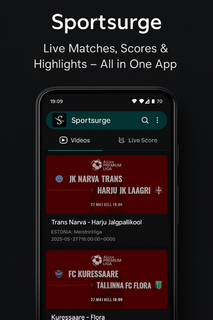
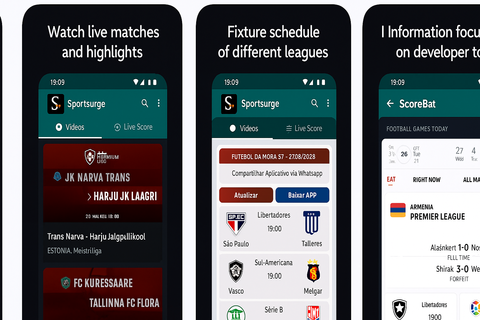
Sportsurge - Live Sports TV helps you keep up with basketball, football, baseball, and global soccer without opening multiple apps. It suits users who check scores during busy days, want quick schedules before a game night, or need TV details for the next match. Coverage spans NBA, NFL, MLB, UEFA Champions League, Premier League, Copa Libertadores, and more, while local matches are also included. Because it focuses on information, Sportsurge - Live Sports TV APK stays lightweight and fast for frequent checks. Sportsurge - Live Sports TV featuresReal-time scores across major leaguesSportsurge - Live Sports TV shows live scores as games progress in the NBA, NFL, MLB, and top soccer competitions. You can glance at current results and see changes as they happen without heavy loading. Standings links and tables are available so you can understand how today’s results affect the bigger picture.Broadcasting details for where and how to watchBefore a game starts, you can view broadcasting information that points to channels or services carrying the event. This helps you plan viewing without searching through multiple sources. The app keeps this info close to the schedule so you can move from fixture to viewing details in one place.Fixtures organized by date and competitionUse simple filters to browse upcoming fixtures by day, week, or specific competition. Sorting by league makes it easy to jump from the Premier League to the UEFA Champions League or Copa Libertadores. Clear date headers and competition labels reduce scrolling and help you find the next kickoff quickly.Match previews and highlightsFor each game, you can read a concise preview and later find highlight recaps. This keeps you informed before the whistle and helps you catch up after the final score. Previews and highlights are displayed alongside fixtures and scores for a smooth flow from schedule to recap.Fast, lightweight interfaceThe app uses a clean layout with quick navigation tabs so you can move from scores to schedules in seconds. Pages load fast, which is useful during busy matchdays. The straightforward design supports frequent checks without draining attention or mobile data. Important notes about Sportsurge - Live Sports TVBefore you proceed, consider the following points that shape how the app works and what to expect during use. Information focus: the app delivers scores, schedules, previews, highlights, and broadcasting details. It is not a streaming service. Copyright disclaimer: Sportsurge only displays public sports trailers and scoreboards and does not host or stream copyrighted content. Transparency: contains ads. No data shared with third parties. The app may collect device IDs. Naming note: some users also search for “SportSurge,” but the app name shown here is Sportsurge - Live Sports TV. Coverage scope: marquee leagues include NBA, NFL, MLB, UEFA Champions League, Premier League, and Copa Libertadores, along with local matches. How to use Sportsurge - Live Sports TV on AndroidGetting started takes only a few steps, and you can check scores right away. To begin, complete the download Sportsurge - Live Sports TV process, then open the app to set your view preferences. From there, switch between scores, fixtures, and broadcasting info as needed. Install and open the app, then allow standard permissions if prompted so the interface can load content properly. From the home view, choose a sport such as basketball, football, baseball, or soccer to narrow the listings. Next, filter fixtures by date or select a competition like the Premier League or UEFA Champions League. Tap a match to see live scores, a short preview before kickoff, and highlights after the game ends. Check the broadcasting details section on the same match page to find where and how to watch. Start tracking live games nowSportsurge - Live Sports TV focuses on quick scores, clear schedules, and practical broadcasting info in one place. If you prefer a lightweight Live Sports TV app for frequent checks, this fits well. For easy setup, look for the Sportsurge - Live Sports TV latest version when you install or update.
Show more

1. Download MEmu installer and finish the setup

2. Start MEmu then open Google Play on the desktop

3. Search Sportsurge - Live Sports TV in Google Play
Install
4. Download and Install Sportsurge - Live Sports TV
5. On install completion click the icon to start

6. Enjoy using Sportsurge - Live Sports TV on PC with MEmu
MEmu App Player є кращим безкоштовним емулятором Android, і 50 мільйонів людей вже користуються його чудовим ігровим досвідом Android. Технологія віртуалізації MEmu дає вам змогу відтворювати тисячі ігор Android на вашому комп'ютері, навіть найбільш насичених графікою.
Bigger screen with better graphics; Long duration, without limitation of battery or mobile data.
Full Keymapping support for precise control of keyboard and mouse or gamepad.
Multiple game accounts or tasks on single PC at one time with Multi-Instance manager.
Use Sportsurge - Live Sports TV on PC by following steps: