Action Taimanin
Aktualisiert
Aktuelle Version
2.10.102
Angeboten von

Bei all Ihrer Leidenschaft für das Spielen von Action Taimanin sollten Ihre Hände nicht auf einen winzigen Bildschirm Ihres Telefons beschränkt sein. Spielen Sie wie ein Profi und übernehmen Sie die volle Kontrolle über Ihr Spiel mit Tastatur und Maus. MEmu bietet Ihnen all die Dinge, die Sie erwarten. Laden Sie Action Taimanin herunter und spielen Sie es auf dem PC. Spielen Sie so lange, wie Sie wollen, ohne Grenzwerte für Akku, mobile Daten und störende Anrufe. Das brandneue MEmu 9 ist die beste Wahl, um Action Taimanin auf dem PC zu spielen. Das exquisite voreingestellte Tastaturbelegungssystem, das mit unserem Fachwissen vorbereitet wurde, macht Action Taimanin zu einem echten PC-Spiel. Der MEmu Multi-Instanz-Manager ermöglicht das Spielen von 2 oder mehr Konten auf demselben Gerät. Und das Wichtigste: Unsere exklusive Emulations-Engine kann das volle Potenzial Ihres PCs freisetzen und für reibungslose Abläufe sorgen.
Mehr anzeigen
Laden Sie Play Action Taimanin auf dem PC mit MEmu Android Emulator. Viel Spaß beim Spielen auf großmundieren. Action Taimanin is a fun, fast-paced and free-to-play hack-and-slash RPG that combines action with visual novel elements.


Action Taimanin is a fun, fast-paced and free-to-play hack-and-slash RPG that combines action with visual novel elements.
In near-future Tokyo, demons run rampant, and sinners of humanity wreak havoc. A Taimanin task force consisting of gorgeous superhuman ninjas is established to fight against the rising syndicates of the darkness. You are the task force Commander – and your first mission is to retrieve a stolen biological weapon... Missions with the task force will take you from Japan to around the world with your friends, foes, and the international superpowers always following.
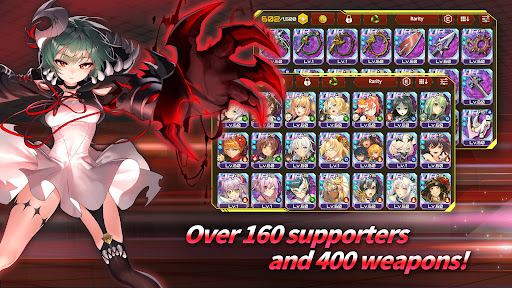
Assemble your beautiful, powerful kunoichis of Taimanin fame along with their Supporters and fight against terror and crime across the world using powerful ninja arts. The impactful Main Story, Daily Quests, Events, and other game modes guarantee hours and hours of entertaining game content.
◆ 3D-RENDERED CHARACTERS
Meet the beautiful ninja girls in all their 3D-rendered glory! Collect stylish costumes and epic weapons to make your Taimanins even more powerful. Have fun with the customization functions and create sleek costume-weapon combinations.
◆ ACTION-PACKED COMBAT
With the easy controls, you can hack and slash your way through classic action challenges on different difficulty levels. Use Supporters and various combinations of each Character's unique skills to customize your combat style. Melee, ranged, or mixed - find out which fighting style suits you the best! Both PVE and PVP are available.
◆ INTERACTIONS AND VISUAL NOVELS
Gift your favorite girls something soft, tasty, or fragrant and increase the Affinity level to unlock sweet actions, in-game currency, and various rewards. The visual novel stories for both Characters and Supporters contain beautiful graphics and epic stories that will put you on a rollercoaster of emotions.
◆ BATTLE ARENA
Compete against your friends in 3-on-3 PVP sessions every week in the Battle Arena! Deploy your most powerful Taimanins to challenge the weekly ranking.
◆ ARENA TOWER
Floor after another full of enemies. Gather your most skilled Taimanins and defeat robots, demons, zombies, and other creatures to collect numerous rewards and become the apex of the Arena Tower!
◆ Taima-Five VR
Jump on raids with your best three ninjas and fight against powerful enemies!
◆ Total War
Utilize all your characters to challenge a boss with infinite HP and test your limit!
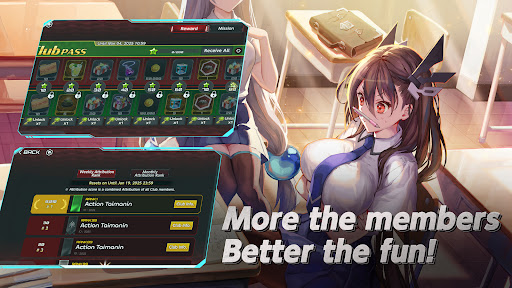
◆ Club System
Join a club, cooperate with others, and empower your characters with various buffs for battle!
◆ PRIVATE ROOM
Place your characters in rooms with different themes and create dramatic scenarios. Let your creativity run wild in a sandbox studio full of possibilities!
--- MINIMUM REQUIREMENTS ---
Storage: 8GB or more available space
RAM: 3GB or higher
OS Version: Android 9 or later
--- RECOMMENDED REQUIREMENTS ---
Storage: 8GB or more available space
RAM: 4GB or higher
OS Version: Android 10 or later
--- CONFIGURING PERMISSIONS ---
Storage: Requires access to storage to attach and upload files in bug reports and customer service inquiries.
※ You can continue the gameplay without this permission.
--- MANAGE AND REVOKE PERMISSIONS ---
Device Settings → Apps → Choose Apps → App Settings → Permissions
--- COMMUNITY ---
Official Website: https://www.actiontaimanin.net/
Facebook: https://www.facebook.com/ActionTaimanin
X (Twitter): https://x.com/Action_Taimanin
YouTube Channel: https://www.youtube.com/c/OFFICIALActionTaimanin/
Support: support@gremorygames.com
Mehr anzeigen

1. Laden das MEmu-Installationsprogramm herunter und beenden die Installation

2. MEmu starten und Google Play auf der Homepage öffnen

3. Suchen Action Taimanin in Google Play
Install
4. Herunterladen und Installieren Action Taimanin
5. Klicken nach Abschluss der Installation auf das Symbol, um es zu starten

6. Viel Spaß beim Spielen von Action Taimanin auf dem PC mit MEmu
MEmu App Player ist der beste kostenlose Android-Emulator und 50 Millionen Menschen genießen bereits seine hervorragende Android-Gaming-Erfahrung. Mit der MEmu-Virtualisierungstechnologie können Sie Tausende von Android-Spielen problemlos auf Ihrem PC spielen, selbst bei grafikintensiven Spielen.
BGrößeres Bild mit besserer Grafik; Keine unterbrechungen, keine sorgen um Akku
Komplette Tastenbelegung unterstützt mit Maus und Tastatur oder Controller
Mit dem „Multi-Instance-Manager“ können Sie mehrere Spielkonten oder Spiele gleichzeitig auf einem PC ausführen.
Play Action Taimanin on PC by following steps: