Crossfire: Legends
Aktualisiert
Aktuelle Version
1.0.13.60
Angeboten von

Bei all Ihrer Leidenschaft für das Spielen von Crossfire: Legends sollten Ihre Hände nicht auf einen winzigen Bildschirm Ihres Telefons beschränkt sein. Spielen Sie wie ein Profi und übernehmen Sie die volle Kontrolle über Ihr Spiel mit Tastatur und Maus. MEmu bietet Ihnen all die Dinge, die Sie erwarten. Laden Sie Crossfire: Legends herunter und spielen Sie es auf dem PC. Spielen Sie so lange, wie Sie wollen, ohne Grenzwerte für Akku, mobile Daten und störende Anrufe. Das brandneue MEmu 9 ist die beste Wahl, um Crossfire: Legends auf dem PC zu spielen. Das exquisite voreingestellte Tastaturbelegungssystem, das mit unserem Fachwissen vorbereitet wurde, macht Crossfire: Legends zu einem echten PC-Spiel. Der MEmu Multi-Instanz-Manager ermöglicht das Spielen von 2 oder mehr Konten auf demselben Gerät. Und das Wichtigste: Unsere exklusive Emulations-Engine kann das volle Potenzial Ihres PCs freisetzen und für reibungslose Abläufe sorgen.
Mehr anzeigen
Laden Sie Play Crossfire: Legends auf dem PC mit MEmu Android Emulator. Viel Spaß beim Spielen auf großmundieren. [Crossfire: Legends April-Update – Stille Heimkehr jetzt live].
[Crossfire: Legends April-Update – Stille Heimkehr jetzt live]
I. Gameplay-Updates: Klassische Spielmodi sind zurück und jede Woche kommen neue hinzu – für endlose Abwechslung!
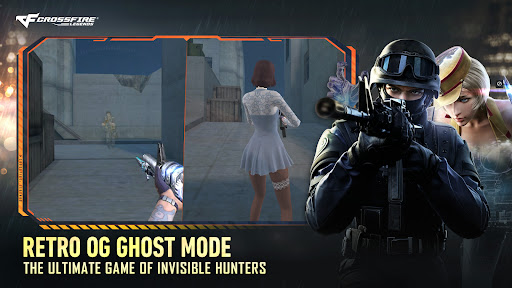
(1) Geistermodus: Die Black List platziert und zündet C4, während Global Risk versucht, sie aufzuhalten. Black-List-Agenten sind im Stillstand unsichtbar, werden beim Bewegen oder Springen leicht sichtbar und können nur Nahkampfwaffen benutzen. Global Risk kann ihre Positionen anhand von Geräuschen und Audioerkennung orten.
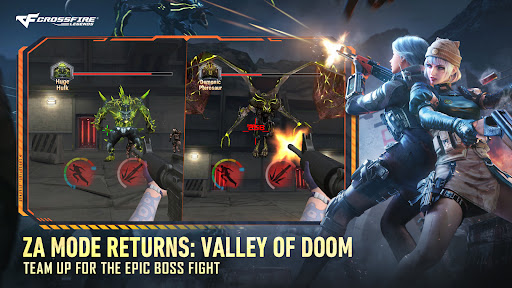
(2) Erste PvE-Karte [Biohazard]: Die allererste PvE-Karte von CFL ist da – eine originalgetreue Nachbildung eines beliebten Klassikers. Schließt euch mit Freunden zusammen, kämpft euch durch die Level und besiegt den Endboss für pralle Belohnungen.
II. Riesige Gratis-Boni: Es gibt jede Menge Gratis-Belohnungen zu ergattern! Nehmt an Events teil, um seltene Waffen und exklusive Charaktere zu bekommen!
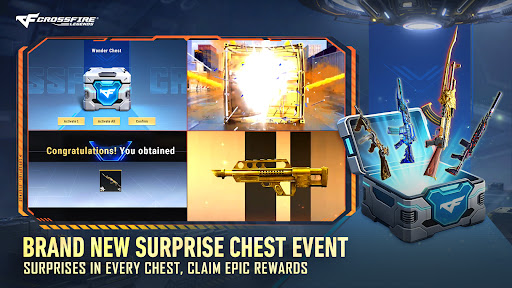
(1) Wundertruhe: Ein brandneues Belohnungssystem, mit dem Spieler Wundertruhen verdienen können, indem sie einfach Spielzeit sammeln. Schließe deine tägliche Ranglisten-Herausforderung ab und spiele Arcade-Modi, um noch mehr Truhen zu verdienen! Jede Truhe bietet die Chance auf lila/orangefarbene Waffen, VVIP-Fragmente, VVIP+-Fragmente und andere wertvolle Gegenstände. Im Laufe dieser Version erhalten Spieler 3 kostenlose VVIP-Waffen und 1 VVIP+-Waffe. Die erste VVIP+-Waffe ist die AK47-Beast-Noble Gold (eine verbesserte Beast-Variante), mit der du leichter denn je auf höchste Feuerkraft zugreifen kannst. Schließe jeden neuen Modus in der jeweiligen Woche zum ersten Mal ab, um eine zusätzliche Wundertruhe zu erhalten. Die Belohnungen sind kumulativ – je mehr du spielst, desto mehr verdienst du!
(2) Blaue-Keramik-Event: Vom 28. April bis 11. Mai findet das „Ansteckungs-Event“ statt. Schließe die vorgegebenen Aufgaben ab, um die limitierte VVIP-Waffe AK47-Blue Pottery-Gold zu erhalten.
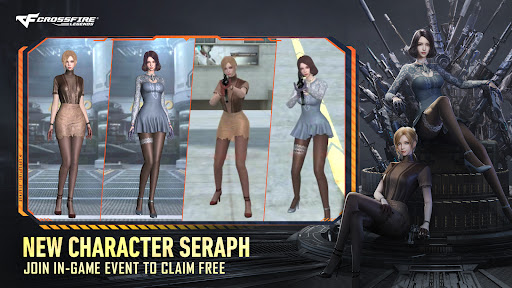
(3) Seraph-Abstieg-Event: Vom 27. April bis 17. Mai findet das exklusive Event „Seraph-Abstieg“ statt. Schließe die Aufgaben ab, um diesen Charakter und alle Belohnungen freizuschalten.
(4) Engel-Event:
Engel-Utility: Spiele Matches in der neuen Saison. Je nachdem, wie viele Wunderkisten du gesammelt hast, kannst du ein komplettes VVIP-Utility-Set verdienen, mit dem du Streugranaten einsetzen kannst.
Engel-Nunchaku: Vom 4. bis 24. Mai findet das Event „Engel-Nunchaku“ statt. Schließe die Event-Aufgaben ab, um die VVIP-Nunchaku zu gewinnen: Nunchaku-Gold und Nunchaku-Engel.
Projekt Künstlicher Engel: Vom 16. bis 31. Mai läuft das Projekt „Künstlicher Engel“. Schließe die Aufgaben ab, um deine eigene Engel-M4A1 herzustellen. Teile sie mit deinen Freunden und zeige deinen persönlichen Stil!
(5) Finde den Dunklen Schatten-Event: Die äußerst beliebte IP Nailoong erobert die CFL! Nimm am Event teil, jage die Spuren von Dark Shadow und schließe die Aufgaben ab, um die Nailoong-Kanone, die Nailoong-Rauchgranate, den Nailoong-Kopfschutz, den Nailoong-Rucksack und mehr zu erhalten.
III. Neuer Saison-Battle-Pass
Schließe Missionen im Spiel ab, um Pass-EP zu verdienen und diese kostenlos gegen Diamanten und andere Belohnungen einzulösen. Mit dem Premium-Pass erhältst du exklusive Belohnungen, darunter die M4A1-Summer Breeze, den beliebten Charakter Diaochan und viele weitere seltene Gegenstände.
IV. Neue Waffen & Ausrüstung: Extrem seltene kosmetische Waffen der Spitzenklasse sind jetzt verfügbar!
(1) Noble-Roulette-Event: Eine Neuauflage der legendären VVIP-Waffen, die das Spielgefühl der Originale mit verbesserter Kampfleistung verbindet. Zu gewinnen gibt es die M4A1-Predator-Noble Gold, die Desert Eagle-El Dorado-Noble Gold, die B.C. Axe-Beast-Noble Gold und viele weitere VVIP-Waffen. Versuche dein Glück beim Ingame-Glücksziehungs-Event und gewinne diese Gegenstände.
(2) Neue Versorgungs-Updates: Frische Versorgungsgegenstände werden eingeführt, um die Leistung in allen Modi zu verbessern. Mutationsmodus-Verbesserung: Dual Steyr TMP – Todesauge. Verlängerte Killstreak-Dauer: AK47 – Predator. Nahkampf-Dreierkombo: M4A1 – S – Stahlimperium. Erhöhte Bewegungsgeschwindigkeit beim Ausrüsten: Keris – Earl
Mehr anzeigen

1. Laden das MEmu-Installationsprogramm herunter und beenden die Installation

2. MEmu starten und Google Play auf der Homepage öffnen

3. Suchen Crossfire: Legends in Google Play
Install
4. Herunterladen und Installieren Crossfire: Legends
5. Klicken nach Abschluss der Installation auf das Symbol, um es zu starten

6. Viel Spaß beim Spielen von Crossfire: Legends auf dem PC mit MEmu
MEmu App Player ist der beste kostenlose Android-Emulator und 50 Millionen Menschen genießen bereits seine hervorragende Android-Gaming-Erfahrung. Mit der MEmu-Virtualisierungstechnologie können Sie Tausende von Android-Spielen problemlos auf Ihrem PC spielen, selbst bei grafikintensiven Spielen.
BGrößeres Bild mit besserer Grafik; Keine unterbrechungen, keine sorgen um Akku
Komplette Tastenbelegung unterstützt mit Maus und Tastatur oder Controller
Mit dem „Multi-Instance-Manager“ können Sie mehrere Spielkonten oder Spiele gleichzeitig auf einem PC ausführen.
Play Crossfire: Legends on PC by following steps: