REMATCH
Aktualisiert
Aktuelle Version
Angeboten von

Bei all Ihrer Leidenschaft für das Spielen von REMATCH sollten Ihre Hände nicht auf einen winzigen Bildschirm Ihres Telefons beschränkt sein. Spielen Sie wie ein Profi und übernehmen Sie die volle Kontrolle über Ihr Spiel mit Tastatur und Maus. MEmu bietet Ihnen all die Dinge, die Sie erwarten. Laden Sie REMATCH herunter und spielen Sie es auf dem PC. Spielen Sie so lange, wie Sie wollen, ohne Grenzwerte für Akku, mobile Daten und störende Anrufe. Das brandneue MEmu 9 ist die beste Wahl, um REMATCH auf dem PC zu spielen. Das exquisite voreingestellte Tastaturbelegungssystem, das mit unserem Fachwissen vorbereitet wurde, macht REMATCH zu einem echten PC-Spiel. Der MEmu Multi-Instanz-Manager ermöglicht das Spielen von 2 oder mehr Konten auf demselben Gerät. Und das Wichtigste: Unsere exklusive Emulations-Engine kann das volle Potenzial Ihres PCs freisetzen und für reibungslose Abläufe sorgen.
Mehr anzeigen
Laden Sie Play REMATCH auf dem PC mit MEmu Android Emulator. Viel Spaß beim Spielen auf großmundieren. REMATCH is a fast-paced, action-packed multiplayer game that puts you in control of a single player on a team competing in thrilling 5v5 matches.


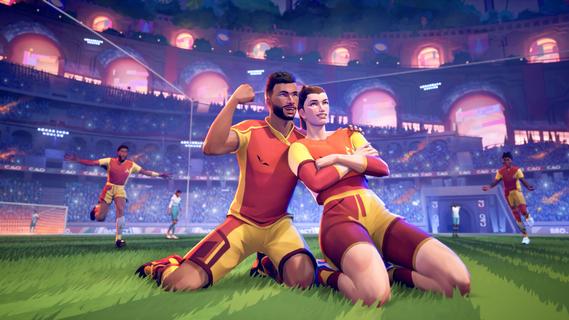

REMATCH is a fast-paced, action-packed multiplayer game that puts you in control of a single player on a team competing in thrilling 5v5 matches. Designed from an immersive third-person perspective, the game combines strategic team play with dynamic combat mechanics, creating an engaging and competitive experience for players who enjoy both tactical depth and intense action. In REMATCH, teamwork is essential. Each player controls a unique character with distinct abilities and playstyles, encouraging cooperation and coordination among teammates. Success depends not only on individual skill but also on how well players communicate, plan strategies, and adapt to the evolving battlefield. The game rewards players who can anticipate opponents’ moves, execute precise timing, and leverage their character’s strengths to outmaneuver and outfight the enemy team. The matches are designed to be quick and exhilarating, making REMATCH ideal for players seeking fast gameplay sessions without sacrificing depth. The third-person perspective enhances situational awareness, allowing players to better gauge their surroundings, spot threats, and coordinate attacks or defenses. This viewpoint also highlights the fluid animations and detailed character designs, adding to the immersive feel of each battle. REMATCH features a diverse roster of characters, each bringing unique skills and roles to the team. Whether you prefer aggressive frontline fighters, stealthy assassins, supportive healers, or ranged damage dealers, there’s a character to match your preferred playstyle. Mastering your chosen character’s abilities and understanding their synergy with teammates is key to dominating matches. Beyond the core gameplay, REMATCH offers various modes and maps that keep the experience fresh and challenging. Different environments present unique tactical opportunities and obstacles, requiring teams to constantly adapt their strategies. The game also includes progression systems that reward players with new skills, cosmetics, and upgrades, providing motivation to improve and personalize their characters. Playing with friends amplifies the excitement of REMATCH. Forming a coordinated squad allows for more sophisticated tactics and better communication, increasing your chances of victory. The game’s matchmaking system ensures balanced competition, pairing you with players of similar skill levels for fair and engaging matches. Overall, REMATCH is a compelling blend of strategy, action, and team-based combat. Its fast-paced 5v5 battles, immersive third-person perspective, and emphasis on teamwork make it a standout title for fans of competitive multiplayer games. Whether you’re a casual player looking for quick matches or a competitive gamer aiming to climb the ranks, REMATCH offers an exhilarating arena to test your skills and teamwork.
Mehr anzeigen

1. Laden das MEmu-Installationsprogramm herunter und beenden die Installation

2. MEmu starten und Google Play auf der Homepage öffnen

3. Suchen REMATCH in Google Play
Install
4. Herunterladen und Installieren REMATCH
5. Klicken nach Abschluss der Installation auf das Symbol, um es zu starten

6. Viel Spaß beim Spielen von REMATCH auf dem PC mit MEmu
MEmu App Player ist der beste kostenlose Android-Emulator und 50 Millionen Menschen genießen bereits seine hervorragende Android-Gaming-Erfahrung. Mit der MEmu-Virtualisierungstechnologie können Sie Tausende von Android-Spielen problemlos auf Ihrem PC spielen, selbst bei grafikintensiven Spielen.
BGrößeres Bild mit besserer Grafik; Keine unterbrechungen, keine sorgen um Akku
Komplette Tastenbelegung unterstützt mit Maus und Tastatur oder Controller
Mit dem „Multi-Instance-Manager“ können Sie mehrere Spielkonten oder Spiele gleichzeitig auf einem PC ausführen.
Play REMATCH on PC by following steps: