Rogue Legend - Roguelike RPG
Aktualisiert
Aktuelle Version
0.451
Angeboten von

Bei all Ihrer Leidenschaft für das Spielen von Rogue Legend - Roguelike RPG sollten Ihre Hände nicht auf einen winzigen Bildschirm Ihres Telefons beschränkt sein. Spielen Sie wie ein Profi und übernehmen Sie die volle Kontrolle über Ihr Spiel mit Tastatur und Maus. MEmu bietet Ihnen all die Dinge, die Sie erwarten. Laden Sie Rogue Legend - Roguelike RPG herunter und spielen Sie es auf dem PC. Spielen Sie so lange, wie Sie wollen, ohne Grenzwerte für Akku, mobile Daten und störende Anrufe. Das brandneue MEmu 9 ist die beste Wahl, um Rogue Legend - Roguelike RPG auf dem PC zu spielen. Das exquisite voreingestellte Tastaturbelegungssystem, das mit unserem Fachwissen vorbereitet wurde, macht Rogue Legend - Roguelike RPG zu einem echten PC-Spiel. Der MEmu Multi-Instanz-Manager ermöglicht das Spielen von 2 oder mehr Konten auf demselben Gerät. Und das Wichtigste: Unsere exklusive Emulations-Engine kann das volle Potenzial Ihres PCs freisetzen und für reibungslose Abläufe sorgen.
Mehr anzeigen
Laden Sie Play Rogue Legend - Roguelike RPG auf dem PC mit MEmu Android Emulator. Viel Spaß beim Spielen auf großmundieren. Embark on an action roguelike RPG adventure with Rogue Legend, where every battle makes your hero stronger.
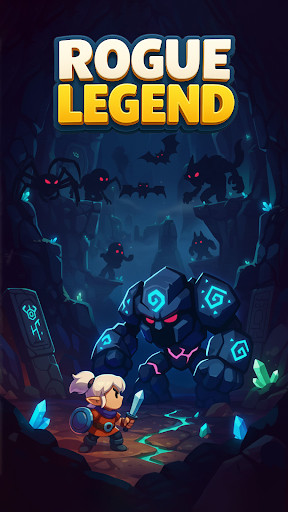
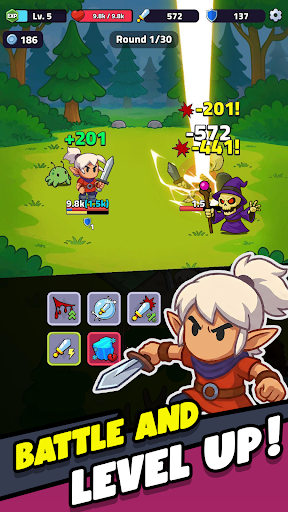
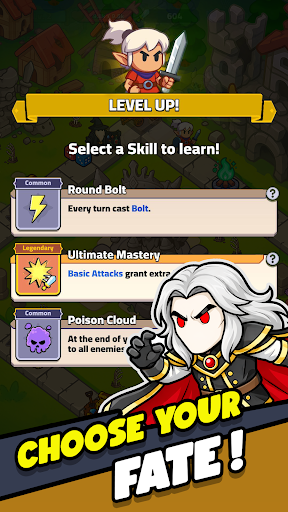
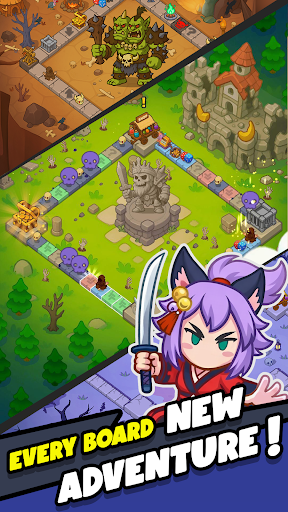
Embark on an action roguelike RPG adventure with Rogue Legend, where every battle makes your hero stronger.
In Rogue Legend, you journey through worlds filled with monsters, treasures, and powerful bosses. Each run is a new roguelike RPG experience of strategy, combat, and growth, giving you the chance to strengthen your hero and push further with every run.
Enter a World of Endless Battles:
Every session begins in the lobby. Press Play and roll the dice to start your roguelike RPG run, diving into a board-based action RPG full of encounters and surprises. As your hero moves across the board, different events unfold depending on where you land:
* Enemy Tiles: Engage in fast, automatic roguelike RPG battles. After each fight, choose one of three upgrades to shape your build.
* Buff Tiles: Gain boosts to attack, defense, and speed to help your hero survive longer in Rogue Legend’s idle-friendly dungeons.
* Negative Tiles: Face debuffs that test your timing and strategic decisions.
* Minigame Tiles: Roll for luck in short events where you can win extra loot or power-ups.
* Shop Tiles: Spend gold to buy new gear, upgrades, and legendary equipment.
* Special Tiles: Additional tile types will be added over time to expand Rogue Legend’s gameplay depth.
Defeat Bosses and Grow Stronger:
Your goal is to survive, adapt, and conquer every boss battle. Each fight is an opportunity to grow stronger, unlocking new roguelike RPG challenges, rewards, and abilities that prepare your hero for the next run in this idle RPG adventure.
Upgrade, Progress, and Customize Your Hero:
Between runs, return to the lobby to enhance your hero through Rogue Legend’s RPG progression systems:
* Gear System: Collect and upgrade your weapons, armor, and equipment.
* Talent System: Level up to unlock new stats, passive abilities, and bonuses that fit your playstyle.
* Pet System: Obtain and train pets that join you in combat (coming soon).
Roguelike Depth with Idle RPG Progression
Rogue Legend blends the excitement of roguelike gameplay with the satisfaction of RPG and idle progression. Each run feels fast, rewarding, and different. The board and dice mechanics make every move matter, while the idle RPG design ensures steady progress without repetitive grind.
A Journey of Strategy and Power:
If you enjoy roguelike action, RPG adventure, and idle gameplay, Rogue Legend delivers a journey of endless replayability.
Fight, roll, and rise again in Rogue Legend, the roguelike idle RPG where every battle shapes your hero’s fate.
Mehr anzeigen

1. Laden das MEmu-Installationsprogramm herunter und beenden die Installation

2. MEmu starten und Google Play auf der Homepage öffnen

3. Suchen Rogue Legend - Roguelike RPG in Google Play
Install
4. Herunterladen und Installieren Rogue Legend - Roguelike RPG
5. Klicken nach Abschluss der Installation auf das Symbol, um es zu starten

6. Viel Spaß beim Spielen von Rogue Legend - Roguelike RPG auf dem PC mit MEmu
MEmu App Player ist der beste kostenlose Android-Emulator und 50 Millionen Menschen genießen bereits seine hervorragende Android-Gaming-Erfahrung. Mit der MEmu-Virtualisierungstechnologie können Sie Tausende von Android-Spielen problemlos auf Ihrem PC spielen, selbst bei grafikintensiven Spielen.
BGrößeres Bild mit besserer Grafik; Keine unterbrechungen, keine sorgen um Akku
Komplette Tastenbelegung unterstützt mit Maus und Tastatur oder Controller
Mit dem „Multi-Instance-Manager“ können Sie mehrere Spielkonten oder Spiele gleichzeitig auf einem PC ausführen.
Play Rogue Legend - Roguelike RPG on PC by following steps: