
Yomovies
Aktualisiert
Aktuelle Version
Angeboten von

Bei all Ihrer Leidenschaft für das Spielen von Yomovies sollten Ihre Hände nicht auf einen winzigen Bildschirm Ihres Telefons beschränkt sein. Spielen Sie wie ein Profi und übernehmen Sie die volle Kontrolle über Ihr Spiel mit Tastatur und Maus. MEmu bietet Ihnen all die Dinge, die Sie erwarten. Laden Sie Yomovies herunter und spielen Sie es auf dem PC. Spielen Sie so lange, wie Sie wollen, ohne Grenzwerte für Akku, mobile Daten und störende Anrufe. Das brandneue MEmu 9 ist die beste Wahl, um Yomovies auf dem PC zu spielen. Das exquisite voreingestellte Tastaturbelegungssystem, das mit unserem Fachwissen vorbereitet wurde, macht Yomovies zu einem echten PC-Spiel. Der MEmu Multi-Instanz-Manager ermöglicht das Spielen von 2 oder mehr Konten auf demselben Gerät. Und das Wichtigste: Unsere exklusive Emulations-Engine kann das volle Potenzial Ihres PCs freisetzen und für reibungslose Abläufe sorgen.
Mehr anzeigen
Laden Sie Play Yomovies auf dem PC mit MEmu Android Emulator. Viel Spaß beim Spielen auf großmundieren. Yomovies app free is designed for user who want to watch or download movies online.
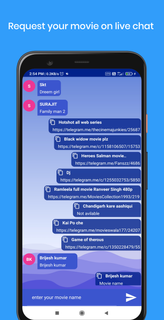

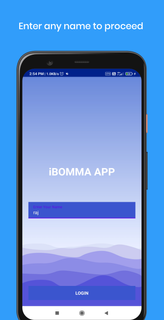

Yomovies app free is designed for user who want to watch or download movies online.yomovies will gives you an exclusive access to live movie request for FREE.Nowadays finding a telugu movie on website or any other app is so difficult and we also waste our most of time to find where we can watch telugu movies. So don't worry here we come up with the solution of your problem i.e. LIVE MOVIE REQUEST on yomovies app free live chat.This is the best feature in this yomovies app free.Yomovies offers to request your latest, old movies and web-series for free.When you search movies on the web you will get too many posts where finding an exact movie on those post is much difficult, so here we help you to get your movie direct online watching or downloading link on the yomovie download app live chat is very easy.yomovies will provide all Telugu, Tamil, Hindi and English movies. If you are looking to download any movie for free then you are at right placeSimple open yomovies app live chat page, and request your movies. You will get your movies link to download or watch online.Have you tried everywhere to get your movie and still searching that's why we come up with yomovies live movie request.Ask for your movie via yomovies live chat, you will get your movie link easily.How to get my movies on YOMOVIES APP FREE: -(very simple)1. Click on live movie request.2. This will open yomovies download app live chat page.3. Type your movie name and send.4. You will get your film link open and watch or download.Why yomovies app:-1. We will help you to get your movies.2. On live chat you can get your movie link very easily.3. You can save your your time to finding movie on any other places simple request on live and sit back till get your movie links.4. We also added list of movies year wise.5. You will get your latest movies on yomovies first page.We hope you will like this application yomovies if yes then please send us your comments. We would love to hear from you.
Mehr anzeigen

1. Laden das MEmu-Installationsprogramm herunter und beenden die Installation

2. MEmu starten und Google Play auf der Homepage öffnen

3. Suchen Yomovies in Google Play
Install
4. Herunterladen und Installieren Yomovies
5. Klicken nach Abschluss der Installation auf das Symbol, um es zu starten

6. Viel Spaß beim Spielen von Yomovies auf dem PC mit MEmu
MEmu App Player ist der beste kostenlose Android-Emulator und 50 Millionen Menschen genießen bereits seine hervorragende Android-Gaming-Erfahrung. Mit der MEmu-Virtualisierungstechnologie können Sie Tausende von Android-Spielen problemlos auf Ihrem PC spielen, selbst bei grafikintensiven Spielen.
BGrößeres Bild mit besserer Grafik; Keine unterbrechungen, keine sorgen um Akku
Komplette Tastenbelegung unterstützt mit Maus und Tastatur oder Controller
Mit dem „Multi-Instance-Manager“ können Sie mehrere Spielkonten oder Spiele gleichzeitig auf einem PC ausführen.
Play Yomovies on PC by following steps: