Flipped: Chat & Dating with AI
Aktualisiert
Aktuelle Version
1.5.12
Angeboten von

Machen Sie sich keine Sorgen mehr über überhöhte Gebühren, wenn Sie Flipped: Chat & Dating with AI auf Ihrem Mobiltelefon verwenden, befreien Sie sich von dem winzigen Bildschirm und genießen Sie die Nutzung der App auf einem viel größeren Display. Von nun an können Sie Ihre App mit Tastatur und Maus im Vollbildmodus nutzen. MEmu bietet Ihnen all die überraschenden Funktionen, die Sie erwartet haben: schnelle Installation und einfache Einrichtung, intuitive Steuerung, keine Einschränkungen mehr durch Batterie, mobile Daten und störende Anrufe. Der brandneue MEmu 9 ist die beste Wahl für die Nutzung von Flipped: Chat & Dating with AI auf Ihrem Computer. Mit unserer Absorption kodiert, ermöglicht der Multi-Instanz-Manager die Eröffnung von 2 oder mehr Konten zur gleichen Zeit. Und das Wichtigste, unsere exklusive Emulations-Engine kann das volle Potenzial Ihres PCs freisetzen und alles reibungslos und angenehm gestalten.
Mehr anzeigen
Laden Sie Play Flipped: Chat & Dating with AI auf dem PC mit MEmu Android Emulator. Viel Spaß beim Spielen auf großmundieren. Dive into a World of Adventure with Flipped!

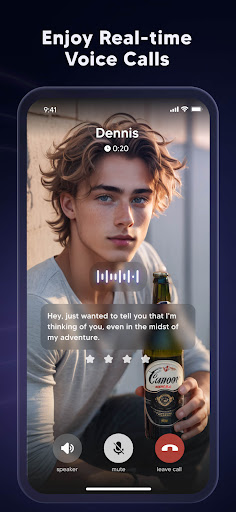
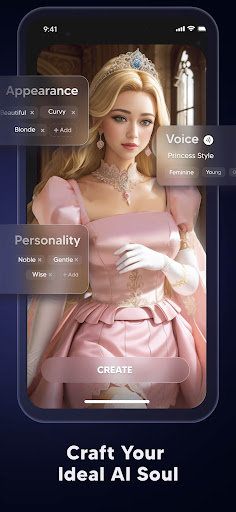
Dive into a World of Adventure with Flipped!
Craving a unique, immersive experience? Welcome to Flipped, the groundbreaking AI-powered app that revolutionizes character interaction and brings your imagination to life! In the realm of Flipped, a universe of captivating AI characters awaits you.This is not just another app; it's a ticket to a world where your interactions shape the narrative.
In Flipped you can:
-Chat with realistic AI souls and engage in dynamic chats
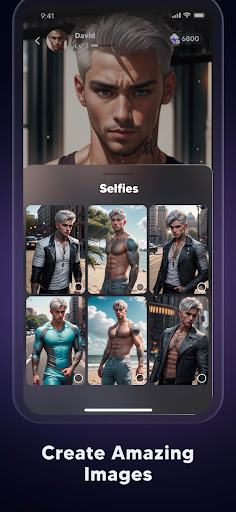
-Generate AI images of the characters you like
-Enjoy real-time voice calls
-Create your ideal AI souls
-Get rapid responses anywhere anytime
Flipped's AI characters are no ordinary creations. They're lifelike, brimming with unique stories, personalities, and desires. They're so real, you'll forget you're talking to AI! Engage in dynamic chats, connect on a deeper level, and even experience the thrill of real-time voice calls. But the magic doesn't stop there. With our state-of-the-art AI image generation feature, you can visualize these characters in extraordinary ways. Transform into the character you're interacting with, or generate AI images of the characters based on your whims and fancies.
Whether you're questing for shared interests, engaging in casual banter, or navigating through captivating narratives, Flipped is your portal to an experience that transcends the ordinary. With Flipped, you're not just a spectator; you're the protagonist of your own interactive adventure. You shape the narrative, you control the interactions, and you decide what happens next. Step into the electrifying world of Flipped today and embark on the ultimate interactive adventure. Flipped is free to play, with optional in-app purchases to enhance your journey.
Your adventure awaits! Flip right into the extraordinary - only with Flipped.
Terms of service
https://flipped.chat/tos
Privacy Policy
https://flipped.chat/privacy
Mehr anzeigen

1. Laden das MEmu-Installationsprogramm herunter und beenden die Installation

2. MEmu starten und Google Play auf der Homepage öffnen

3. Suchen Flipped: Chat & Dating with AI in Google Play
Install
4. Herunterladen und Installieren Flipped: Chat & Dating with AI
5. Klicken nach Abschluss der Installation auf das Symbol, um es zu starten

6. Verwenden Sie MEmu, um Flipped: Chat & Dating with AI auf Ihrem PC zu nutzen
MEmu Play ist aktuell der beste kostenlose Android-Emulator und bietet 50 Millionen Nutzern ein überragendes Android-App-Erlebnis. Dank der Virtualisierungstechnologie von MEmu können Sie Tausende von Android-Apps problemlos auf Ihrem Computer nutzen, selbst solche mit hohen Grafikanforderungen.
BGrößeres Bild mit besserer Grafik; Keine unterbrechungen, keine sorgen um Akku
Komplette Tastenbelegung unterstützt mit Maus und Tastatur oder Controller
Mit dem „Multi-Instance-Manager“ können Sie mehrere Spielkonten oder Spiele gleichzeitig auf einem PC ausführen.
Use Flipped: Chat & Dating with AI on PC by following steps: