Inspectorio QRM
Aktualisiert
Aktuelle Version
4.33.0
Angeboten von

Machen Sie sich keine Sorgen mehr über überhöhte Gebühren, wenn Sie Inspectorio QRM auf Ihrem Mobiltelefon verwenden, befreien Sie sich von dem winzigen Bildschirm und genießen Sie die Nutzung der App auf einem viel größeren Display. Von nun an können Sie Ihre App mit Tastatur und Maus im Vollbildmodus nutzen. MEmu bietet Ihnen all die überraschenden Funktionen, die Sie erwartet haben: schnelle Installation und einfache Einrichtung, intuitive Steuerung, keine Einschränkungen mehr durch Batterie, mobile Daten und störende Anrufe. Der brandneue MEmu 9 ist die beste Wahl für die Nutzung von Inspectorio QRM auf Ihrem Computer. Mit unserer Absorption kodiert, ermöglicht der Multi-Instanz-Manager die Eröffnung von 2 oder mehr Konten zur gleichen Zeit. Und das Wichtigste, unsere exklusive Emulations-Engine kann das volle Potenzial Ihres PCs freisetzen und alles reibungslos und angenehm gestalten.
Mehr anzeigen
Laden Sie Play Inspectorio QRM auf dem PC mit MEmu Android Emulator. Viel Spaß beim Spielen auf großmundieren. Inspectorio Sight is a network platform designed to create dynamic, risk-assessment based quality control programs, focused on maximizing your resources while improving quality.
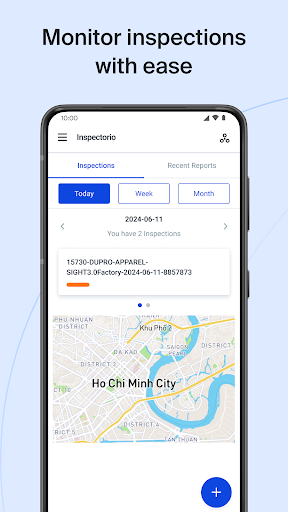
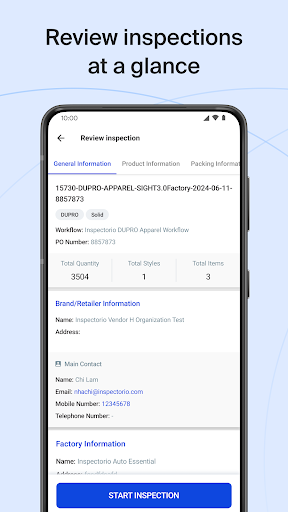
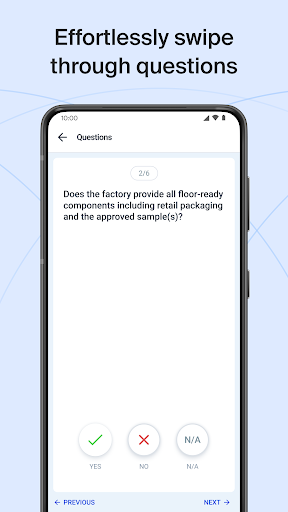
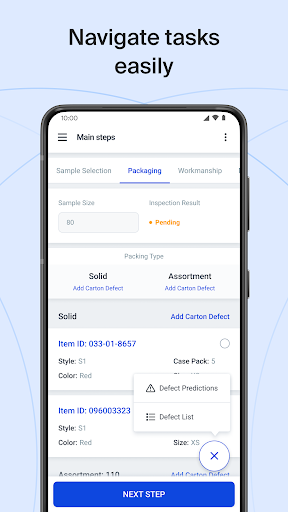
Inspectorio Sight is a network platform designed to create dynamic, risk-assessment based quality control programs, focused on maximizing your resources while improving quality. Leverage Inspectorio Sight to reduce overheads by saving time, automating manual tasks, and leveraging objective data and real-time visibility of events to help you focus on high risk areas and value added activities. Get ahead of issues with defect prediction and shift from a reactive to a preventive risk assessment quality model!
The Inspectorio web and mobile platforms work in sync to provide a single centralized source of truth where all key stakeholders in the production process can connect to execute, monitor, and report on quality control activities. Gather all inspection data and trigger activities end-to-end directly from our mobile application.
Highlights: Features and Benefits
· Record packaging & workmanship defects with speed and accuracy, including images, videos and inspector comments
· Generate inspection reports in seconds and instantly upload accurate, up-to-date results to the cloud (where they are immediately visible to all stakeholders!)
· Eliminate the risk of manual error as sample sizes, AQLs, measurement tolerances and inspection results are automatically calculated for you
· Inspections can be monitored in real-time, providing unrivaled visibility in to what is happening on the factory floor – rest assured that your inspection data is accurate and trustworthy!
· Reduce the time spent taking sample measurements by up to 60% by syncing your mobile app with our smart tape device
· Proactively notify inspectors of likely or trending defects using predictive risk assessment tools
· Monitor inspector performance in real-time, and observe trends over time (Send in-app prompts to Inspectors who ‘move too fast’!)
More than 5,000 of the world’s leading brands, retailers, vendors, and factories have chosen Inspectorio Sight to digitize, automate, and optimize their quality assurance operations.
Are you ready to be part of this industry transformation? For more information on how to get started on the Inspectorio Sight platform, please visit our website.
(Please Note: Users must have an active Inspectorio Sight account to be able to sign in to the Inspectorio Sight app)
Mehr anzeigen

1. Laden das MEmu-Installationsprogramm herunter und beenden die Installation

2. MEmu starten und Google Play auf der Homepage öffnen

3. Suchen Inspectorio QRM in Google Play
Install
4. Herunterladen und Installieren Inspectorio QRM
5. Klicken nach Abschluss der Installation auf das Symbol, um es zu starten

6. Verwenden Sie MEmu, um Inspectorio QRM auf Ihrem PC zu nutzen
MEmu Play ist aktuell der beste kostenlose Android-Emulator und bietet 50 Millionen Nutzern ein überragendes Android-App-Erlebnis. Dank der Virtualisierungstechnologie von MEmu können Sie Tausende von Android-Apps problemlos auf Ihrem Computer nutzen, selbst solche mit hohen Grafikanforderungen.
BGrößeres Bild mit besserer Grafik; Keine unterbrechungen, keine sorgen um Akku
Komplette Tastenbelegung unterstützt mit Maus und Tastatur oder Controller
Mit dem „Multi-Instance-Manager“ können Sie mehrere Spielkonten oder Spiele gleichzeitig auf einem PC ausführen.
Use Inspectorio QRM on PC by following steps: