Larped - Wealth Simulator
Aktualisiert
Aktuelle Version
1.8
Angeboten von

Machen Sie sich keine Sorgen mehr über überhöhte Gebühren, wenn Sie Larped - Wealth Simulator auf Ihrem Mobiltelefon verwenden, befreien Sie sich von dem winzigen Bildschirm und genießen Sie die Nutzung der App auf einem viel größeren Display. Von nun an können Sie Ihre App mit Tastatur und Maus im Vollbildmodus nutzen. MEmu bietet Ihnen all die überraschenden Funktionen, die Sie erwartet haben: schnelle Installation und einfache Einrichtung, intuitive Steuerung, keine Einschränkungen mehr durch Batterie, mobile Daten und störende Anrufe. Der brandneue MEmu 9 ist die beste Wahl für die Nutzung von Larped - Wealth Simulator auf Ihrem Computer. Mit unserer Absorption kodiert, ermöglicht der Multi-Instanz-Manager die Eröffnung von 2 oder mehr Konten zur gleichen Zeit. Und das Wichtigste, unsere exklusive Emulations-Engine kann das volle Potenzial Ihres PCs freisetzen und alles reibungslos und angenehm gestalten.
Mehr anzeigen
Genieße Larped - Wealth Simulator auf deinem PC mit MEmu Play in einer fantastischen Version. Dieser leistungsstarke, kostenlose Android-Emulator bietet dir Zugriff auf Tausende von Android-Apps für deinen Desktop. Bleib mit Freunden in Kontakt und arbeite effizienter! Larped is a prop bank and dashboards.
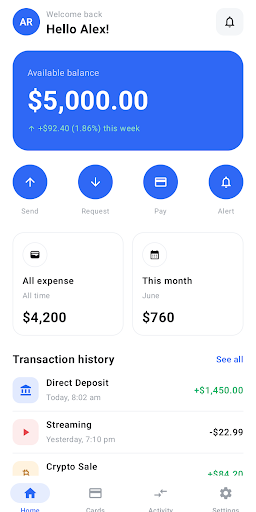
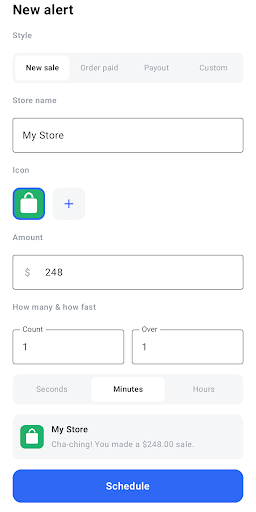
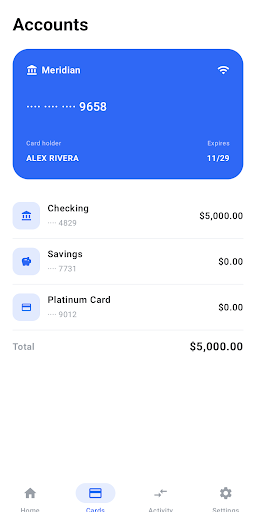
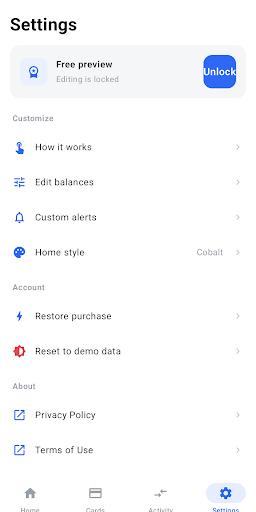
Larped is a prop bank and dashboards.
Built for creators, filmmakers, and live-action role-players who need props that look the part. Larped gives you a realistic, fully directed banking app you control down to the cent, so the money in your scene looks exactly how the story needs it to.
Open it and you've got a clean, modern bank: a balance, a card, transaction history, a crypto and stock portfolio, and a sales dashboard. Every number is yours to set, and there's not a single edit button in sight - so on screen, it just looks like an account.
DIRECT EVERY DETAIL
• Set any balance - checking, savings, and card - with a hidden triple-tap on the number
• Build a crypto portfolio with a live, volatile-looking chart and a draggable price scrubber
• Add and edit stock positions; watch the dashboard bars grow as the totals climb
• Tune your "all-time" and "this month" spending tiles to match the narrative
STAGE THE MOMENT
• Fire realistic sale and payout alerts on cue - pick how many, spread them over seconds, minutes, or hours, and let them land at random for that
"going viral" feel
• Count order numbers up automatically, choose a cash-register sound, and set the store name and icon
• Preview any alert on a full-screen lock screen for a perfect take
MAKE IT YOURS
• Put your own name on the account and card
• Switch currency symbols for any region
• Choose your home theme and app icon
MADE FOR
Content creators and editors • Filmmakers and student films • Theater and live-action role-play • Sketches, skits, and storytelling
A PROP - NOT A BANK
Larped connects to no bank and no real account. There is no login, and no real money ever moves — every value is fictional and lives only on your device. It's a creative tool for storytelling, and we ask that you use it honestly.
ONE-TIME UNLOCK
Larped Pro unlocks all editing and customization for a single purchase. Pay once, yours forever — no subscription.
TOS - https://larped.app/terms
Mehr anzeigen

1. Laden das MEmu-Installationsprogramm herunter und beenden die Installation

2. MEmu starten und Google Play auf der Homepage öffnen

3. Suchen Larped - Wealth Simulator in Google Play
Install
4. Herunterladen und Installieren Larped - Wealth Simulator
5. Klicken nach Abschluss der Installation auf das Symbol, um es zu starten

6. Verwenden Sie MEmu, um Larped - Wealth Simulator auf Ihrem PC zu nutzen
MEmu Play ist aktuell der beste kostenlose Android-Emulator und bietet 50 Millionen Nutzern ein überragendes Android-App-Erlebnis. Dank der Virtualisierungstechnologie von MEmu können Sie Tausende von Android-Apps problemlos auf Ihrem Computer nutzen, selbst solche mit hohen Grafikanforderungen.
BGrößeres Bild mit besserer Grafik; Keine unterbrechungen, keine sorgen um Akku
Komplette Tastenbelegung unterstützt mit Maus und Tastatur oder Controller
Mit dem „Multi-Instance-Manager“ können Sie mehrere Spielkonten oder Spiele gleichzeitig auf einem PC ausführen.
Use Larped - Wealth Simulator on PC by following steps: