Native Opencart App for Mobile
Aktualisiert
Aktuelle Version
1.7
Angeboten von

Machen Sie sich keine Sorgen mehr über überhöhte Gebühren, wenn Sie Native Opencart App for Mobile auf Ihrem Mobiltelefon verwenden, befreien Sie sich von dem winzigen Bildschirm und genießen Sie die Nutzung der App auf einem viel größeren Display. Von nun an können Sie Ihre App mit Tastatur und Maus im Vollbildmodus nutzen. MEmu bietet Ihnen all die überraschenden Funktionen, die Sie erwartet haben: schnelle Installation und einfache Einrichtung, intuitive Steuerung, keine Einschränkungen mehr durch Batterie, mobile Daten und störende Anrufe. Der brandneue MEmu 9 ist die beste Wahl für die Nutzung von Native Opencart App for Mobile auf Ihrem Computer. Mit unserer Absorption kodiert, ermöglicht der Multi-Instanz-Manager die Eröffnung von 2 oder mehr Konten zur gleichen Zeit. Und das Wichtigste, unsere exklusive Emulations-Engine kann das volle Potenzial Ihres PCs freisetzen und alles reibungslos und angenehm gestalten.
Mehr anzeigen
Laden Sie Play Native Opencart App for Mobile auf dem PC mit MEmu Android Emulator. Viel Spaß beim Spielen auf großmundieren. COMPLETE MCOMMERCE SOLUTION.
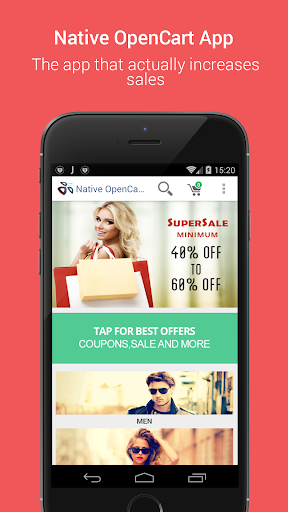
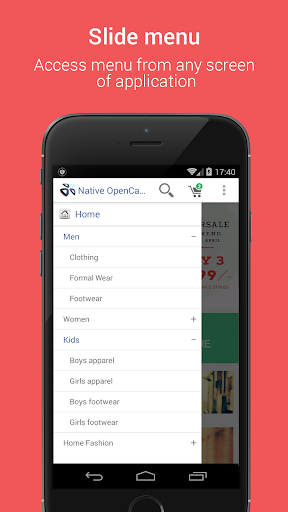
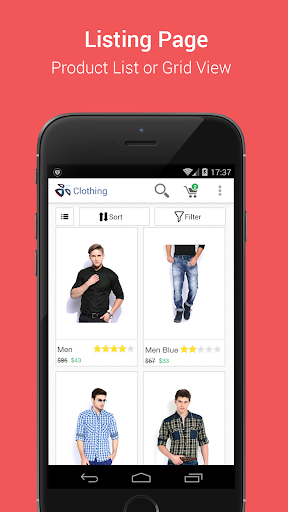
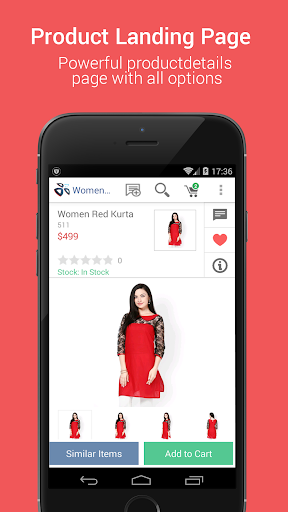
COMPLETE MCOMMERCE SOLUTION
-Seemless Integration
-Landing page that guides users
-Anywhere access menu
-Category and Product listings
PRODUCT SHOWCASE
-Product Gallery
-Product Attributes
-Rating and Review
MOBILE CHECKOUT
-One page checkout
-Popular payment gateway
-Guest checkout
CUSTOMER ACCESS
-Order history and status
-Wishlist
LIST OF FEATURES :
-Installs over Opencart in just 5 minutes
-Multilanguage Support
-Multi Currencies Support
-All shipping method support
-All payment method support
-Coupons/ Vouchers/Reward Points Supported at checkout
-wish list Supported
-Share To friends via email, apps, Bluetooth etc.
-Independent Featured Module
-Independent Slideshow
-Individual Banner, App Icon and App name
-Opencart Login/Register
-All Customer Field Validation With Inherited customer profile
-Customer Image
-Forget password
-Multiple shipping address
-Support all cart validation
-Special/discount support
-Checkbox/ radio/ dropdown- product option support
-Attributes support
-Reviews- add/view support
-Product image carousal & zoom support
-Tags support
-Special price end timer support
-Category/sub category method support
-Category Sort support
-View orders support
-My downloads support
-Push notification support on multi languages
-Enhanced filter support
-Create easy filter on category by Product options support
-Create easy filter on category by Opencart Category Filters
-Information pages support
-Contact admin page
-Logo & app color , background, price color Changeable
-Related product support
-Customer preferred language & currency support, remembered by APP
Mehr anzeigen

1. Laden das MEmu-Installationsprogramm herunter und beenden die Installation

2. MEmu starten und Google Play auf der Homepage öffnen

3. Suchen Native Opencart App for Mobile in Google Play
Install
4. Herunterladen und Installieren Native Opencart App for Mobile
5. Klicken nach Abschluss der Installation auf das Symbol, um es zu starten

6. Verwenden Sie MEmu, um Native Opencart App for Mobile auf Ihrem PC zu nutzen
MEmu Play ist aktuell der beste kostenlose Android-Emulator und bietet 50 Millionen Nutzern ein überragendes Android-App-Erlebnis. Dank der Virtualisierungstechnologie von MEmu können Sie Tausende von Android-Apps problemlos auf Ihrem Computer nutzen, selbst solche mit hohen Grafikanforderungen.
BGrößeres Bild mit besserer Grafik; Keine unterbrechungen, keine sorgen um Akku
Komplette Tastenbelegung unterstützt mit Maus und Tastatur oder Controller
Mit dem „Multi-Instance-Manager“ können Sie mehrere Spielkonten oder Spiele gleichzeitig auf einem PC ausführen.
Use Native Opencart App for Mobile on PC by following steps: