Pulse HRV by Camera BLE ECG
Aktualisiert
Aktuelle Version
Angeboten von

Machen Sie sich keine Sorgen mehr über überhöhte Gebühren, wenn Sie Pulse HRV by Camera BLE ECG auf Ihrem Mobiltelefon verwenden, befreien Sie sich von dem winzigen Bildschirm und genießen Sie die Nutzung der App auf einem viel größeren Display. Von nun an können Sie Ihre App mit Tastatur und Maus im Vollbildmodus nutzen. MEmu bietet Ihnen all die überraschenden Funktionen, die Sie erwartet haben: schnelle Installation und einfache Einrichtung, intuitive Steuerung, keine Einschränkungen mehr durch Batterie, mobile Daten und störende Anrufe. Der brandneue MEmu 9 ist die beste Wahl für die Nutzung von Pulse HRV by Camera BLE ECG auf Ihrem Computer. Mit unserer Absorption kodiert, ermöglicht der Multi-Instanz-Manager die Eröffnung von 2 oder mehr Konten zur gleichen Zeit. Und das Wichtigste, unsere exklusive Emulations-Engine kann das volle Potenzial Ihres PCs freisetzen und alles reibungslos und angenehm gestalten.
Mehr anzeigen
Genieße Pulse HRV by Camera BLE ECG auf deinem PC mit MEmu Play in einer fantastischen Version. Dieser leistungsstarke, kostenlose Android-Emulator bietet dir Zugriff auf Tausende von Android-Apps für deinen Desktop. Bleib mit Freunden in Kontakt und arbeite effizienter! Check: Heart Rate (Pulse), Heart Rate Variability (HRV), Fitness, Stress level, Cardio calculations track progress and more using smartphone camera, ECG or BLE (additional device required).
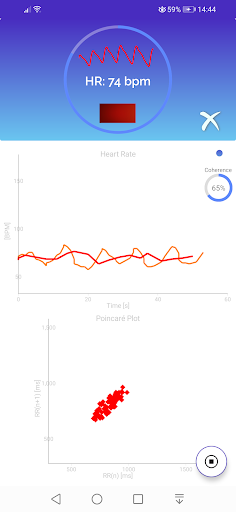
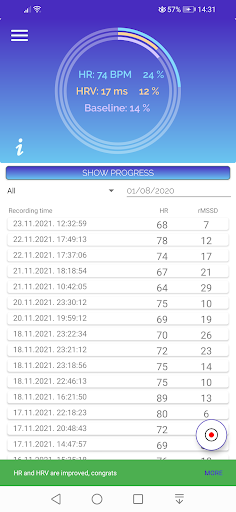
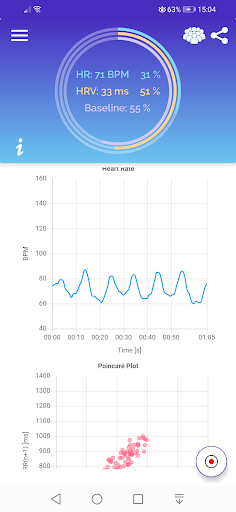
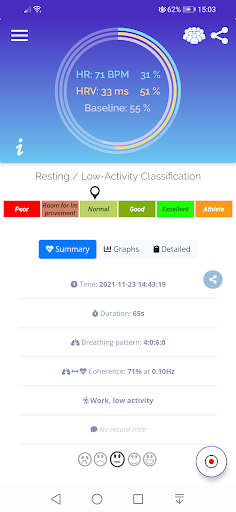
Check: Heart Rate (Pulse), Heart Rate Variability (HRV), Fitness, Stress level, Cardio calculations track progress and more using smartphone camera, ECG or BLE (additional device required).
App detects heartbeats using:
1. Integrated camera (PPG-Photoplethysmography signal processing)
2. BLE enabled fitness additional device
3. Mobile ECG sensing extender additional device which is available for preorders
PPG-Photoplethysmography signal is captured using smartphone camera by placing finger on the camera lens. PPG signal is result of volumetric changes in blood in peripheral circulation.
Application provides summarized analysis results (as classes starting from Poor .. to Athlete) using HR and HRV (Heart Rate Variability) analysis.
Some analysis interpretation instructions:
Normal resting heart rate for adults ranges from 40 to 70 beats a minute. Lower heart rate at rest implies more efficient heart function and better overall fitness.
Heart Rate Variability
HRV correlates with heart health, stress, athletic training, emotional health, and fitness.
rMSSD (Root Mean Square of Successive Differences) is strong overall Fitness level indicator. Try to have rMSSD greater than 40ms, track your progress in app history graph.
HRV graphs show changes in pulse.
Cardio
Get benefits from Cardio using zones calculation and instructions in the app.
Analysis duration
In general, longer analysis provides more reliable results.
* 10-15 seconds is sufficient for Heart Rate
* 30 seconds analysis provides HRV measurements
* One minute analysis provides more reliable HRV measurements
* Two+ minutes analysis is necessary for reliable spectral analysis
ECG for Everybody https://ecg4everybody.com is in early stage and we are open for cooperation. Our Mobile ECG sensing extender device is ready for pre-orders. It is an unique mobile ECG sensing solution which can operate without electrodes and capture up to six ECG channels with dozen lower manufacturing price design.
This is not a medical app.
Mehr anzeigen

1. Laden das MEmu-Installationsprogramm herunter und beenden die Installation

2. MEmu starten und Google Play auf der Homepage öffnen

3. Suchen Pulse HRV by Camera BLE ECG in Google Play
Install
4. Herunterladen und Installieren Pulse HRV by Camera BLE ECG
5. Klicken nach Abschluss der Installation auf das Symbol, um es zu starten

6. Verwenden Sie MEmu, um Pulse HRV by Camera BLE ECG auf Ihrem PC zu nutzen
MEmu Play ist aktuell der beste kostenlose Android-Emulator und bietet 50 Millionen Nutzern ein überragendes Android-App-Erlebnis. Dank der Virtualisierungstechnologie von MEmu können Sie Tausende von Android-Apps problemlos auf Ihrem Computer nutzen, selbst solche mit hohen Grafikanforderungen.
BGrößeres Bild mit besserer Grafik; Keine unterbrechungen, keine sorgen um Akku
Komplette Tastenbelegung unterstützt mit Maus und Tastatur oder Controller
Mit dem „Multi-Instance-Manager“ können Sie mehrere Spielkonten oder Spiele gleichzeitig auf einem PC ausführen.
Use Pulse HRV by Camera BLE ECG on PC by following steps: